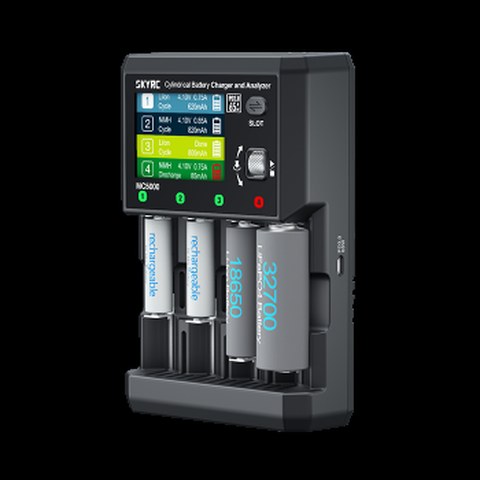
The official SkyRC MC5000 instruction manual covers a lot of ground — multiple charge modes, over a dozen supported chemistries, and enough menu depth that skimming the PDF once is not quite enough to feel confident using every feature. Here is a practical rundown of what the manual actually tells you, organized the way I wish it had been laid out originally.
Key Specs
- Input: 100-240V AC (1.5A @ 220V / 2.8A @ 100V)
- Charge power: 80W total
- USB-C PD3.0 output: up to 65W
- Slots: 4 independent, each up to 5.00A
- Chemistries: Li-ion, Li-ion HV, LiFePO4, NiMH, NiCd, eneloop, NiZn, RAM, LTO, Na-ion
- Modes: Charge, Discharge, Storage, Break-in, Cycle, Refresh
- Display: 2.8″ TN, 240×320, 262K colors
- Accuracy: voltage ±10mV, current ±(1.0%+5mA)
- Dimensions: 188 x 122 x 65mm, weight approximately 665g
The Six Charge Modes Explained
The manual lists six distinct modes, and knowing when to use each one is the real key to getting the most out of the MC5000:
- Charge — standard charging up to your set current, the default mode for day-to-day use
- Discharge — drains a cell down to a set voltage, useful for storage prep or capacity testing
- Storage — brings a lithium cell to a safe long-term storage voltage rather than full charge, extending shelf life
- Break-in — cycles a new or long-dormant cell gently to help it reach full rated capacity
- Cycle — repeats charge/discharge automatically, useful for conditioning NiMH cells or testing capacity retention over multiple cycles
- Refresh — a deeper reconditioning cycle aimed at cells that have degraded from disuse
For most people charging cells day to day, Charge mode alone covers 90% of use cases. Storage mode is worth using specifically for lithium cells you are putting away for weeks or months, since storing at full charge voltage accelerates capacity fade.
Setting Up Each Slot
- Each of the 4 slots operates fully independently — different chemistries, currents, and modes can run simultaneously across all four
- Cell length support goes up to 80mm with a minimum contact length of 29mm, covering everything from small NiMH cells to long protected 21700s
- The manual recommends double-checking polarity orientation before starting, especially for cells without clear polarity markings
Using the USB-C PD3.0 Output
A detail buried a bit deeper in the manual: the MC5000’s USB-C port is not just for connecting to a PC — it can output up to 65W via PD3.0, meaning the charger itself can fast-charge a laptop or phone while it is not actively maxed out charging batteries. It is a nice bit of dual-purpose design that a lot of first-time owners miss entirely because it is not the headline feature on the box.
The first time I actually read through the full manual rather than just plugging cells in and guessing, I realized I had been skipping Storage mode entirely for cells I was setting aside for a few months — a small mistake that the manual calls out clearly but that is easy to miss if you never open the PDF.
“Didn’t realize the MC5000 could fast-charge my phone over USB-C until I actually read the manual cover to cover. Worth the twenty minutes.” — Nadia F., cylindrical battery hobbyist, posting in an 18650 enthusiast community
Accuracy and Why It Matters
The manual specifies voltage accuracy of ±10mV and current accuracy of ±(1.0% + 5mA), which is tight enough for genuinely meaningful capacity testing and internal resistance comparisons between cells — not just rough charging. If you are sorting a batch of used 18650s to find which ones are still healthy enough for a high-drain application, this level of accuracy is what makes that kind of comparison trustworthy.
Reading the Manual’s Chemistry Chart
One of the more genuinely useful sections buried in the manual is the full chemistry compatibility chart, since the MC5000 supports an unusually wide spread: Li-ion, Li-ion HV, LiFePO4, NiMH, NiCd, eneloop-specific profiles, NiZn, RAM (alkaline recharge), LTO, and Na-ion. Each chemistry has its own safe voltage range and recommended charge current ceiling documented in the manual, and getting these settings wrong is one of the more common mistakes new owners make.
- Double-check chemistry selection matches the actual cell before starting — selecting the wrong chemistry profile can lead to over- or under-charging
- RAM (rechargeable alkaline) support is a notable inclusion most competing chargers skip entirely
- LTO cells have a distinctly different safe voltage window than standard Li-ion, and the manual calls this out explicitly to avoid confusion
Firmware Updates and Long-Term Support
The manual also documents a firmware update procedure via USB connection to a PC, which matters because SkyRC has historically added chemistry support and menu refinements to MC-series chargers after initial release. Checking for updates periodically is worth the small time investment, particularly if a newer cell chemistry becomes popular after your unit was purchased.
Frequently Asked Questions
Where can I find the official MC5000 manual?
SkyRC hosts the official instruction manual PDF directly on skyrc.com under the MC5000 product/support section.
What is Storage mode for?
It brings a lithium cell down (or up) to a safe voltage for long-term storage rather than leaving it at full charge, which helps slow capacity fade during extended downtime.
Can all four slots run different chemistries at once?
Yes, each slot operates independently, so you can charge a LiFePO4 cell in one slot and a NiMH cell in another simultaneously.
Does the MC5000 support Na-ion batteries?
Yes, sodium-ion is among the chemistries listed in the official manual, alongside more common Li-ion, LiFePO4, NiMH, NiCd, NiZn, and LTO options.
Conclusion
The MC5000 manual reveals a charger with more depth than its spec sheet alone suggests — six distinct charge modes, tight measurement accuracy, and a genuinely useful secondary USB-C power output. Reading through it properly rather than guessing at the menus is worth the time investment for anyone serious about cylindrical cell management.
Ryan reads through manufacturer manuals in full before writing reviews, since chargers like the MC5000 often hide their best features a few pages deep. He writes at softwaredriverdownload.com.