The ISDT SC-620 shares its compact footprint and scOs interface with the smaller SC-608, but pushes output all the way up to 500W, making it one of the most powerful chargers available in such a small case. Here is what that extra power actually requires to use.
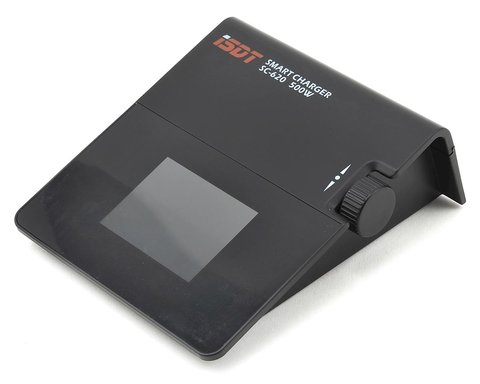
Key Specs
- DC input: 9-32V, output 0-30V
- Charge current: 0.1-20.0A, discharge current 0.1-5.0A
- Maximum power: 500W
- 2.4-inch IPS color display, same platform as the SC-608
- USB output: 5V/2A for charging phones or accessories
- Dimensions approximately 115 x 130 x 52mm
- Price: Roughly $50-60
- Compatibility: XT60 main connector fits most current LiPo/LiFe/LiHV packs; needs a high-current external DC supply such as the ISDT SP3060 to unlock the full 500W
Why You Need a Serious External Power Supply
The SC-620’s 500W rating is only achievable with a beefy external DC power source, since the charger itself has no built-in AC supply:
- A basic 12V, low-amperage supply will not come close to unlocking the full rating
- ISDT’s own SP-series power supplies, like the SP3060, are designed specifically to feed chargers like this one
- Without a high-current DC source, the SC-620 behaves more like a mid-power charger than a 500W unit
Charge Current Range: 0.1A to 20A
The wide charge current range makes the SC-620 usable for both small packs and large high-capacity batteries:
- Small packs benefit from the fine 0.1A resolution at the low end
- Large multi-cell packs can be charged at up to 20A when paired with a sufficiently powerful supply
- Discharge current tops out at 5A, useful for capacity testing without a separate discharger
Same scOs Interface as the SC-608
Anyone who has used the SC-608 will feel at home immediately, since the SC-620 runs the identical rotary-dial scOs interface on the same 2.4-inch IPS display, just inside a larger case to accommodate the higher-current internals and cooling.
Firmware Updates and USB Output
Like its smaller sibling, the SC-620 receives firmware updates through a direct PC connection rather than a phone app, and includes a 5V/2A USB output port for charging accessories directly from the unit while it is powered.
Comparing the SC-620 to the SC-608
Stepping up from the SC-608 to the SC-620 mainly buys headroom for larger packs and faster charging:
- 20A charge current versus 8A on the SC-608
- 500W maximum power versus 150W
- A larger case to house the additional cooling and current-handling components
Planning a Complete High-Power Setup
Getting the most out of the SC-620 usually means budgeting for the full system rather than just the charger:
- A high-current DC power supply, such as the ISDT SP3060
- Adequately rated cabling and connectors for 20A charge currents
- A well-ventilated charging area, since sustained high-power charging generates real heat
Discharge Mode for Capacity Testing
With a 5A discharge current ceiling, the SC-620 can run basic capacity tests on packs without needing a separate discharger like the FD-200 for lighter-duty testing, though the FD-200 remains the better choice for larger packs or higher discharge currents.
Noise and Heat Under Sustained Load
Running the SC-620 near its rated 500W for extended periods produces noticeable fan noise and heat, so plan for a well-ventilated charging area rather than a closed cabinet if you regularly charge large packs at high current.
A Quick Comparison to the ISDT D2
Where the D2 splits a fixed 200W AC supply across two channels, the SC-620 focuses all of its considerably higher power ceiling into a single channel, making it the better choice when charging one large pack as fast as possible is the priority rather than running two packs at once.
Typical Use Cases That Justify the Extra Power
The SC-620’s higher ceiling makes the most sense for larger multirotor packs, sizable fixed-wing batteries, or anyone regularly charging multiple large packs back-to-back before a competition where charge time directly affects how many flights or runs you can fit into a day.
Final Thoughts on High-Power Compact Chargers
The SC-620 represents a category of charger that barely existed a few years ago: genuinely high-power output in a case small enough to carry in one hand. The catch, as covered above, is that unlocking that power requires investing in the right supporting power supply, which is worth factoring into the total cost before buying.
A Note on Connector Compatibility
Like the SC-608, the SC-620 uses a standard XT60 main connector on the charge side, keeping it compatible with most current LiPo packs out of the box, while the DC input side uses the higher-current connector needed to safely handle its 500W ceiling.
I paired the SC-620 with a 24V supply that could only deliver a fraction of its rated current, and the charger simply throttled itself down without complaint, charging safely but well below the 500W ceiling. It was a useful reminder that a charger’s peak rating and what you actually get out of it depend entirely on the power supply feeding it.
“It’s genuinely a 500W charger, but only once you feed it what a 500W charger actually needs upstream.”
— Owen B., RC Multirotor Builder, RCGroups Forum
Troubleshooting Power, Balance, and Connection Errors
Because the SC-620 depends entirely on an external DC supply for its power, most issues people report are really power-delivery problems rather than a fault in the charger itself.
- Charger won’t reach anywhere near 500W: check the amperage rating of the DC power supply feeding it, since a supply rated for less current than the charger is asking for will cause it to throttle down automatically
- Balance port error on a pack: reseat the balance connector fully and inspect the pins for bent or corroded contacts before assuming the pack itself has failed
- “Input voltage low” or similar DC input warning: confirm the supply is within the SC-620’s 9-32V input range and that the input cable and connectors are rated for the current being drawn
- Charge stops partway through: verify the cell count setting matches the pack being charged, since a mismatched cell count is a common cause of an early safety cutoff
If a display error won’t clear, the manual fallback is to disconnect everything, power the charger with no pack attached, and confirm the screen and menu navigate normally on their own. This isolates whether the fault sits with the power supply, the battery pack, or the charger itself, which is worth doing before contacting support or assuming a unit needs to be replaced.
Frequently Asked Questions
What power supply does the SC-620 need to hit 500W?
A high-current external DC supply, such as ISDT’s own SP-series units like the SP3060, which are built specifically to feed high-power chargers like this.
Is the SC-620 the same interface as the SC-608?
Yes, both run the same scOs rotary-dial interface on a matching 2.4-inch IPS display, just in a larger case for the SC-620’s higher-current components.
What is the maximum discharge current on the SC-620?
5A, which is lower than its 20A charge current but sufficient for capacity testing and storage prep.
Does the SC-620 have USB output?
Yes, a 5V/2A USB port is built in for charging phones or accessories while the unit is powered.
Conclusion
The SC-620 is genuinely capable of 500W charging, but that number only means something once paired with an appropriately powerful DC supply. Treat it as a charger-plus-power-supply system rather than a standalone unit, and it becomes one of the fastest compact options available for large lithium packs.
Ryan has a computer science degree and has spent years pulling drivers, firmware, and hardware manuals apart to see how they actually work, including pairing high-power compact chargers like the SC-620 with dedicated power supplies to reach rated output. He writes at softwaredriverdownload.com.