The ISDT FD-200 is often mistaken for a charger because of its size and the ISDT branding, but it is actually a dedicated discharger and analyzer, meant to work alongside a charger rather than replace one. This manual guide clarifies what it does and how to use it safely.
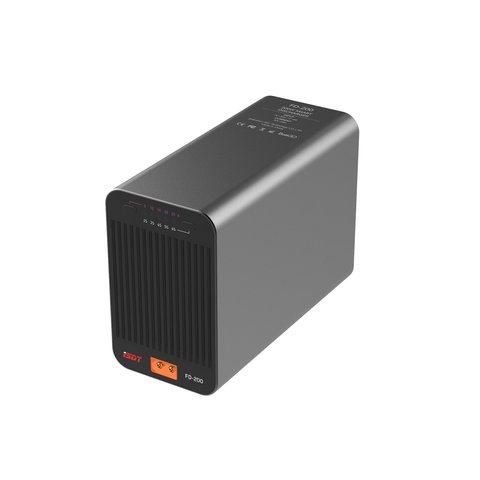
Key Specs
- DC input: 7-35V
- Maximum discharge power: 200W
- Supports 2-8S batteries
- Selectable discharge current: 5, 10, 15, 20, or 25A
- Dimensions approximately 142 x 100 x 63mm, weight around 790g
- Bluetooth control through the isd GO companion app
What the FD-200 Is Not: It Does Not Charge Batteries
This is the single most important thing to understand from the manual. The FD-200 only discharges batteries; it has no charging circuitry at all. It is designed as a companion device to:
- Bring packs down to a safe storage voltage after use
- Perform controlled capacity analysis by discharging at a known current
- Safely drain damaged or swollen packs before disposal
Selecting a Discharge Current
The FD-200 offers five fixed discharge current steps: 5A, 10A, 15A, 20A, and 25A. Choosing the right one depends on your goal:
- Use lower currents like 5A or 10A for accurate capacity measurement
- Use higher currents like 20A or 25A when you need to bring a pack down quickly, within the 200W ceiling
- Remember the 200W limit means very high-voltage packs will be capped below their selected current setting
Controlling It With the isd GO App
Rather than a full onboard menu, the FD-200 leans on Bluetooth connectivity for control:
- Pair the unit with the isd GO app on your phone
- Select 2S through 8S depending on your battery
- Set your discharge current and starting/ending voltage targets
- Monitor real-time voltage and discharged capacity from the app
Safety Features Worth Knowing
Because discharging batteries at high current generates significant heat, the FD-200 includes several protections built into the manual’s safety section:
- Overcurrent protection if the load exceeds the safe threshold
- Overvoltage protection if the DC input exceeds 35V
- Overheat protection paired with active cooling fans
When to Use a Discharger vs Just Storage Mode on a Charger
Many chargers include a basic storage mode, so it is worth knowing when a dedicated discharger like the FD-200 adds real value:
- Storage mode on a charger is usually slow and limited in current
- The FD-200’s selectable higher currents bring large packs to storage voltage much faster
- Capacity analysis at a controlled current is more accurate than relying on a charger’s built-in estimate
Pairing the FD-200 With a Charger in Your Workflow
A typical combined workflow looks like this:
- Charge the pack fully on your charger of choice
- Use the FD-200 to discharge at a controlled current for capacity testing if needed
- Discharge to storage voltage on the FD-200 before long-term storage instead of leaving packs fully charged
Understanding the Weight and Cooling Design
At nearly 800 grams, the FD-200 is noticeably heavier than a comparable charger of similar footprint, which reflects the internal components needed to dissipate 200W of discharge heat safely. The active cooling fans run more aggressively at higher discharge currents, so expect noticeable fan noise during a 20A or 25A session.
Battery Disposal Use Case
Beyond routine storage prep, the FD-200 is also genuinely useful for safely draining a damaged or swollen pack before disposal, since discharging a lithium battery to a low voltage significantly reduces the fire risk during transport or recycling compared to disposing of a fully charged pack.
Keeping Discharge Sessions Safe Indoors
Running a discharge at 20A or 25A generates real heat over time, so keep the FD-200 on a heat-resistant surface, away from flammable materials, and within sight rather than in another room, the same precautions you would apply to any high-current charging session.
Battery Life and Long-Term Storage Habits
Bringing packs to storage voltage after every session, rather than leaving them fully charged between uses, is one of the simplest habits for extending LiPo lifespan, and a dedicated discharger like the FD-200 makes that habit far less tedious across a large fleet of batteries.
Final Thoughts on App-Based Control
Relying on a phone app for control feels unusual at first if you are used to onboard buttons and a simple LCD, but in practice it makes sense for a device like the FD-200: discharge sessions can run for a long time, and being able to check progress from across the room or another part of the house without standing over the unit is genuinely convenient once you get used to the workflow.
I used the FD-200 to bring a stack of 6S packs down to storage voltage after a long flying weekend, running them at a 15A discharge rate through the app while I did other things nearby. Watching the app track capacity in real time made it obvious which packs were aging, since a couple of them held noticeably less capacity than their rated mAh.
“Pairing it with a proper charger changed how I store batteries between flying seasons, no more guessing at storage voltage.”
— Tomas K., Fixed-Wing RC Pilot, Model Aviation Reviewer
Frequently Asked Questions
Does the ISDT FD-200 charge batteries?
No, it is a discharger and analyzer only. It has no charging function and is meant to be used alongside a separate charger like the ISDT D2 or SC-608.
What is the maximum discharge current on the FD-200?
25A, though the actual current used is capped by the 200W maximum power limit depending on pack voltage.
How do I control the FD-200?
Through the isd GO Bluetooth app on your phone, which handles current selection, voltage targets, and real-time monitoring.
Can I use the FD-200 to test battery capacity?
Yes, running a controlled discharge at a known current and measuring the discharged mAh is one of its primary intended uses.
Conclusion
The FD-200 fills a specific niche: safe, controlled discharging and capacity analysis, not charging. Once that distinction is clear, the manual’s workflow through the isd GO app is straightforward, and the unit becomes a useful companion for storage prep and diagnosing aging packs alongside whatever charger you already use.
Ryan has a computer science degree and has spent years pulling drivers, firmware, and hardware manuals apart to see how they actually work, including pairing dedicated dischargers like the FD-200 with bench chargers to test real battery capacity. He writes at softwaredriverdownload.com.