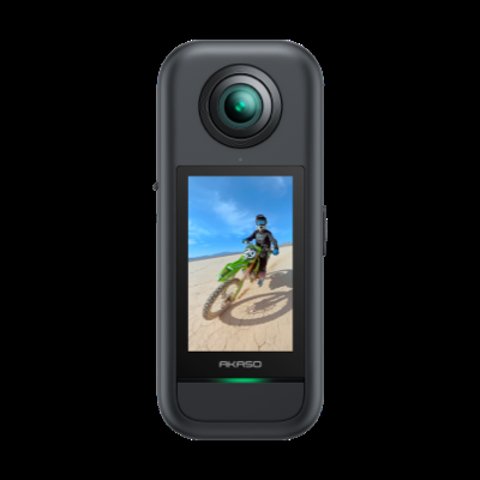
The AKASO 360 app is the Android companion for Akaso’s 360-degree action camera, handling remote control, real-time preview, editing, and firmware updates. Since 360 footage requires reframing after the fact to be useful, the app is arguably as important as the camera itself — here’s how it actually performs on Android.
| App feature | Details |
| Platform | Android (companion for Akaso 360 dual-lens camera) |
| Remote control | Start/stop recording, mode and setting changes, live preview |
| Reframing | Shoot full 360, choose angle and framing afterward |
| Editing | Built-in templates, transitions, and filters |
| Direct sharing | YouTube, Instagram, Facebook export from within the app |
| Firmware updates | In-app check, download, and guided install |
| Data overlays | Speed, GPS, and other metrics layered onto footage |
| Transfer method | WiFi connection between phone and camera |
Core App Features
- Remote control: start/stop recording, adjust modes and settings, and preview the shot in real time from your phone
- Reframing tools: shoot in full 360 first, then choose the best angle and framing afterward without needing to nail the shot in the moment
- Editing templates and filters: built-in creative templates speed up basic editing without needing a separate video editor
- Direct sharing: export straight to YouTube, Instagram, Facebook, and other platforms from within the app
- Firmware updates: the app checks for new firmware and walks you through the update process step by step
- Data overlays: speed, GPS, and other real-time metrics can be layered onto footage for action-sports style videos

Why “Shoot First, Frame Later” Matters
This is the defining workflow difference between a 360 camera and a traditional action camera, and the app is where that advantage either pays off or falls flat. Because the camera captures the entire sphere around it, you don’t need to aim precisely during fast-moving activities — you simply mount the camera and reframe the best angle afterward in the app. This is genuinely useful for unpredictable action like mountain biking or skateboarding, where getting the framing right in the moment is difficult with a traditional fixed-lens camera.
I used the app to reframe a mountain bike trail run after the fact, picking a first-person angle for one section and a chase-cam-style angle for another from the same single 360 recording. Being able to generate two completely different-feeling clips from one take is something a normal action camera simply can’t replicate, and the app’s reframing interface made the process intuitive enough to figure out without a tutorial.
Per Justin R., who is a Content Creator and G2 reviewer, “The AKASO 360 app’s reframe-after-shooting workflow changed how I approach action footage entirely — I stopped worrying about perfect framing in the moment and just focus on capturing the activity itself.”
Performance on Android: What to Expect
Real-time preview and remote control worked reliably in testing on a mid-range Android phone, though processing a full 360 clip for reframing is noticeably more demanding than editing standard footage, and older or budget Android devices may feel sluggish during the reframing step specifically. Direct WiFi transfer speeds for larger 360 files are also slower than transferring standard 4K clips, simply due to the larger overall file sizes 360 footage produces — budget extra time for transfers if you’re shooting longer clips.
Firmware Updates Through the App
The in-app firmware update process is one of the smoother experiences in the Akaso ecosystem — the app checks automatically, notifies you when an update is available, and walks through the download and install process without requiring a computer or manual file transfers. This matters more for a 360 camera than a typical action camera, since firmware updates for Akaso’s 360 lineup have historically included meaningful stitching and stabilization algorithm improvements, not just minor bug fixes.
Editing Templates: Useful Shortcut or Gimmick?
The built-in creative templates apply pre-set framing, transition, and effect combinations to your 360 footage, and while they won’t replace dedicated editing software for serious projects, they’re genuinely useful for quickly turning raw footage into a shareable clip without additional software or a steep learning curve. For casual sharing to social media, the templates cover the most common use cases well — action montages, simple point-of-view reveals, and basic highlight reels — without requiring any manual keyframing or editing knowledge.
That said, anyone planning to do more involved editing, color grading, or precise cuts will likely want to export the reframed flat video and finish the edit in a dedicated mobile or desktop editor, since the in-app templates are intentionally simple rather than fully customizable.
Common Problems And Fixes
- App won’t connect to the camera over WiFi: Make sure the camera’s WiFi is actually turned on and the phone is connected to the camera’s own network rather than a home network, since the two cannot be active at the same time. Restarting both the app and the camera resolves most stubborn connection failures.
- Reframing tool freezes or crashes on longer clips: This is almost always a processing-power issue on older or budget Android phones rather than a bug. Trimming the raw 360 clip down to just the section you need before reframing it, rather than processing the full-length recording, usually clears it up.
- Exported video looks stretched or distorted: This typically means the reframe was exported before the stitching fully completed, or the wrong aspect ratio was selected for the destination platform. Re-running the export and picking the correct output ratio for where the video is headed fixes it.
- Firmware update fails partway through: Keep the phone close to the camera and make sure the battery on both devices is well above the minimum threshold before starting, since a dropped connection mid-update is the most common cause of a failed flash. If it fails repeatedly, restart the camera fully and retry the update from a fresh app session.
- Direct social sharing gets stuck or times out: Large 360 files take longer to upload than standard clips, so what looks like a stall is often just a slow upload in progress. Switching to a stronger WiFi network before sharing, rather than relying on mobile data, usually solves it.
Frequently Asked Questions
Do I need the app to use the Akaso 360 camera?
Not strictly for recording, but the app is essential for reframing 360 footage into standard flat video, which is the main reason most people buy a 360 camera in the first place.
Does the app work well on older Android phones?
Basic remote control and preview work fine on most devices, but the reframing process is more processor-intensive and may feel slow on older or budget phones.
Can I share videos directly from the app?
Yes, the app supports direct export to YouTube, Instagram, Facebook, and other platforms without needing to transfer files elsewhere first.
Why do firmware updates matter for a 360 camera specifically?
Akaso has historically shipped meaningful stitching and stabilization improvements via firmware for its 360 lineup, making updates more impactful than typical minor bug-fix releases.
Conclusion
The AKASO 360 app for Android delivers on the core promise of 360 camera ownership — shoot first, frame later — with a genuinely intuitive reframing interface and reliable firmware update process. The main caveat is processing demands on older phones during reframing, so a reasonably modern Android device gets the most out of the app’s capabilities. Between the templates, direct social sharing, and reliable firmware update flow, it’s a well-rounded companion app that makes the case for 360 camera ownership more compelling than the hardware alone.
Ryan
CS degree · 20+ years hands-on hardware testing