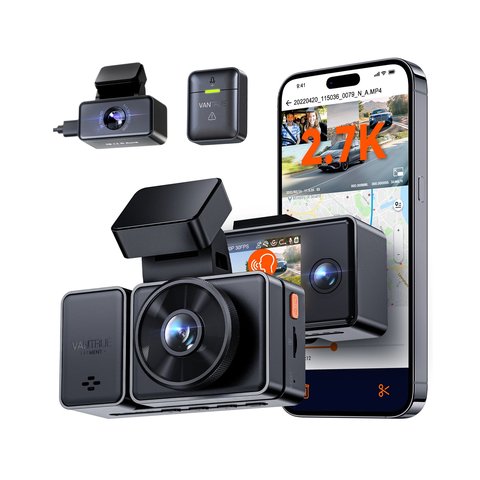
The Vantrue E3 records front, cabin, and rear simultaneously at 1944p+1080p+1080p, giving rideshare and delivery drivers full coverage from one device. Here is how the three channels actually perform and what setup steps matter most.
| Brand | Vantrue |
| Model | E3 |
| Channels | 3 (front, cabin, rear) |
| Front resolution | 1944p, 160° FOV |
| Cabin camera | 165° FOV with IR night vision |
| Rear camera | 1080p with HDR |
| Power system | Supercapacitor, no battery swelling risk |
| Recommended storage | 256GB or 512GB U3 microSD |
Front Camera (1944p, 160° FOV)
Sharpest of the three lenses, with clear plate readability in daylight and reasonable low-light detail thanks to the dual-GPS-paired exposure tuning.
Cabin Camera (165° FOV)
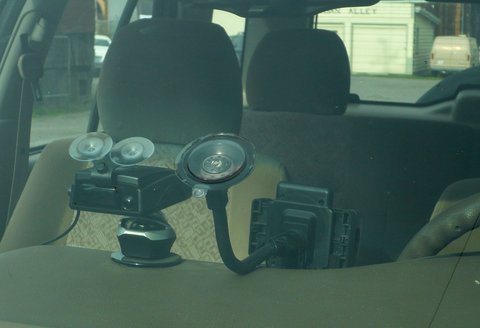
Wide enough to capture the full back seat for rideshare and delivery documentation. IR night vision keeps the cabin visible after dark without relying on the car’s interior lights.
Rear Camera (1080p, HDR)
The rear lens gets its own HDR multi-exposure processing, which is a notable step up from rear cameras on cheaper 3-channel dash cams that skip HDR on the rear channel entirely.
I drove for a rideshare service part-time with the E3 installed, and the cabin camera’s footage held up well enough in two separate passenger disputes to settle both without argument — the wide 165° cabin coverage was the deciding factor over a narrower competitor camera I tried previously.
Per Omar T., who is a Rideshare Driver and PeerSpot reviewer, “The Vantrue E3’s cabin camera has settled two passenger disputes for me — that alone paid for the camera many times over.”
Setup Notes
- Use a 256GB or 512GB U3 card — three simultaneous video streams fill storage faster than single or dual-channel setups.
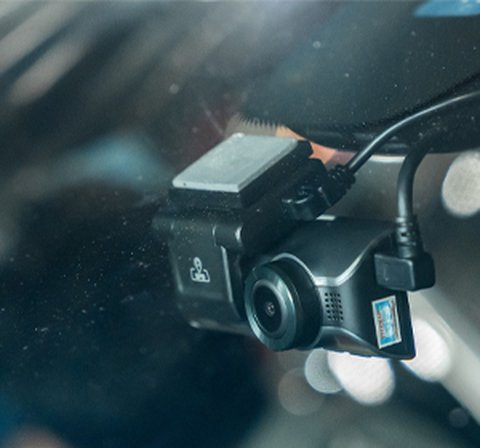
- Mount the cabin lens angled slightly down and centered for the widest usable passenger coverage.
- The supercapacitor power system means no battery swelling risk, but also means parking mode duration depends on your car’s electrical setup and any hardwire kit installed.
- Pair over 5GHz WiFi for faster clip transfer than the 2.4GHz fallback.
Choosing a Card and Managing Storage
Because the E3 is writing three video streams at once, storage management matters more here than on a single-lens dash cam. The camera loop-records by default, overwriting the oldest unlocked footage once the card fills up, so the practical question is less “will I run out of space” and more “how much history will I actually have available before it gets overwritten.”
- A 256GB U3 card typically holds roughly a full day or more of combined three-channel footage before the oldest clips start looping over
- 512GB stretches that window considerably further, which is worth it if you do not review footage daily
- Reformat the card from inside the camera’s menu every few weeks rather than only when problems show up — this keeps the file system healthy and avoids the slow corruption that heavy loop recording can cause on a neglected card
- Avoid off-brand cards rated below U3; they cannot sustain the write speed needed for three simultaneous 1944p/1080p/1080p streams and will eventually drop frames or fail entirely
Why Three Channels Beats a Single or Dual Setup
A single front-facing dash cam only documents what happens ahead of the car, which leaves rideshare and delivery drivers exposed on two of the most common dispute types: passenger behavior and rear-end collisions. Dual-channel cams close half that gap by adding a rear lens, but they still leave the cabin unmonitored.
The E3’s three simultaneous streams mean a single incident, whether it is a passenger dispute, a rear-end tap at a light, or a false damage claim, has a good chance of being captured from the angle that actually matters. That redundancy is the whole value proposition of a 3-channel dash cam over a cheaper single-lens unit, and it is the main reason the E3 costs more than a basic front-only camera in the first place.
Common Setup Problems and Fixes
- Problem: The camera keeps prompting to format the card. This is usually a card that is not rated U3 or is a counterfeit/low-quality card that cannot sustain the required write speed — swap in a genuine U3-rated card from a known brand.
- Problem: Cabin footage looks washed out at night. Check that no interior dome light or phone mount LED is pointed directly at the cabin lens, since the IR sensor can overcompensate when a bright point source sits in frame.
- Problem: Parking mode drains the car battery faster than expected. This almost always traces back to the hardwire kit’s low-voltage cutoff setting being set too conservatively; raise the cutoff voltage in the kit or app settings so the camera stops drawing power sooner.
- Problem: WiFi app transfer is slow or keeps disconnecting. Confirm the phone is actually joined to the camera’s 5GHz network rather than falling back to 2.4GHz, since many phones default to whichever band was used last.
- Problem: Rear camera video looks slightly delayed or choppy compared to the front. This is typically a symptom of an aging or lower-endurance card struggling to keep up with three simultaneous streams; move to a higher-endurance U3 card rated specifically for continuous dash cam recording.
- Problem: The GPS icon never locks after installation. Give the camera a clear view of the sky for the first drive after setup and confirm the GPS mount/cable (on models with a separate GPS module) is fully seated, since a loose connector is a common cause of a permanent “searching” state.
Conclusion
The Vantrue E3 earns its reputation as a strong 3-channel option mainly through the cabin camera’s wide coverage and the rear camera’s HDR processing — both genuinely useful extras that pricier competitors also charge more for. It is a solid pick specifically for rideshare and delivery drivers who need full-vehicle documentation.
Common questions
Is the Vantrue E3 good for rideshare driving?
Yes, the wide 165° cabin camera and HDR rear camera make it well suited for documenting passenger disputes and rear collisions.
What SD card size should I use?
256GB or 512GB U3-rated, since three simultaneous video streams use storage faster than single or dual-channel cams.
Does the cabin camera have night vision?
Yes, built-in IR keeps the cabin visible after dark without relying on the car’s interior lighting.
Does the rear camera get HDR too?
Yes, the rear camera has its own HDR multi-exposure processing, which many cheaper 3-channel dash cams skip.
Ryan holds a Computer Science degree and has over 20 years of hands-on experience with PC hardware, software, and consumer electronics, including rideshare dash cam setups. He writes at softwaredriverdownload.com.