The DDPAI Z60 Pro is DDPAI’s current flagship dash cam, pairing dual Sony STARVIS 2 sensors with optional 4G connectivity and expandable 3-channel recording. Here’s a full look at what makes it the top of the lineup.
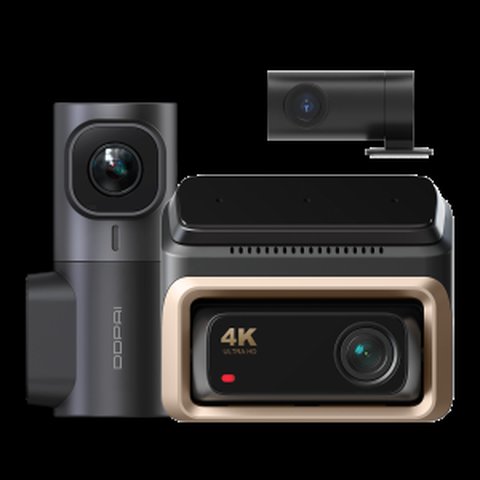
| Spec | Detail |
|---|---|
| Front Sensor | Sony STARVIS 2 IMX678, HDR |
| Rear Sensor | Sony STARVIS 2 IMX662, HDR |
| Video Resolution | 4K front / 1080P rear, 3K/60fps high-frame-rate mode |
| Storage | 32GB built-in eMMC plus up to 512GB TF card |
| Display | 3" screen with 4 physical buttons |
| Connectivity | 5GHz WiFi, GPS, ADAS 2.0 real-time alerts |
| Expansion | 3-channel via MINI2X and πLink wireless technology |
| Optional 4G | 30GB of free data for the first 90 days |
Key Specs
- Front STARVIS 2 IMX678 and rear IMX662 Sony sensors, both with HDR
- 4K front recording, 1080P rear, with 3K/60fps high-frame-rate mode
- 32GB built-in eMMC plus up to 512GB TF card support
- 3″ display with 4 physical buttons
- 5GHz WiFi, GPS, ADAS 2.0 real-time alerts
- Expandable to 3-channel with the MINI2X via πLink wireless technology
- Optional 4G module with 30GB of free data for the first 90 days
Why Dual STARVIS 2 Sensors Matter
Most dash cams pair a good front sensor with a noticeably weaker rear one, since manufacturers assume rear footage matters less. The Z60 Pro breaks from that pattern by using Sony STARVIS 2 sensors on both channels, which means rear footage holds up nearly as well in low light as the front. This is particularly useful for reviewing rear-end collisions or parking lot incidents at night, where a cheaper rear sensor would leave you with a grainy, unusable clip.
The 3K/60fps high-frame-rate mode is another meaningful upgrade over standard 30fps recording, since it captures nearly twice the motion detail during high-speed driving, making license plates and fast lane changes easier to read back clearly.
Expanding to 3-Channel Coverage
DDPAI’s πLink wireless technology lets you add the compact MINI2X camera to the Z60 Pro setup for interior monitoring, without running a physical cable between the two units. This gives you 4K front, 2K interior, and 1080P rear coverage simultaneously, which matters if you drive for rideshare or simply want cabin footage alongside standard front and rear recording.
The optional 4G module is worth evaluating carefully before buying — the free 30GB of data for 90 days is a nice trial period, but factor in the ongoing subscription cost afterward if you actually plan to use remote live-view regularly rather than treating it as a novelty feature.
Installation Basics
- Mount the front unit behind the rearview mirror using the included bracket
- Route the rear camera cable along the headliner to the back window
- Optionally pair a MINI2X interior camera wirelessly for 3-channel coverage
- Connect power via 12V adapter or a hardwire kit, and pair the app over WiFi
For full specs, see DDPAI’s official Z60 Pro product page.
Storage Strategy for High-Bitrate Recording
Running 3K/60fps front recording alongside a 1080P rear channel generates noticeably larger files than standard 30fps dual-channel setups, which means the included 32GB eMMC fills up faster than you might expect on default settings. Pairing the camera with a large, high-endurance TF card (256GB or 512GB) is worth budgeting for from day one rather than discovering the storage limitation after a few weeks of use.
If you add the MINI2X for 3-channel recording, storage demand increases further, so it’s worth reviewing your loop recording settings and deciding whether you actually need the highest frame rate mode running continuously versus reserving it for specific drives where footage quality matters most.
Comparing the Z60 Pro to the Standard Z60
The base Z60 shares the same general form factor and 4K front recording but drops down to a single, less advanced sensor rather than the Pro’s matched dual STARVIS 2 setup, and doesn’t support the 3K/60fps high-frame-rate mode. If dual-sensor low-light performance and higher frame rates aren’t priorities for you, the base Z60 covers most of the same core functionality for meaningfully less money.
Troubleshooting Common Z60 Pro Issues
Even a well-built flagship dash cam runs into the occasional hiccup, usually tied to firmware, storage, or connectivity rather than a hardware fault. Here are the issues owners run into most often and how to work through them.
- Camera won’t power on: Confirm the 12V adapter is seated firmly in the socket and that the socket itself is switched on with the ignition; try a different port or a hardwire kit fuse tap to rule out a dead outlet before assuming a unit fault.
- App won’t connect over WiFi: Forget the camera’s network on your phone and reconnect, and make sure your phone isn’t also trying to stay on your home WiFi or mobile data at the same time, since that conflict is a common cause of a stuck connection.
- TF card errors or recording stops unexpectedly: Reformat the card in-camera rather than on a computer, and stick to a high-endurance card rated for continuous dash cam recording; budget cards without that rating wear out and throw errors much sooner.
- GPS won’t lock: Give the unit a few minutes with a clear view of the sky after a cold start, since GPS acquisition after being unpowered for a while naturally takes longer than picking the signal back up on a short trip.
- Parking mode isn’t triggering: Double-check that a hardwire kit is installed and configured correctly, and that the parking mode sensitivity setting in the app hasn’t been left on a low threshold that ignores minor bumps.
Frequently Asked Questions
Is the 4G module required to use the Z60 Pro?
No, the camera records and functions fully over local WiFi without the 4G module; it’s an optional add-on for remote live-view and cloud features.
Does the MINI2X need to be bought separately?
Yes, the MINI2X is sold as a separate accessory for the optional 3-channel upgrade.
Is 3K/60fps available on both front and rear?
The high-frame-rate mode primarily benefits front recording; check current firmware notes for exact rear channel behavior.
How much does the 4G data cost after the free trial?
Pricing varies by region and plan; check DDPAI’s current data plan options before committing to ongoing 4G use.
Does parking mode work without the hardwire kit?
Extended parking recording requires a hardwire kit for continuous power; without one, coverage is limited to built-in backup power duration.
Is the eMMC storage a full backup of the SD card?
It functions as an emergency failsafe rather than a full mirror; check DDPAI’s documentation for exact behavior during card failure.
Does the Z60 Pro support voice control?
Yes, voice commands are supported for hands-free photo capture and basic settings toggles while driving.
Is professional installation recommended?
It’s designed for DIY installation, though a hardwire kit install for parking mode is easier with basic wiring experience or professional help.
Can the front and rear cameras be replaced independently?
Check DDPAI’s current accessory listings, as individual camera replacement availability can vary rather than always requiring a full unit swap.
Does the Z60 Pro support Apple CarPlay or Android Auto?
No, it’s a dedicated dash cam rather than an infotainment device, so it doesn’t integrate with phone mirroring systems.
Can I use the Z60 Pro without ever connecting the app?
Yes, it records independently to the card; the app is only needed for footage review, settings, and updates.
Long-Term Ownership Considerations
As a flagship-tier purchase, the Z60 Pro is the kind of dash cam you install and expect to keep running for several years without needing to think much about it. Periodic firmware checks, occasional lens cleaning, and reformatting your TF card every few months will keep it performing reliably over that timeframe, and the dual eMMC-plus-card storage architecture means you’re less likely to face a total footage loss scenario compared to simpler single-storage dash cams.
Conclusion
The Z60 Pro earns its flagship position through the matched dual STARVIS 2 sensors and genuine 3-channel expandability, both of which address real gaps in cheaper dash cams. It’s the right choice if you want the sharpest all-around footage in DDPAI’s lineup and don’t mind paying for the top tier.
Ryan
CS graduate · tests every camera and driver he writes about firsthand