The WOLFBOX MF50 is the smallest and lightest model in WOLFBOX’s electric air duster lineup, built for quick, everyday cleaning rather than heavy-duty workshop use. Here’s a closer look at what it actually does well, and where it falls short compared to the larger MF100 and MF200.
| Spec | Detail |
|---|---|
| Model | WOLFBOX MF50 |
| Speed | Up to 110,000 RPM, 3 settings |
| Weight | 0.45 lb |
| Nozzles | 4 interchangeable nozzles included |
| Charging | USB-C, full charge in about 3.5 hours |
| Runtime | Up to 240 minutes on lowest setting |
| Price tier | Roughly $40–$56 |
Key Specs
- Up to 110,000 RPM, 3 adjustable speed settings
- Weighs just 0.45 lb — the lightest model in the lineup
- 4 interchangeable nozzles included
- USB-C charging, full charge in about 3.5 hours
- Up to 240 minutes of runtime on the lowest setting
- Price tier: Budget, roughly $40–$56 depending on bundle
- Compatibility: Any USB-C charger/cable for charging; nozzles are MF50-specific and not interchangeable with the MF100/MF200
Getting the Most Out of It
- Start on the lowest speed setting for delicate electronics like camera lenses or drone bodies
- Switch to a higher setting for denser debris, like PC case dust or car floor mats
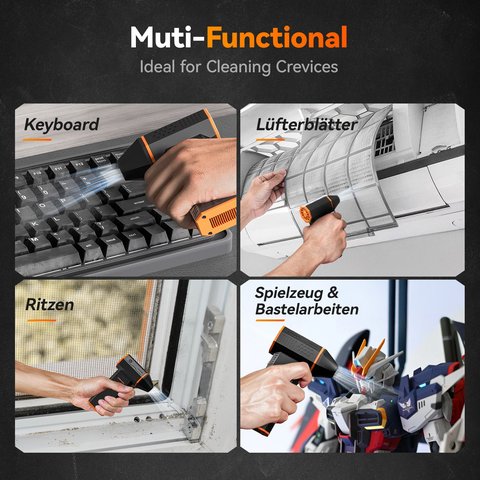
- Swap nozzles based on the task — narrow tips for tight gaps, wider ones for open surfaces
- Recharge via USB-C before the battery fully depletes to preserve long-term battery health
- Store it somewhere visible and reachable, since a duster left in a drawer tends not to get used
The MF50’s biggest practical advantage over its larger siblings is simply that it’s easy to keep within reach — a duster that lives in a desk drawer because it’s too bulky to leave out doesn’t actually get used as often as one small enough to sit next to your keyboard.
How the MF50 Compares to the Rest of the Lineup
Against the MF100, the MF50 trades roughly 40,000 RPM of peak power for a lighter body and significantly longer runtime per charge — 240 minutes versus 100 minutes on the lowest setting. Against the MF200, it lacks the swappable battery system entirely, but also costs less and weighs almost half as much. For most people who just want to keep a keyboard, laptop, and car interior dust-free without a workshop-grade tool, the MF50 covers that use case comfortably.
Where it falls short is heavier debris — sawdust, pet hair embedded in car carpeting, or a PC case that hasn’t been cleaned in a year or more. For those situations, stepping up to the MF100 or MF200 will clear the job faster and with less repeated passing over the same area.
For full specs, see WOLFBOX’s official MF50 product page.
Why Size and Weight Matter More Than Spec Sheets Suggest
A 0.45 lb tool that sits within arm’s reach on a desk gets used far more often than a heavier, more powerful one stored in a closet or drawer. This is the practical reasoning behind the MF50’s positioning — WOLFBOX isn’t trying to compete with the MF100 or MF200 on raw cleaning power, but on making the everyday habit of quick electronics cleaning as frictionless as possible.
A Good Fit for Gift-Giving or Office Use
Because of its low price point relative to the rest of the lineup and genuinely broad usefulness, the MF50 also works well as a practical gift for anyone who works from a desk regularly, or as a shared tool for an office that wants to keep multiple workstations dust-free without buying individual cans of compressed air for every desk. Its light weight and simple one-button operation make it approachable even for someone who’s never used an electric duster before.
Troubleshooting Common Problems
Most MF50 issues come down to charge state or a blocked nozzle rather than a defective unit:
- Won’t turn on: plug it into a USB-C charger for at least 15–20 minutes before assuming it’s dead — a fully drained battery sometimes needs a few minutes of charging before the power button responds at all.
- Airflow feels weaker than expected: check the nozzle for a partial blockage first, and confirm it’s seated fully — a loosely attached nozzle leaks airflow around the seam instead of directing it out the tip.
- Won’t charge or the indicator light doesn’t come on: try a different USB-C cable and power source before assuming the battery has failed, since a cable rated for charge-only (no data) can sometimes be underpowered for a full charge.
- Runtime seems shorter than advertised: the 240-minute figure applies to the lowest speed setting only; higher settings draw more power and will noticeably shorten runtime per charge.
If the power button still doesn’t respond after a full charge, the manual fallback most electric dusters share is a forced reset: hold the power button down for 10-15 seconds to clear a stuck state, which resolves most unresponsive-button cases without needing a warranty exchange.
Frequently Asked Questions
Is the MF50 powerful enough for a genuinely dusty desktop PC?
It handles light-to-moderate dust well, but for heavily caked-on buildup, the higher-RPM MF100 will clear it faster.
Is it suitable as a first-time buyer’s introduction to electric dusters?
Yes, its low price and simple operation make it a sensible starting point before deciding if you need more power from the MF100 or MF200.
Does it come with a carrying case?
This varies by bundle; check your specific listing for included accessories.
Can the battery be replaced if it wears out?
The MF50 uses a built-in battery rather than a swappable cartridge, so a worn battery isn’t user-replaceable the way it is on the MF200.
Is it safe for cleaning phone charging ports?
Yes on a low speed setting with the narrow nozzle, though it’s worth being gentle around small connector pins.
Does it come in different colors?
Color options vary by retailer and region, so check the specific listing if a particular color matters to you.
Can it double as a small fan on hot days?
It’s designed for directed cleaning airflow rather than general cooling, so it’s not a practical substitute for an actual personal fan.
How loud is it compared to a hairdryer?
On lower settings it’s noticeably quieter than a typical hairdryer, though the higher speed setting approaches similar noise levels.
Does it come with a USB-C wall adapter included?
This varies by bundle; some listings include just the charging cable, expecting you to supply your own USB-C wall adapter.
How does noise level compare to the larger models?
The MF50 tends to run a bit quieter than the MF100 at comparable speed settings, since it’s a smaller, lower-peak-power motor.
Is it worth buying if I already own canned air?
If you clean electronics more than occasionally, yes — it pays for itself in avoided can purchases and avoids the propellant residue risk of canned air.
Is it quiet enough to use in an office setting?
On lower speed settings, yes, it’s reasonably quiet compared to a vacuum, though the higher setting will draw some attention in a quiet office.
Can it be checked as carry-on when traveling?
As a lithium battery device, it generally needs to travel in carry-on luggage rather than checked bags, consistent with most airline battery device policies.
Conclusion
The MF50 is the right pick if portability and everyday convenience matter more than maximum cleaning power. For heavier jobs, it’s worth stepping up to the MF100 or MF200 instead, but for daily keyboard and laptop upkeep, the MF50’s size and runtime are hard to beat, and it’s the easiest of the three models to actually keep within reach for regular use.
Ryan
CS graduate · tests every camera and driver he writes about firsthand