The Blurams A21C, also sold as the Outdoor Pro Camera, is a 1080p weatherproof outdoor camera built around AI person detection, a built-in siren, and either local microSD or Blurams Cloud storage without a mandatory subscription. Here’s what it offers and how to get it set up.
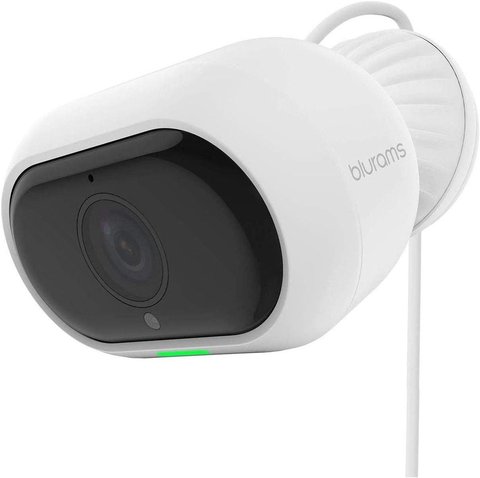
Key Specs
- 1080p FHD resolution with a Sony CMOS sensor for better low-light performance
- Starlight night vision using high-power infrared LEDs with an IR-cut filter
- IP65 weatherproof rating for full outdoor exposure
- AI-based person, motion, and sound detection, plus facial recognition
- Built-in siren and flashing light that can be triggered remotely
- Two-way audio with 3D noise reduction for clearer conversations
- 2.4GHz Wi-Fi only; no 5GHz support
Setting Up the A21C
- Download the Blurams app and create a free account
- Add the camera and scan its QR code to connect it to your 2.4GHz Wi-Fi network
- Mount the camera at your chosen outdoor location, ideally 2.5 to 3 meters high with a slight downward tilt
- Insert a microSD card (up to 128GB) if you want local recording instead of relying on cloud storage

The built-in siren and strobe light are genuinely useful deterrents rather than just a checkbox feature — being able to trigger a loud alarm remotely through the app when you spot something suspicious on live view adds a layer of active deterrence that plain motion alerts don’t provide.
Storage Options
- Local microSD recording works without any subscription, up to a 128GB card
- Blurams Guard cloud service offers up to 30 days of video history, with a free 7-day trial available
- Cloud and local storage aren’t mutually exclusive; some users run both for redundancy
For full specs and the official app download, see Blurams’ official A21C product page.
Frequently Asked Questions
Does the A21C need a subscription to work?
No, local microSD recording works without any subscription; cloud storage is an optional paid upgrade after the free trial.
Can I connect it to 5GHz Wi-Fi?
No, the A21C only supports 2.4GHz networks, so make sure your router broadcasts a 2.4GHz band.
Does it work with Alexa or Google Assistant?
Yes, it supports both Alexa and Google Assistant for basic voice commands and viewing on compatible smart displays.
Can I trigger the siren manually?
Yes, the siren and flashing light can both be activated on demand from within the app during live view.
Conclusion
The A21C is a solid budget-friendly outdoor camera if AI detection, a built-in siren, and subscription-free local recording matter more to you than 4K resolution. Setup is quick, and the combination of local and optional cloud storage gives some flexibility depending on how much backup history you want.
Ryan T. is a PC hardware enthusiast with 15+ years of experience fixing drivers and testing consumer tech. He writes for softwaredriverdownload.com.