The DDPAI Z60 Pro can be expanded into a genuine 3-channel dash cam setup by wirelessly pairing it with the MINI2X camera, giving you front, rear, and interior coverage simultaneously. Here’s exactly how the 3-channel setup works and what it captures.
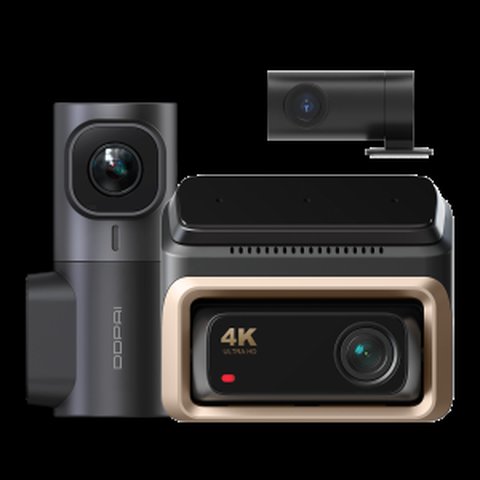
What the 3-Channel Setup Actually Records
- Front: 4K via the Z60 Pro’s STARVIS 2 IMX678 sensor
- Rear: 1080P via the Z60 Pro’s STARVIS 2 IMX662 sensor
- Interior: 2K via the wirelessly paired MINI2X camera
- All three channels record simultaneously and sync through the DDPAI app
How πLink Wireless Pairing Works
DDPAI’s πLink technology connects the MINI2X to the Z60 Pro over a dedicated wireless link rather than requiring you to run a physical cable from the main unit to an interior-facing camera. This makes installation significantly simpler than a traditional wired 3-channel setup, since you’re not fishing a cable through the cabin trim to reach a dashboard or rearview mirror position for the interior lens.
The tradeoff is that wireless pairing depends on maintaining a stable connection between the two units; while generally reliable within a vehicle cabin’s short distances, it’s worth periodically confirming the interior channel is still recording correctly through the app rather than assuming it always is.
Who Actually Needs 3-Channel Coverage
Interior monitoring matters most for rideshare and delivery drivers who want documentation of passenger interactions, and for anyone who’s had a dispute over what happened inside the vehicle during a trip. For typical personal driving without passengers, the extra interior channel is less critical, and many drivers get by fine with just the standard front-and-rear 2-channel setup.
Before buying the MINI2X specifically for 3-channel expansion, think honestly about whether you’ll actually review interior footage regularly — it’s a genuinely useful feature for the right use case, but an unnecessary added cost and setup step if you rarely have passengers or don’t need cabin documentation.
Setting Up the 3-Channel Configuration
- Install the Z60 Pro’s front and rear cameras following the standard 2-channel process
- Mount the MINI2X in a position with a clear view of the cabin, typically near the rearview mirror or dashboard
- Power on both units and open the DDPAI app to initiate πLink pairing
- Confirm all three channels appear in the live preview before relying on the setup
For full specs, see DDPAI’s official Z60 Pro product page.
Storage Planning for a Full 3-Channel Setup
Running three simultaneous recording channels — 4K front, 1080P rear, and 2K interior — consumes storage noticeably faster than a standard 2-channel setup. It’s worth pairing the Z60 Pro with a high-capacity, high-endurance TF card (256GB or larger) if you go the full 3-channel route, since the combined bitrate across all three feeds will fill a smaller card far faster than expected on default settings.
Frequently Asked Questions
Is the MINI2X sold together with the Z60 Pro by default?
Typically no, it’s sold as a separate accessory for the optional 3-channel upgrade.
Does the interior camera need its own power source?
Yes, the MINI2X requires its own power connection, typically run separately to a USB power source in the cabin.
Can 3-channel footage be reviewed as one synced file?
The DDPAI app generally lets you view all three channels together during playback, though exact export behavior can vary by firmware version.
Does adding the MINI2X reduce battery or power efficiency?
Yes, running a third camera increases total power draw, so factor this in if relying on limited backup power during parking mode.
Is night vision available on the interior channel?
Yes, the MINI2X includes NightVIS 2.0 processing for cabin visibility in low light.
Can I use a different DDPAI camera instead of the MINI2X for 3-channel?
The πLink 3-channel expansion is specifically designed around the MINI2X; check current compatibility notes before trying alternatives.
Does the 3-channel setup drain the car battery faster while parked?
Yes, running three channels increases parking-mode power draw compared to a standard 2-channel setup, so a hardwire kit with low-voltage cutoff is worth using.
Can the MINI2X be repositioned after initial installation?
Yes, it can be remounted, though you’ll want to re-confirm cabin framing in the app afterward.
Does the interior channel record audio as well as video?
Yes, the MINI2X captures audio alongside video for the interior channel.
Can the MINI2X record independently without the Z60 Pro connected?
No, it’s designed specifically to pair with a Z60 or Z60 Pro rather than operate as a fully standalone camera.
Is a car charger included in the Z60 Pro base package?
Yes, a standard 12V car charger is included with the Z60 Pro base unit.
Does the MINI2X come with its own printed quick-start guide?
Yes, it typically ships with its own brief setup guide separate from the Z60 Pro’s main manual.
Comparing to a Traditional Wired 3-Channel System
Traditional wired 3-channel dash cam kits require running a cable from the main unit all the way to an interior-mounted camera, typically threading it through headliner trim across the length of the cabin. This is genuinely tedious work even for experienced installers. The Z60 Pro’s wireless πLink approach eliminates that entirely, trading a small amount of wireless reliability risk for a dramatically simpler installation process that most people can complete themselves in well under an hour.
Confirming Compatibility Before Buying the MINI2X
Before purchasing the MINI2X specifically for this expansion, double check that your Z60 Pro’s firmware version supports πLink pairing, since very early production units occasionally required a firmware update first. This is typically a quick check and update through the DDPAI app before pairing, but worth confirming ahead of time rather than discovering a compatibility issue after both units are already mounted in your vehicle.
Conclusion
The Z60 Pro’s 3-channel expansion via the MINI2X is a genuinely well-executed feature for drivers who need interior coverage, avoiding the messy cable-running typical of wired 3-channel setups. It’s worth the extra cost specifically if cabin monitoring matters to your driving situation, and skippable if it doesn’t.
Ryan
Computer Science graduate · longtime smart home and PC hardware tester