If your wireless connection keeps dropping or your Broadcom-based network adapter shows up as unknown in Windows, you need the correct Broadcom 802.11n driver installed for your specific card model. This guide walks you through finding, downloading, and installing it the right way, plus what to do when the automatic installer refuses to cooperate.
Broadcom made the wireless chipsets used inside a huge number of laptops from Dell, HP, Acer, Lenovo, and Toshiba during the 802.11n era. Because the physical card is often OEM-branded, the driver you need usually comes from your laptop maker’s support page rather than Broadcom directly, though a generic Broadcom package will work in most cases.
Author/Publisher: Broadcom Inc. (formerly Broadcom Corporation)
Driver Date: Varies by OEM, typically last updated during the Windows 7/8 support cycle
Version: 6.30.223.x (WHQL certified branch)
File Name: Bcmwl6x64.exe (64-bit) / Bcmwl632.exe (32-bit)
File Size: Approximately 28-45 MB depending on package
OS Compatibility: Windows 7, Windows 8/8.1, Windows 10 (Windows 11 support is limited and often requires the generic Microsoft driver instead)
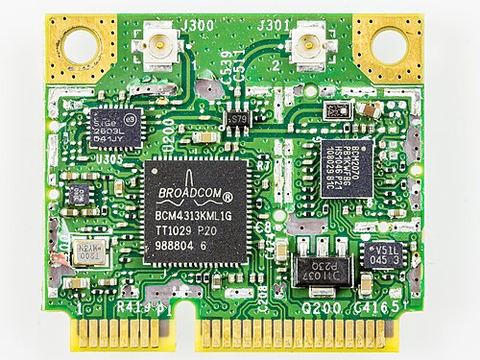
How to Identify Your Exact Broadcom Chipset
Before downloading anything, confirm which Broadcom chip is physically in your machine. Installing the wrong sub-model driver is the number one reason people end up with a non-functioning adapter.
- Open Device Manager (right-click Start, choose Device Manager).
- Expand Network adapters and look for a Broadcom entry.
- Right-click it, select Properties, then the Details tab, and choose Hardware Ids from the dropdown.
- Note the PCI\VEN_14E4 string — the number after DEV_ tells you the exact chip revision.
I have run into this personally on an old Dell Inspiron with a BCM4312 card — installing a BCM4322 package left the adapter greyed out with a yellow warning icon until I matched the exact hardware ID.
Downloading the Correct Driver
You have two reliable sources:
- Your laptop manufacturer’s support site (search your exact model number plus “wireless driver”).
- The Broadcom support portal, which still lists legacy 802.11n packages under networking downloads.
Avoid third-party “driver update” sites that bundle unrelated software. Stick to the OEM or Broadcom source.
Standard Installation Steps
- Close any wireless management utilities running in the background.
- Run the downloaded installer as administrator.
- Allow the wizard to remove any older Broadcom driver version if prompted.
- Restart the computer when the installer finishes.
- Reconnect to your wireless network and confirm the connection is stable.
Manual Install via Device Manager (Fallback Method)
If the executable installer fails silently or errors out, you can point Windows directly at the extracted driver files:
- Extract the downloaded .exe using 7-Zip instead of running it (right-click, 7-Zip, Extract Here).
- Open Device Manager, right-click the Broadcom adapter (or the “Network controller” unknown device), and choose Update Driver.
- Select “Browse my computer for drivers,” then point it to the extracted folder.
- Let Windows search subfolders and install the matching .inf file.
This manual route has saved me more than once on machines where the packaged installer crashed partway through — going straight to the .inf file skips whatever is breaking the wrapper installer.
Troubleshooting a Failed Installation
Common problems and fixes:
- Adapter shows “This device cannot start (Code 10)”: Uninstall the device in Device Manager, check “Delete the driver software,” reboot, and reinstall fresh.
- Installer says “no compatible hardware found”: You downloaded the wrong chipset variant — recheck the hardware ID.
- Wireless works but disconnects randomly: Disable power management on the adapter (Properties > Power Management tab, uncheck “Allow the computer to turn off this device”).
- Driver installs but no wireless networks appear: Confirm the physical wireless switch or Fn key toggle on your laptop is turned on.
Per Daniel Wong, who is an IT support technician at a regional accounting firm, “We had three older Dell laptops with the same Broadcom card failing after a Windows update. Extracting the driver package and doing a manual Device Manager install instead of running the installer directly fixed all three in under an hour.”
Windows 10 vs Windows 11 Behavior
On Windows 10, the OEM Broadcom package generally installs cleanly and gives you the full Broadcom wireless utility with extra configuration tabs. On Windows 11, many of these older 802.11n-era packages are blocked by driver signature requirements or simply refuse to detect the hardware because the INF files were never updated for the newer OS. In that case, Windows 11’s built-in generic driver (delivered automatically through Windows Update) is usually your best option — it lacks the Broadcom utility software but provides stable basic connectivity. You can check for it under Settings > Windows Update > Optional Updates > Driver updates.
Helpful Resources
For more background on diagnosing wireless adapter problems in Windows, see Microsoft’s official Wi-Fi troubleshooting guide and this Tom’s Hardware walkthrough on fixing Wi-Fi adapters that stop working after an update.
Frequently Asked Questions
Why does Device Manager show my Broadcom adapter as “Network controller” with no driver?
This happens on a clean Windows install because the base OS does not ship with Broadcom’s specific driver. Install the correct package for your exact chip and the entry will rename itself automatically.
Can I use a generic Windows Update driver instead of the Broadcom package?
Yes, and it often works fine for basic browsing. You lose Broadcom’s advanced wireless utility and some power-saving features, but connectivity itself is usually stable.
My laptop manufacturer no longer lists this driver. What now?
Search Broadcom’s own support archive using your chip’s hardware ID, or try a driver from a same-generation laptop model by the same brand — chipsets were frequently shared across product lines.
Is it safe to use third-party driver update tools for this?
I would avoid them for wireless chipsets specifically. Mismatched Broadcom packages can leave the adapter completely disabled, and you are better off manually matching the hardware ID yourself.
Does this driver also enable Bluetooth on combo cards?
No. Many Broadcom cards combine Wi-Fi and Bluetooth on one physical module, but they use separate driver packages. You will need to install the Bluetooth driver independently.
Conclusion
Getting a Broadcom 802.11n adapter working reliably comes down to matching the exact chipset and, when the installer misbehaves, falling back to a manual Device Manager install. Once the correct driver is in place, these older cards are still perfectly capable of stable Wi-Fi on modern Windows versions.
Written by Ryan, a computer science graduate with over 20 years of hands-on experience repairing and configuring PC hardware. For more driver guides and troubleshooting articles, visit softwaredriverdownload.com.