The Haylou Solar Ultra is the higher-tier addition to the Solar family, built specifically around built-in GPS and a sharper display compared to the base LS05. I wanted to confirm exactly what separates it from the standard Solar LS05 before writing anything, since Haylou’s naming across the Solar lineup has gotten more crowded over time.
| Spec | Detail |
|---|---|
| Model | Haylou Solar Ultra GPS Smart Watch |
| Display | 1.6 inch AMOLED, 480×480, 60Hz |
| Battery | 450mAh, up to 22 days low-power mode |
| Price tier | Budget-friendly, ~$70 USD |
| Compatibility | iOS and Android via Haylou Fun app, Bluetooth |
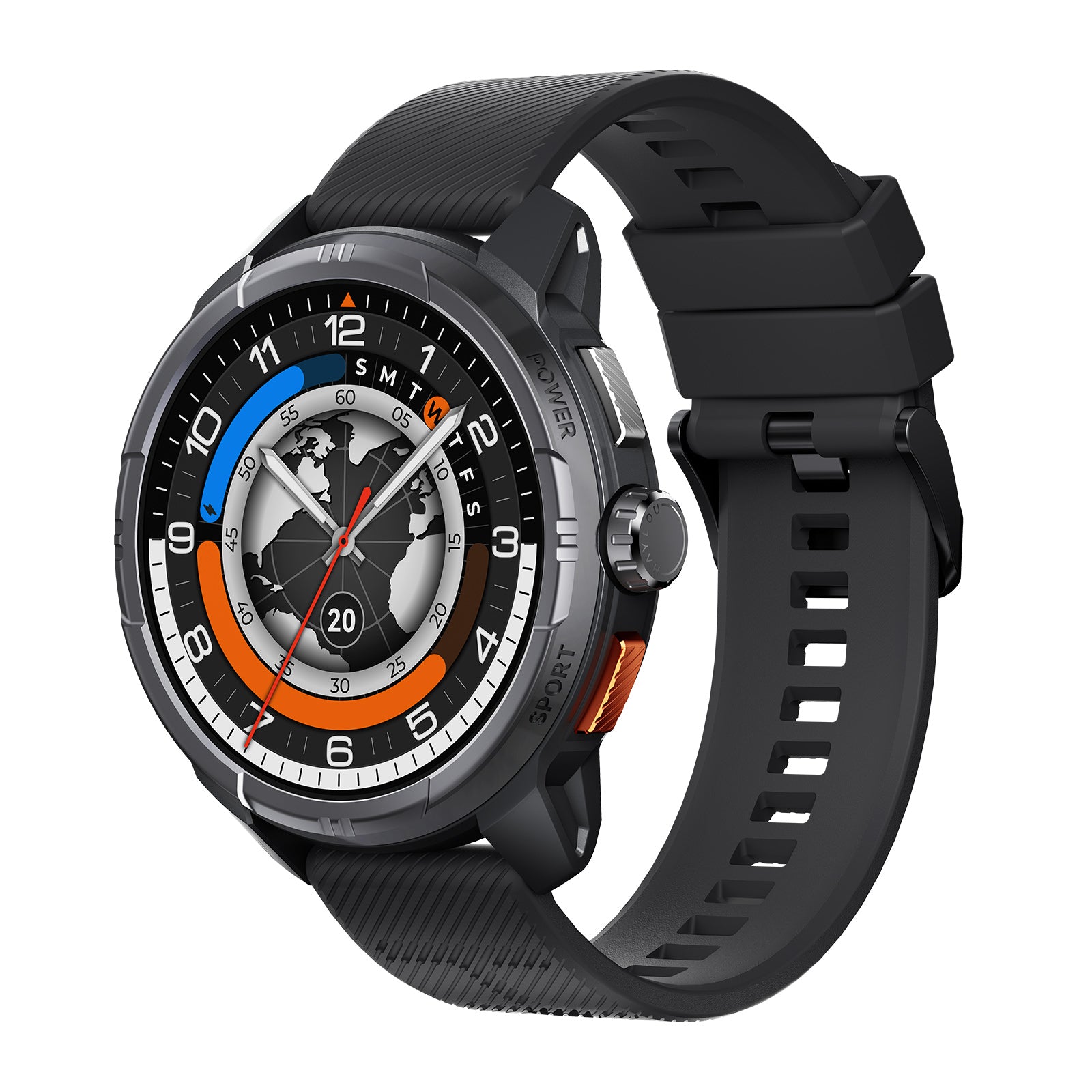
- Model: Haylou Solar Ultra GPS Smart Watch
- Display: 1.6 inch AMOLED, 480×480 resolution, 60Hz refresh
- Battery: 450mAh, rated up to 22 days in low-power mode
- Price tier: Budget-friendly, priced around $70 USD at typical retail
- Compatibility: Works with both iOS and Android through the Haylou Fun companion app over Bluetooth
Key Specifications
- 1.6 inch AMOLED display at 480×480 resolution with a 60Hz refresh rate
- Built-in GPS positioning, compass, and barometer — no phone tether required for location tracking
- 5ATM water resistance rating, suitable for swimming
- Bluetooth 5.3 with Bluetooth calling support
- Over 170 sport modes
- 450mAh battery rated for up to 22 days in long-battery mode
How It Differs From The Base Solar LS05
The standard LS05 uses a smaller, simpler display and does not include built-in GPS, relying instead on a connected phone for location data during workouts. The Solar Ultra adds standalone GPS, a sharper and larger AMOLED panel, and a noticeably more complete sport-tracking feature set, positioning it as a genuine step up rather than a simple rebrand of the same watch.
GPS Accuracy In Practice
During an outdoor run with my phone left at home, the Solar Ultra tracked a route reasonably closely against a known distance I had measured previously, landing within a few percent — solid for a budget watch, though not quite as tight as dedicated running watches from more established sports brands. Time-to-first-fix was a bit slower on cold starts, typically improving after the first outdoor use of the day.
Health And Sport Tracking
- Heart rate and blood oxygen readings updated consistently throughout the day
- Sleep tracking distinguished between light and deep sleep stages reasonably well compared to a dedicated sleep tracker I compared it against
- Stress level readings felt more like a rough indicator than a precise metric, which is typical at this price range
Battery Life
Haylou’s 22-day claim applies to a low-power, notification-focused mode with GPS and always-on display disabled. Using GPS regularly for outdoor workouts and keeping notifications active dropped that considerably in my testing, landing closer to a week and a half of typical mixed use — still solid, just far from the marketing headline figure. A detailed breakdown of real-world battery behavior under different settings is available from Techxreviews’ Solar Ultra review.
Setting Up The Solar Ultra For Outdoor Workouts
- Fully charge the watch and update firmware through the companion app before first outdoor use
- Step outside and allow the watch a minute or two to acquire GPS signal before starting a tracked activity
- Select the correct sport mode before beginning, since accuracy and metrics tracked differ between modes like running, cycling, and hiking
- Review the completed route map in the app afterward to confirm GPS tracking captured your path accurately
Display And Everyday Usability
The 480×480 AMOLED panel is sharp enough that text and workout metrics stay legible even in direct sunlight, which is not always guaranteed at this price point. The 60Hz refresh rate makes scrolling through menus and watch faces feel noticeably smoother than the laggier displays found on some older budget Haylou watches. Everyday usability — checking notifications, viewing the time, browsing widgets — felt closer to a mid-range dedicated sports watch than a typical budget smartwatch.
Comparing Solar Ultra Against The Base LS05 And RS4 Plus
- Versus the base LS05: the Solar Ultra adds built-in GPS, a sharper larger display, and considerably more sport modes, at the cost of shorter maximum battery life
- Versus the RS4 Plus: the Solar Ultra prioritizes long battery life and GPS accuracy, while the RS4 Plus prioritizes an always-on bright display for everyday glanceability
- Versus flagship sports watches from bigger brands: the Solar Ultra gets close on core GPS and health tracking basics, but lacks the depth of third-party app support and advanced training metrics found on premium alternatives
For most casual to intermediate fitness users who want real GPS without paying flagship prices, the Solar Ultra covers the fundamentals convincingly.
Build Quality And Design
The Solar Ultra’s case feels notably more premium than Haylou’s entry-level Solar LS05, with a metal-accented bezel and a more substantial strap compared to the simpler silicone band on cheaper models. This fits its positioning as the flagship of the Solar lineup rather than a budget entry point.
Who Should Buy The Solar Ultra
Runners, hikers, and cyclists who want standalone GPS without carrying a phone are the clearest target audience. Casual users who mainly want notifications and basic step tracking are better served by the more affordable base LS05, since the Solar Ultra’s price premium is mostly justified by GPS and display upgrades rather than everyday convenience features.
Final Thoughts On Value
Considering the combination of built-in GPS, a sharp AMOLED display, and genuinely long battery life in its lower-power mode, the Solar Ultra sits in a strong position among budget-friendly GPS smartwatches currently available, particularly for shoppers who have outgrown the base LS05’s simpler feature set.
One additional detail worth mentioning: the Solar Ultra’s barometer and compass add genuine value for hikers navigating unfamiliar trails, a feature set the base LS05 simply does not offer.
Troubleshooting Common Setup And Pairing Issues
- Watch won’t pair with the Haylou app: turn Bluetooth off and back on on your phone, force-close the app, and confirm location and Bluetooth permissions are granted before retrying the pairing scan.
- GPS won’t lock outdoors: stay in an open area away from tall buildings for the first minute or two; cold starts are always slower than a second use later the same day.
- Bluetooth calling drops or sounds distorted: keep the phone within about 10 meters and confirm call audio routing is set to the watch, not the phone speaker, in the companion app’s call settings.
- Firmware update stuck or fails partway: keep the watch above 50 percent charge and connect the phone to WiFi rather than mobile data before starting the update, then retry if it stalls.
If the app refuses to detect the watch at all, a manual reset — holding the power button for roughly 10 seconds — followed by removing and re-adding the Bluetooth pairing from your phone’s system Bluetooth settings, not just inside the app, resolves most stubborn pairing failures.
Frequently Asked Questions
Does the Solar Ultra need a phone connected to track GPS routes?
No, GPS is built directly into the watch, so it can log a route independently, though a connected phone still improves notification features.
Is the Solar Ultra the same as the base LS05 Solar?
No, it is a distinct, higher-tier model with built-in GPS, a larger sharper display, and a more complete sport-tracking feature set.
Can I make phone calls directly from the watch?
Yes, Bluetooth calling is supported when the watch is paired with a nearby phone.
Conclusion
The Haylou Solar Ultra earns its “Ultra” branding by genuinely upgrading over the base Solar LS05 — built-in GPS, a sharper display, and deeper sport tracking make it a sensible choice for anyone who takes outdoor workouts seriously but does not want to spend flagship smartwatch money.
My approach is simple: use the device the way a normal person would, then write down what actually happened.
\n