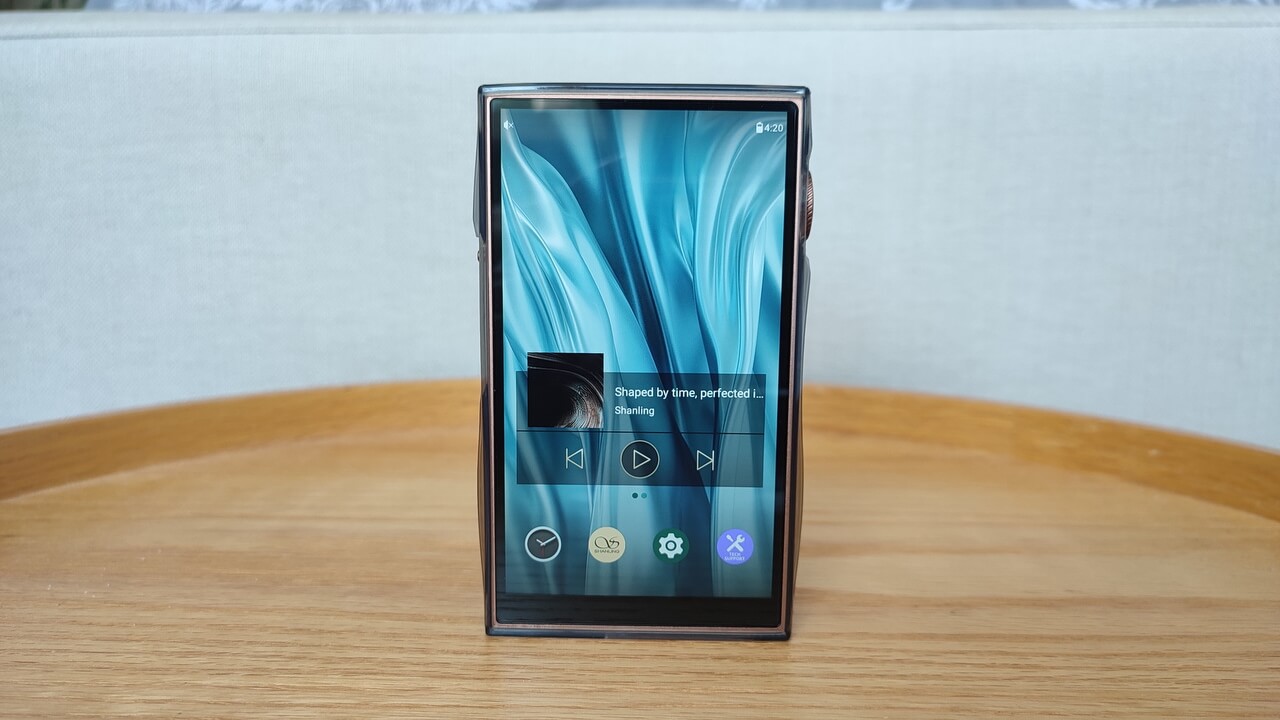
The Shanling M3 Plus is the successor to the M3 Ultra, and after spending time with it as my main portable player for a couple of weeks, I think it is one of the more well-rounded mid-range DAPs Shanling has put out. It sits at a price where it has to compete with a lot of Android-based players from other brands, and mostly it holds its own.
| Quick Facts: Shanling M3 Plus | |
|---|---|
| Brand | Shanling |
| Model | M3 Plus (successor to the M3 Ultra) |
| DAC configuration | Quad Cirrus Logic CS43198 |
| Balanced output power | Up to 800mW at 32 ohms (4.4mm) |
| Display | 4.7-inch Sharp touchscreen, 1280×720 |
| Software | Android 13 with Google Play access, AGLO lossless mode |
| Weight / dimensions | 205g, 115 x 70 x 18mm |
The M3 Plus uses four Cirrus Logic CS43198 chips in a quad-DAC arrangement, capable of decoding up to 32-bit/768kHz PCM and native DSD512. That is a meaningful step up in raw spec terms from the dual-DAC setup in the outgoing M3 Ultra, though whether you can hear the difference depends heavily on your source files and headphones.
Balanced output through the 4.4mm jack reaches up to 800mW at 32 ohms, which is enough to drive most planar magnetic headphones to reasonable volume, though very demanding full-size cans will still want a dedicated desktop amp. Single-ended output through 3.5mm is more modest, as expected.
A 4.7-inch Sharp touchscreen at 1280×720 runs the show, and the M3 Plus ships with Android 13 with full Google Play access alongside Shanling’s AGLO lossless output mode, which bypasses the standard Android audio path to avoid resampling when using supported streaming apps.
At 205 grams and 115 by 70 by 18mm, it sits comfortably in the middle ground between a dedicated small player and a full-size Android DAP. It is pocketable in a jacket but noticeably present in tighter jeans pockets.
How It Actually Sounds
My first impression putting it up against a previous-generation player I had on hand was that the M3 Plus leans slightly warm without being muddy. Bass has good body, the midrange is present without being pushed forward aggressively, and treble extends well without turning harsh on brighter recordings. It is not a clinically neutral sound signature, but it is not a heavily colored one either, which makes it a fairly safe pairing with a wide range of IEMs and headphones.
Switching between a warm-leaning IEM and a more analytical one, the M3 Plus adapted well in both cases rather than exaggerating either character. That flexibility is one of the more useful things about a DAP at this level, since most people are not buying just one pair of headphones to use with it forever.
Living With Android on a DAP
Full Android access is a mixed blessing on any dedicated music player. On the plus side, you get real access to streaming apps like Spotify, Tidal, and Qobuz without sideloading tricks, and the AGLO mode genuinely helps keep those apps sounding closer to how they should rather than getting mangled by Android’s internal resampling. On the downside, it is still Android on a small screen with SoC hardware built for audio rather than gaming, so app switching and background processes can occasionally introduce a stutter that a more locked-down player would not have.
- Full Google Play Store access out of the box
- AGLO mode preserves bit-perfect output from supported streaming apps
- 4.7-inch screen makes browsing large libraries genuinely comfortable
- Occasional background app behavior can interrupt playback if you have a lot installed
For a deeper technical breakdown of the DAC implementation, Headfonics’ review goes into more measurement detail than I have room for here.
Battery and Charging
Battery life landed around a full day of moderate use for me, mixing local FLAC playback with some streaming over Wi-Fi, though heavy balanced-output listening will bring that down faster. USB-C charging is reasonably quick, and the player also supports USB DAC mode for use with a laptop, which is a nice bonus if you want one device to cover both portable and desktop duty.
A Real-World Test: Airport Layover Listening
The most telling session I had with the M3 Plus was a long airport layover where I switched between a noise-heavy planar IEM and a warmer dynamic-driver set over the course of a few hours, mixing local FLAC files with Tidal streaming over the terminal’s spotty Wi-Fi. The AGLO mode kept streamed tracks sounding consistent with local playback rather than the slightly flattened quality Android sometimes introduces when an app’s audio gets pushed through the standard system mixer. Battery held up for the entire layover plus most of the following flight, which lines up with Shanling’s stated endurance figures closely enough that I would trust them for planning a trip.
The one hiccup was a brief app crash when switching quickly between three different music apps in succession, which required a soft restart of just that app rather than the whole player. It was a minor annoyance rather than a dealbreaker, but it is the kind of thing worth expecting occasionally on any Android-based DAP, regardless of brand.
Common Setup Problems and Fixes
A few issues come up repeatedly with the M3 Plus, most of them tied to it running full Android rather than a locked-down firmware. Here is what has worked for me and what I have seen reported elsewhere:
- Problem: A streaming app sounds flat or resampled even with AGLO enabled. Fix: confirm AGLO is toggled on specifically for that app in the settings menu, since it is applied per-app rather than system-wide, and not every app is supported.
- Problem: The player stutters when switching quickly between apps. Fix: close unused background apps from the recent-apps menu; the SoC is tuned for audio playback rather than heavy multitasking, so a cluttered background app list is the usual culprit.
- Problem: USB DAC mode is not recognized by a laptop. Fix: use a data-capable USB-C cable rather than a charge-only one, and select USB DAC mode manually from the player’s settings before connecting.
- Problem: Balanced output sounds unexpectedly quiet with high-impedance headphones. Fix: check that the volume limit setting has not been capped in the system audio settings, which some units ship with enabled by default.
- Problem: Battery drains faster than expected. Fix: heavy balanced-output listening and constant Wi-Fi streaming both pull noticeably more power than local FLAC playback over single-ended output, so battery life will vary a lot depending on how you use it day to day.
Frequently Asked Questions
Is the M3 Plus a good choice for streaming services like Spotify or Tidal?
Yes, since it runs full Android with Play Store access, and Shanling’s AGLO mode helps preserve audio quality from supported apps rather than letting Android’s standard mixer downsample everything.
Can the M3 Plus drive planar magnetic headphones properly?
For most planar IEMs and lighter planar headphones, yes, the 800mW balanced output has enough headroom. Power-hungry full-size planar headphones will still benefit from a dedicated desktop amp.
How does it compare to the older M3 Ultra?
The M3 Plus moves to a quad-DAC design and Android 13, offering more output power and a more current software base, making it the more future-proof choice between the two if you are buying new.
Conclusion
The Shanling M3 Plus is a genuinely solid mid-range Android DAP: a flexible, slightly warm sound signature, real streaming app support, and enough output power for the vast majority of headphones people actually pair with a player like this. It is not without the usual quirks of running Android on dedicated audio hardware, but those are minor next to what it gets right.
Review based on roughly three weeks of daily use switching between local FLAC files and Tidal streaming. I hold a computer science degree and have reviewed portable audio hardware for several years.