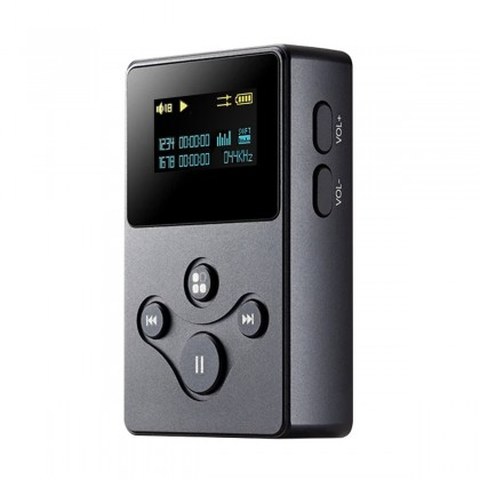
The X2s is xDuoo’s compact, text-menu-driven digital audio player, a refresh of the original X2 with a small single 3.5mm output and deliberately simple controls. Even though it is one of the brand’s more basic players, xDuoo has continued to release firmware updates for it, most notably a version that added USB DAC functionality, letting the X2s double as a USB dongle DAC for a computer in addition to its role as a standalone player.
| Spec | Detail |
|---|---|
| Output | Single 3.5mm headphone output |
| Decoding | DSD128 native support |
| Firmware feature | USB DAC operating mode added via update, doubling as a USB sound card |
| Price tier | Entry-level, budget DAP segment |
| Compatibility | microSD up to 128GB officially supported; USB-C for charging, data, and USB DAC mode |
What Firmware 1.3 Added
The most notable X2s firmware release added a USB DAC operating mode, meaning the player can accept a digital audio stream over USB from a computer and output it through its own headphone jack, effectively functioning as an external sound card in addition to playing files from its own storage. That same update also refreshed the Russian language library included in the menu system, a smaller but still notable fix for international owners.
Before Updating
- Check the current firmware version shown in the X2s system settings menu
- Confirm your microSD card is formatted in FAT32, since some update failures trace back to file system mismatches
- Keep the player charged or connected to power throughout the process
- Download the firmware file only from xDuoo’s official resources page or a verified regional distributor
Step-by-Step Update Process
- Download the correct X2s firmware file, typically distributed as an HEX file named for the model.
- Place the firmware file in the root directory of the X2s’s TF (microSD) card, not inside any subfolder.
- Insert the card into the player if it is not already inserted.
- Enter System Settings on the device and select the Auto Upgrade option.
- Confirm when prompted; the player will read the file, flash the new firmware, and restart automatically.
- After the restart, return to System Settings to confirm the version number now matches the update you installed.
Common Issues During the Process
If the auto upgrade option does not detect the firmware file, the most frequent cause is the file sitting inside a folder rather than directly on the card’s root, or the card itself being formatted in exFAT rather than FAT32. If the player restarts but still shows the old version number, try re-copying the firmware file after reformatting the card, since a partial or corrupted copy during transfer is another common culprit reported in community discussions such as those on the HifiGuides forum.
How the X2s Fits Into xDuoo’s Broader Lineup
The X2s occupies the true entry point of xDuoo’s player range, positioned below the metal-bodied X3ii and well below the touchscreen-driven DP-10 transport. Its appeal has always been simplicity and a low price rather than chasing flagship specifications, which makes it a common recommendation for anyone stepping into dedicated audio players for the first time, or as a lightweight secondary player for situations where a larger, more expensive DAP feels like overkill, such as short runs or gym sessions.
What to Expect From the Text-Only Display
Unlike the Nano D3 or the DP-10, the X2s uses a small, low-resolution text display rather than a graphical interface, showing basic playback information like track name, elapsed time, and battery level. This keeps the unit’s cost down and its battery life comparatively strong, since driving a full color screen is one of the bigger power draws in any portable device. If you are coming from a smartphone-style DAP, the adjustment period is short, and most owners report barely noticing the simpler display after the first few days of regular use.
Why the X2s Is Worth Keeping Updated
Given how simple and inexpensive the X2s is, it would be easy to assume firmware updates are not worth the effort. In practice, the USB DAC addition is a genuinely useful feature for anyone who occasionally wants to use the player as a lightweight external sound card for a laptop, particularly in situations where carrying a separate dongle DAC feels unnecessary. Since the X2s already sits in your bag as a dedicated player, unlocking a second use case through a firmware update rather than buying an additional device is a rare case where an update meaningfully expands what a budget device can do rather than just patching bugs.
What to Do if the Screen Freezes Mid-Update
Occasionally a screen freeze during the update process can look alarming, especially since the X2s has a minimal text-only display that offers little feedback. Give the process a few extra minutes beyond what you expect before assuming it has failed, since flashing time can vary depending on card speed. If the screen remains frozen well past a reasonable window, a forced restart by holding the power button is generally safe to attempt, after which you can check the firmware version to confirm whether the update actually completed before it appeared to freeze.
Troubleshooting Quick Reference
- Firmware file not detected during Auto Upgrade: confirm it sits directly in the card’s root folder (not a subfolder) and that the card is formatted FAT32, not exFAT.
- Version number does not change after restart: reformat the card and re-copy the firmware file fresh, since a partial or corrupted copy during transfer is a common cause.
- Screen freezes mid-update: wait a few extra minutes before assuming failure, and if it stays frozen well past a reasonable window, hold the power button for a forced restart.
- Alternate manual path: if Auto Upgrade will not trigger at all, try a different microSD card entirely, since some update failures trace back to a specific card rather than the firmware file itself.
FAQ
Does the X2s support DSD playback after this firmware update?
Yes, DSD128 support is present on the X2s independent of the USB DAC firmware addition, which is a separate feature focused on the USB input mode.
Can I revert to the older firmware if I do not like the change?
If xDuoo still hosts the earlier firmware file, the same card-based process can be used to reinstall it, though the USB DAC feature would no longer be available.
Will updating erase music stored on my microSD card?
The update process is generally focused on the system firmware rather than your music files, but backing up your card before any firmware update is still good practice.
My player will not turn on after a failed update, what now?
Try holding the power button for an extended period to force a restart, and if that fails, consult xDuoo’s support contact for recovery guidance specific to the X2s.
Is the USB DAC mode automatically active after updating?
You will typically need to select USB DAC mode manually from the system menu after connecting the player to a computer via USB.
Does the X2s support microSD cards larger than 128GB?
Officially it supports up to 128GB, so if you rely on a much larger card for a sizable lossless library, double check your specific card’s compatibility before assuming full capacity will be recognized.
Small, no-frills players like the X2s do not get updated often, so when xDuoo does push a firmware release for one, I think it is worth documenting clearly.