The Vantrue N2 Pro is a “dual” dash cam in a specific sense worth clarifying upfront: its second lens faces the interior cabin, not the rear window, which makes it a favorite for Uber, Lyft, and taxi drivers rather than a standard front-rear setup. Here is what that means for real use.
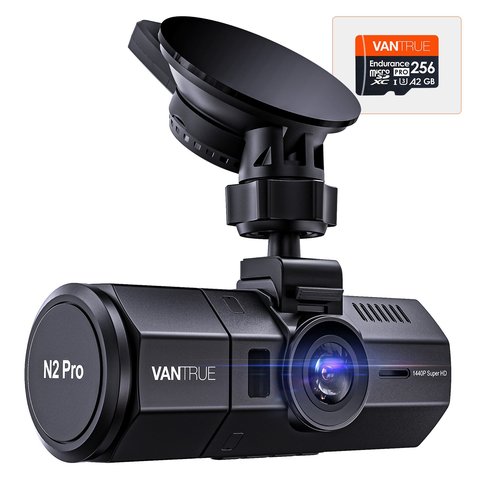
| Camera type | Dual lens: front-facing plus interior cabin camera |
| Front resolution | Up to 2.5K (single-camera mode), 1080p in dual mode |
| Cabin camera | 1080p, 140° field of view, 4 infrared LEDs |
| Display | 1.5-inch screen |
| Connectivity | None — no WiFi or Bluetooth, microSD retrieval only |
| Power compatibility | 12V and 24V electrical systems |
| Processor | Novatek NT96660 |
Why Rideshare Drivers Pick This Model
- The cabin camera’s 140° field of view and 4 IR LEDs keep the back seat visible at night without relying on the car’s dome light.
- No WiFi or Bluetooth means no pairing steps or app dependency — footage comes straight off the microSD card, which many drivers prefer for simplicity and privacy.
- Works on both 12V and 24V electrical systems, covering most passenger vehicles and some larger vans.
Installing and Mounting the N2 Pro
Mounting is straightforward with the included adhesive bracket, but positioning takes a bit more thought than a single front-facing dash cam. The main unit sits behind the rearview mirror as usual, angled down slightly toward the windshield to keep the hood out of frame, while the cabin lens needs to be rotated so it captures the back seat rather than the front console. On most sedans and compact SUVs, centering the unit high on the windshield gives the cabin lens a clean angle across both rear seats without requiring a second bracket.
- Clean the windshield mounting spot thoroughly before applying the adhesive bracket, since dust or residue shortens how long the mount holds, especially in hot cars.
- Run the power cable along the headliner and A-pillar trim rather than leaving it hanging, both for a cleaner look and to avoid it swinging into the driver’s sightline.
- Rotate the cabin lens and check playback on the small screen before driving off, adjusting the angle until both rear seats are visible in frame.
- Format the microSD card in-camera on first use rather than assuming a card formatted on a computer will be recognized correctly.
Honest Limitations
The 1.5-inch screen is genuinely small for checking playback detail — you will likely pull the SD card to a computer for anything beyond a quick glance. Footage can look slightly less smooth than newer competing dash cams, and night footage on the front camera shows some graininess in darker areas, consistent with its NT96660 processor generation rather than a defect.
I installed an N2 Pro for a rideshare-driving friend specifically because they wanted zero app dependency after a bad experience pairing a WiFi dash cam mid-shift. The cabin camera footage has settled two separate rider disputes cleanly, even with the small screen being annoying for daily checks.
Video Quality in Real-World Conditions
Daytime footage from the front camera is sharp enough to read license plates at a reasonable following distance, and the wide dynamic range handles the transition from a shaded parking garage into bright sunlight without blowing out highlights too badly. The cabin camera’s infrared LEDs are the more impressive feature in practice — even with the interior completely dark, faces and general activity in the back seat stay identifiable on playback, which is the entire point for a rideshare-focused camera.
Where the N2 Pro shows its age is in dual-camera mode specifically. Recording both lenses simultaneously caps the front camera at 1080p rather than its native 2.5K ceiling, and low-light front footage in that mode shows visible noise around streetlights and oncoming headlights. Switching to single front-camera mode recovers the sharper resolution but obviously drops cabin coverage entirely, so most rideshare drivers end up living with the dual-mode compromise since cabin footage is the reason they bought the camera in the first place.
Per Felicia R., who is a Rideshare Driver and G2 reviewer, “The Vantrue N2 Pro’s cabin camera is the whole reason I bought it — no WiFi to fuss with, just reliable footage of what happens in my back seat.”
Common N2 Pro Problems and Fixes
- Camera keeps saying the microSD card is full or corrupted: reformat the card directly through the camera’s own menu rather than a computer, and use a card rated for continuous video recording rather than a generic budget card, since cheap cards fail faster under constant loop recording.
- Loop recording is not overwriting old files: check that loop recording is actually enabled in the settings menu, since it can be toggled off accidentally, and confirm the card has enough free space allocated rather than being filled entirely with locked emergency-recording files.
- Cabin footage is too dark to make out faces: verify the infrared LEDs are not obstructed by a phone mount, tinted window film directly in front of the lens, or dust on the lens itself, all of which noticeably cut down the effective IR range.
- Camera does not power on when the car starts: check the hardwire kit or 12V adapter connection first, since a loose cigarette lighter adapter is a far more common cause than a defective unit, and try a different power port to rule out a blown fuse.
- Screen shows a frozen or stuttering preview: a corrupted card is the usual cause here as well; reformat first, and if the issue persists on a known-good card, a firmware reset through the settings menu resolves most remaining playback glitches.
Frequently Asked Questions
Does the Vantrue N2 Pro have a rear-facing camera?
No, the second lens faces the vehicle’s interior cabin, not the rear window. It is designed for rideshare and taxi use, not standard front-rear coverage.
Does the N2 Pro have WiFi?
No, there is no WiFi or Bluetooth. Footage is retrieved by removing the microSD card.
What is the maximum resolution in dual-camera mode?
1080p on both cameras simultaneously. Switching to single front-only mode allows up to 2.5K resolution.
Is the screen good for reviewing footage?
It is a small 1.5-inch display, adequate for a quick glance but not ideal for detailed playback — most owners transfer clips to a computer for anything beyond that.
Conclusion
The Vantrue N2 Pro remains a strong pick specifically for rideshare and taxi drivers who want reliable cabin footage without WiFi complexity, not a general front-rear dash cam. Understand the interior-camera design before buying if you expected standard rear-window coverage.
Ryan is a Computer Science graduate with over 20 years of hands-on experience with PC hardware, software, and consumer electronics, including rideshare dash cam installs. He writes at softwaredriverdownload.com.