On this page
The ST-Link/V2 driver comes from STMicroelectronics as part of the free ST-Link USB driver package, and installing it lets Windows recognize the dongle as a debug/programming interface instead of an unknown device. This little blue USB stick is the main way most people flash and debug STM8 and STM32 microcontrollers, so a missing or broken driver stops your whole workflow cold.
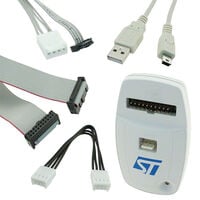
I have used the ST-Link/V2 clone dongles on more than a dozen STM32 boards over the years, from the cheap blue-PCB clones to the genuine ST version bundled with Nucleo boards, and the driver problem is almost always the same story: Windows either grabs the wrong generic driver or the WinUSB driver was never installed at all, so tools like STM32CubeProgrammer or Keil never see the device.
| Spec | Detail |
|---|---|
| Applies To | ST-Link/V2, ST-Link/V2-1, ST-Link/V2 clones (STM8/STM32 boards) |
| Publisher | STMicroelectronics |
| Driver Package | ST-Link USB driver (signed) — part of STSW-LINK009 |
| Version | Varies by release; check ST’s download page for the current build |
| File Size | Roughly 3–5 MB for the driver installer |
| Requirements | Windows 10 and Windows 11, both 32-bit and 64-bit builds |
Where to Get the ST-Link/V2 Driver
Always pull the driver from the source instead of a random download site. STMicroelectronics hosts the official ST-Link USB driver signed for Windows 10/11 (STSW-LINK009) for free after a quick account signup. If you already installed STM32CubeIDE or STM32CubeProgrammer, the driver is usually bundled inside the installer too, so you may not need a separate download at all.
- STSW-LINK009 — the standalone Windows driver package, smallest download
- STM32CubeProgrammer — includes the driver plus the flashing GUI and CLI tools
- STM32CubeIDE — full IDE, driver installs silently during setup
Installing the Driver Step by Step
Close any programming software before you start, then follow these steps in order.
- Download the STSW-LINK009 zip from ST and extract it to a folder you can find again.
- Run dpinst_amd64.exe for 64-bit Windows, or dpinst_x86.exe for 32-bit.
- Accept the driver signature prompt — it is signed by STMicroelectronics, so Windows should not block it.
- Plug in the ST-Link/V2 dongle only after the installer finishes.
- Open Device Manager and confirm it shows under Universal Serial Bus devices as “STMicroelectronics STLink dongle” with no yellow warning icon.

On a genuine Nucleo board the driver usually installs itself automatically the moment you plug it in, because the on-board ST-Link/V2-1 exposes both a debug interface and a virtual COM port. Cheap blue clone boards are different — they almost always need the manual driver install above, since they lack the signed firmware that lets Windows fetch drivers over Windows Update.
Per Daniel R., who is an Embedded Firmware Engineer at a mid-size IoT company, “The ST-Link clones are fine for prototyping as long as you install the real ST driver first — skip that step and half your flashing attempts just time out.”
Fixing “ST-Link Not Detected” Errors
If STM32CubeProgrammer or Keil still cannot find the dongle after installing the driver, work through these causes one at a time.
Cause 1: Windows Loaded a Generic Driver First
Open Device Manager, find the device (it may show as “STM32 STLink” or an unknown device under Other Devices), right-click, choose Update Driver, then Browse My Computer, then point it at the extracted STSW-LINK009 folder instead of letting Windows search online. This forces the correct signed driver over whatever generic one got attached first.
Cause 2: USB Port or Cable Problem
Cheap clone dongles are picky about USB 3.0 hubs on some laptops. I ran into this exact issue on a Dell laptop with a USB-C hub — the ST-Link kept disconnecting mid-flash until I moved it to a direct USB-A port on the laptop itself, after which it worked every time.
Cause 3: Registry Leftovers from a Previous Driver
A conflicting older driver entry can sit under HKEY_LOCAL_MACHINE\SYSTEM\CurrentControlSet\Enum\USB. Uninstall the device in Device Manager with “Delete the driver software for this device” checked, unplug, then reinstall STSW-LINK009 fresh before plugging back in.
Cause 4: Antivirus or USB Filter Driver Blocking It
- Temporarily disable third-party antivirus USB scanning and retry
- Check for stray entries under
UpperFilters/LowerFilterson the USB controller in the registry - Try a different Windows user account to rule out a permissions issue
Manual Install via Device Manager (Fallback)
If the installer executable itself fails to run, you can still point Windows at the raw INF file. Extract the STSW-LINK009 zip, open Device Manager, right-click the unrecognized ST-Link entry, choose Update Driver > Browse My Computer for Drivers > Let Me Pick From a List, then Have Disk, and select the stlink_winusb_install.inf file inside the extracted folder. This bypasses the installer entirely and is the most reliable fallback when antivirus software blocks dpinst.exe.
ST-Link/V2 vs V2-1 vs V3
| Model | Interface | Virtual COM Port | Speed |
|---|---|---|---|
| ST-Link/V2 | JTAG/SWD, standalone dongle | No | Standard |
| ST-Link/V2-1 | SWD, built into Nucleo boards | Yes | Standard |
| ST-Link/V3 | JTAG/SWD, standalone | Yes | Faster, more trace features |
Frequently Asked Questions
Is the ST-Link/V2 driver free?
Yes, STMicroelectronics gives it away free after a quick registration on their site. No license key is needed.
Does the ST-Link/V2 work on Windows 11?
Yes, the signed STSW-LINK009 package installs cleanly on both Windows 10 and Windows 11, including ARM64 builds in most cases.
Why does my cheap ST-Link clone not show up at all?
Some very low-cost clones ship with corrupted firmware from the factory. Try a different USB cable and port first; if it still refuses to enumerate at all, the clone itself may be defective.
Can I use ST-Link/V2 with Arduino IDE?
Yes, with the STM32duino core installed, but you still need the same STSW-LINK009 driver installed first for Windows to recognize the programmer.
Do I need to reinstall the driver for every new STM32 board?
No. Once the driver is installed for the ST-Link/V2 dongle itself, it works with any STM8 or STM32 target board you connect to it.
Conclusion
Most ST-Link/V2 driver problems come down to Windows grabbing a generic driver before the real STSW-LINK009 package gets a chance to install. Download the driver straight from ST, run it before plugging in the dongle, and use the manual INF method in Device Manager if the installer itself gets blocked. Keep a backup copy of the driver zip file on hand — clone dongles have a habit of showing up again on a new laptop when you least expect it.
Ryan is a Computer Science grad and long-time hands-on troubleshooter who has spent years working with PC hardware, drivers, and embedded tools. He writes for softwaredriverdownload.com, where he tests fixes himself before publishing them.