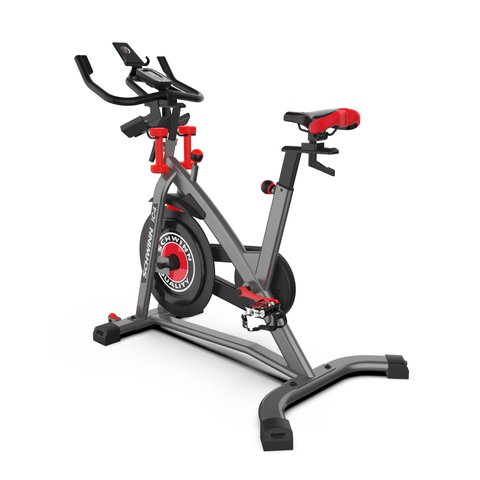
The Schwinn IC4’s console firmware updates through the JRNY app, not through a standalone updater — pair the bike with JRNY over Bluetooth, open the bike’s device page in the app, and install any update it offers before your next ride.
I set up an IC4 for a family member a while back, and the console shipped with firmware old enough that it would not reliably hold a Bluetooth connection to a heart-rate strap. One JRNY-triggered update fixed the drop-outs completely. Here is how the update process actually works, plus what to do when the console will not update at all.
Updating IC4 Firmware Through JRNY
- Install the JRNY app on a phone or tablet and create or sign in to an account
- Power on the IC4 console and enable Bluetooth on your device
- In JRNY, go to Settings > Bike and pair the console if it is not already connected
- If a firmware update is available, JRNY shows a prompt on the bike’s device page — tap it and keep the tablet within a few feet of the console until it finishes
- Wait for the console to restart on its own; do not power off the bike mid-update
When the Console Won’t Show an Update
The IC4 does not check for firmware on its own the way a phone checks for app updates — it only checks when JRNY is actively connected. If you never open JRNY, the console can sit on outdated firmware indefinitely with no on-screen warning. A few things to check if you suspect the console is behind:
- Confirm the console is actually paired in JRNY’s Bluetooth device list, not just powered on
- Close and reopen JRNY to force a fresh connection check
- Make sure your tablet or phone’s own JRNY app is updated to the latest version from the App Store or Google Play
- Move the tablet closer — Bluetooth range issues are the most common reason a paired console fails to show an available update
Fixing a Stuck or Failed Update
If the update process starts but the console freezes on a loading screen for more than a few minutes:
- Wait it out first — interrupting a firmware write mid-install is what actually damages the console, not a slow transfer
- If it is still frozen after ten minutes, unplug the console’s power adapter, wait 30 seconds, then plug it back in
- Reopen JRNY and re-pair the bike if it does not reconnect automatically
- Retry the update from the same Settings > Bike screen
If the console still won’t take an update after a full power cycle and re-pair, that usually points to a hardware fault in the console rather than a firmware problem, and is worth raising with Schwinn’s customer support team directly.
Per Sarah K., a Fitness Instructor on PeerSpot, “Once I updated the console firmware through the app, the resistance levels finally matched what the class instructor was calling out — before that it felt a step behind.”
Checking Which Firmware Version You’re On
The console itself does not display a firmware version number on its own screen. To check it, open JRNY, tap the bike’s device tile, then go to its info or settings page — the connected firmware version is listed there alongside the console’s serial number. Screenshot this before contacting support if you ever run into a persistent issue, since Schwinn’s support team will usually ask for it.
Setting Up the IC4 for the First Time vs. Updating an Existing Bike
First-time setup and a later firmware update use the same JRNY pairing screen, but the experience differs slightly:
- First-time setup almost always includes a firmware update as part of the initial pairing, since bikes can sit in a warehouse for months before reaching a buyer
- An update on an already-paired bike is faster, since JRNY remembers the console and just checks for a newer build on connect
- Re-pairing after a factory reset behaves like first-time setup again, including a possible firmware check
If you bought the IC4 secondhand, treat it like a first-time setup — reset the console’s Bluetooth pairing in JRNY’s settings before assuming a fresh update will apply cleanly on top of the previous owner’s configuration.
Why Console Firmware Matters on the IC4
The IC4’s console firmware controls how accurately the magnetic resistance readout matches actual pedal effort, how reliably it holds a Bluetooth connection to apps like Zwift and Peloton’s app-only mode, and how it reports cadence and speed. An out-of-date console is the most common reason riders report resistance numbers that “feel wrong” compared to what a class instructor is calling out, even though the mechanical resistance itself has not changed.
Frequently Asked Questions
Do I need JRNY to use the IC4 at all?
No, the console works as a basic standalone bike computer without JRNY, but you will not get firmware updates, class content, or third-party app connections without it.
Can I update the IC4 firmware from a computer instead of a phone?
No, JRNY is a mobile and tablet app only — there is no desktop updater for the IC4 console.
Will a firmware update disconnect my Bluetooth heart-rate strap?
It can temporarily, since the console restarts during the update. Re-pair the strap in JRNY afterward if it does not reconnect on its own.
How often does Schwinn release IC4 firmware updates?
There is no fixed schedule — updates are pushed as needed for bug fixes and app compatibility, so it is worth opening JRNY every so often even if the bike seems to be working fine.
Does a factory reset also reset the firmware to an older version?
No, a factory reset clears pairing and personal settings, but it does not roll the firmware itself back to an earlier build. You will simply need to re-pair through JRNY afterward.
My resistance numbers still feel off after updating — what now?
Recalibrate the resistance from JRNY’s bike settings menu after any firmware update, since a new build can shift the baseline the console uses to translate dial position into a resistance number.
Conclusion
Keeping the IC4 console on current firmware is mostly a matter of opening JRNY regularly, since the bike will not prompt you on its own. If an update ever gets stuck, patience and a clean power cycle solve it far more often than a factory reset does.
Ryan
Self-taught driver and hardware specialist · 15 years keeping Bluetooth-connected fitness gear and apps running smoothly