Before writing this, I want to clear up a mix-up that shows up a lot in searches: the RAVPower RP-WD03 is not a wireless charging pad. It is a small portable WiFi router with a built-in 6,700mAh power bank, and I mention that up front because I almost bought the wrong device myself before double-checking the actual product listing against the manual.
Once I understood what it actually was, it turned out to be a handy piece of gear for a specific problem: sharing one wired or hotel internet connection across several devices while also keeping a phone charged. Here is what setup and daily use actually look like.
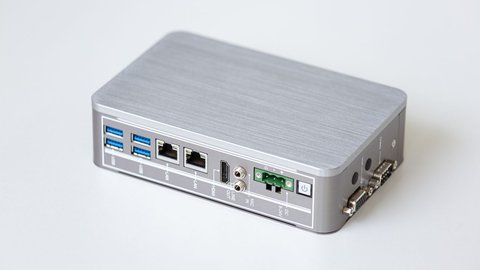
What the RP-WD03 Actually Is
Strip away the marketing name and the RP-WD03 is two devices in one small shell:
- A portable wireless router supporting Router, AP (access point) and Bridge modes
- A 6,000 to 6,700mAh power bank (listings vary slightly on the exact number) with a standard USB output at 5V/1A
The power bank output is on the slower side by today’s standards, 1A is enough to charge a phone but noticeably slower than the 2A-plus fast charging most phones support now. Treat the charging feature as a helpful backup rather than the main reason to buy this device.
Setting Up the Three Modes
The router side is genuinely the useful part, and it covers three common travel and home situations. Setup for each mode differs slightly:
Router Mode
- Connect an Ethernet cable from a DSL or cable modem into the RP-WD03’s WAN port.
- Power on the device and wait for the WiFi light to turn solid.
- Connect to its wireless network from your phone or laptop using the default password on the underside label.
- Open the local dashboard in a browser to confirm the internet connection is active.
AP Mode
This converts a wired Ethernet connection into a WiFi signal without doing any of the router-level configuration, useful in a hotel room that only has a wired jack and no WiFi at all.
Bridge Mode
This extends or shares an existing WiFi network rather than requiring a wired connection, handy when a hotel’s WiFi login only allows one device per room but you have three devices that need internet.

Using the Power Bank Feature
The power bank works independently of the router functions, you do not need WiFi active to use it purely as a backup charger. That said, running the router radio while also charging a phone drains the internal battery noticeably faster than either function alone.
A few practical notes from regular use:
- Expect roughly one partial phone charge from a full battery if the router is also active.
- Turn off the wireless radio in the dashboard if you only need the charging function that day.
- A full recharge of the RP-WD03 itself takes a few hours on a standard USB charger.
Sharing Files From Attached Storage
Like other devices in RAVPower’s FileHub lineup, the RP-WD03 can share files from a connected USB drive or SD card across its wireless network, letting multiple devices browse and stream media without needing internet access at all. It is a slower feature than a dedicated NAS, but useful in a pinch for sharing vacation photos between a few phones without emailing files back and forth.
Troubleshooting Common Problems
- Cannot reach the setup dashboard: forget the WiFi network on your device and reconnect, then reload the local address.
- No internet in Bridge mode: confirm you selected the correct source network and re-entered its password correctly during setup, a common cause of silent failures.
- Charging is very slow: this is expected behavior given the 1A output, use a different power source if you need a fast charge.
- Device will not power on: hold the power button for a longer press than usual, some units need three to five seconds rather than a quick tap.
The RP-WD03 advanced user’s manual covers the full menu structure of the dashboard in more depth than the quick-start card in the box, and RAVPower’s support page is the place to check for firmware updates by model number.
Who This Device Actually Suits
After using it across a few short trips, I settled on a fairly narrow but genuinely useful role for the RP-WD03: back-of-the-bag emergency gear for older hotels and rental properties with a single wired jack and no visible router in the room. It is not something I would recommend buying purely as a power bank, the 1A output is too slow next to a dedicated charger costing about the same, and it is not something I would buy purely as a home router either, since a proper mesh system covers that job far better indoors.
Where it earns its place is the overlap of both needs happening at once, away from home, with unpredictable connectivity, and a phone that occasionally needs a boost while you sort out the WiFi situation. Judged against that specific use case rather than as a general-purpose gadget, it does its job without much fuss.
Frequently Asked Questions
Is the RP-WD03 a wireless charging pad?
No. Despite how it sometimes gets searched, it is a portable WiFi router with a wired USB power bank built in, not a Qi wireless charger. Devices need a USB cable to charge from it.
Does it need a SIM card for internet?
No, it does not have cellular capability. It shares an existing wired or wireless connection rather than creating a new cellular one.
How many devices can connect to it at once?
Typical use supports around five connected devices sharing the same network, similar to other travel routers in this class.
Can I use the power bank feature and the router feature separately?
Yes, they operate independently. You can charge a phone without WiFi active, or run the router without ever using the charging port.
Conclusion
Once the naming confusion is out of the way, the RP-WD03 is a genuinely practical two-in-one gadget for anyone who deals with awkward hotel WiFi setups or wants a wired connection turned into WiFi for a couple of devices. Just do not buy it expecting a Qi wireless charging pad, that part of the name refers to the wireless network it broadcasts, not how it charges your phone.
Written by Priya, a network support specialist based in the US who spends a fair amount of time explaining the difference between “wireless router” and “wireless charger” to confused customers.