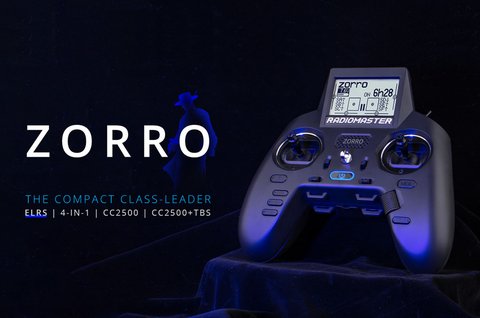
The RadioMaster Zorro is a compact, ergonomic handheld transmitter built around ExpressLRS, designed for pilots who want a small, pistol-grip style radio without giving up multi-protocol flexibility. It has become one of the most popular ELRS-native handhelds on the market, thanks to a shape that fits naturally in both hands and support for a wide range of protocols beyond just ELRS.
Key Specs
- Dimensions: about 170mm x 159mm x 108mm
- Weight: roughly 350g
- Display: 128×64 monochrome LCD
- Power: 2x 3.7V 18350 Li-ion cells, USB-C charging
- Operating voltage: 6.6 to 8.4V DC
- Maximum 16 control channels, receiver dependent
- RF power: 20dBm max on CC2500 and 4-in-1, 24dBm max on ELRS
- Control distance: greater than 2km at 20dBm in open conditions
- Protocol support: ExpressLRS, Team Black Sheep Crossfire, and Multi-protocol (CC2500 and 4-in-1) via the module bay
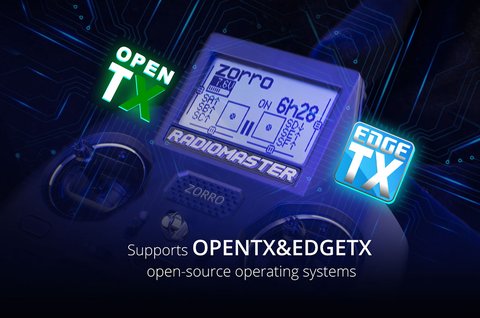
- Firmware: officially supports both OpenTX and EdgeTX
What Makes the Zorro Different
Most stick radios are built as scaled-down versions of full-size transmitters, but the Zorro was designed from the start as a handheld, pistol-grip shape. The result is a radio that rests naturally in your palms during long flying sessions, with the gimbals angled toward your thumbs rather than positioned flat like on a traditional box radio. It also includes a nano-sized external module bay, so you are not locked into the internal ELRS radio if you want to add a different protocol module later.
Setting Up and Binding the Zorro
Initial setup follows the same general EdgeTX flow as other RadioMaster radios, just navigated through the smaller monochrome screen and physical buttons instead of a touchscreen:
- Power on and run through gimbal and switch calibration in Radio Setup
- Create a new model and select the internal ELRS module, or an external module if fitted in the nano bay
- Set channel order and switch assignments to match your aircraft
- Put your receiver into bind mode and trigger bind from the model’s RF setup page
- Confirm a valid RSSI reading on the Zorro’s telemetry screen before flying
Because the Zorro supports Multi-protocol through its module bay, it can also bind to many non-ELRS receivers, including older FrSky and Flysky-compatible protocols, which is handy if you have older aircraft you do not want to rebuild around ELRS.
Using the Zorro Day to Day
I switched to a Zorro as my main travel radio a while back, mainly because it fits into a small backpack pocket that a full-size gimbal radio simply would not. The pistol grip shape took a few flights to fully adjust to if you are coming from a traditional box radio, but once it clicked, I found myself keeping better grip endurance on longer flying sessions than I ever got with a flat stick radio. Battery life on the two 18350 cells comfortably covers a full day of flying for me, and USB-C charging means one cable covers this radio along with my phone and most other gear.
A few things worth knowing before you buy:
- The monochrome screen is small; expect more scrolling through menus compared to touchscreen radios
- The nano module bay is a nice option if you eventually want a non-ELRS protocol
- Hall sensor gimbals hold calibration well over time with minimal drift
- It is genuinely one of the more travel-friendly ELRS radios on the market today
Per Talia B., an RC Hobbyist and PeerSpot reviewer, “The Zorro’s grip shape genuinely reduces hand fatigue on long sessions. I was skeptical about a pistol-style radio at first, but it’s become my default choice for anything longer than a quick flight.”
Getting the Most Range Out of the Zorro’s ELRS Module
The Zorro’s internal ELRS module is capable of a solid 24dBm max output, but a few practical habits make a real difference in how much usable range you actually get in the field. Antenna orientation matters more than most pilots expect; keeping the whip pointed generally toward your aircraft rather than straight up gives a noticeably stronger link on the fringes of your range, since the antenna’s radiation pattern is not perfectly spherical.
Other habits worth building into your pre-flight routine:
- Check your ELRS packet rate setting matches your mission, lower rates for range, higher rates for racing responsiveness
- Avoid standing near large metal objects or vehicles, which can reflect or block the 2.4GHz signal
- Keep the Zorro’s firmware current, since ExpressLRS regularly ships range and stability improvements
- Monitor link quality on the telemetry screen during test flights rather than assuming range based on past experience alone
On a recent trip, I noticed my link quality dropping earlier than expected on one flight, and it turned out I had been holding the Zorro with the antenna angled awkwardly toward my own body rather than the aircraft. A small adjustment to hand position brought the link right back to where I expected it, a good reminder that even a well-designed radio still depends on basic antenna habits.
Frequently Asked Questions
Can the Zorro bind to non-ELRS receivers?
Yes, through its Multi-protocol module bay support, the Zorro can bind to CC2500 and 4-in-1 compatible receivers in addition to native ExpressLRS receivers.
What batteries does the Zorro use?
Two 3.7V 18350 lithium-ion cells, charged over USB-C. These are smaller than the 18650 cells found in larger RadioMaster radios like the T8L.
Does the Zorro support EdgeTX?
Yes, it officially supports both OpenTX and EdgeTX firmware, with EdgeTX being the actively maintained option going forward.
Is the Zorro good for beginners?
It works fine for beginners, though the compact monochrome menu system has a slightly steeper learning curve than touchscreen radios like the TX15.
Choosing Accessories for the Zorro
Because the Zorro’s pistol grip shape differs from a standard box radio, not every accessory sold for RadioMaster’s larger transmitters fits it directly. A dedicated Zorro carrying pouch is worth picking up over a generic radio case, since it is shaped around the grip rather than a flat rectangular body. If you plan to use the nano module bay for a non-ELRS protocol, double check compatibility before buying, since not every third-party module is sized correctly for the Zorro’s smaller bay compared to the module bays on the TX16S or TX15.
- A form-fitted carrying pouch protects the grip shape better than a generic hard case
- Spare 18350 cells are worth keeping on hand for long flying days, since they are smaller than the more common 18650 format
- Silicone stick covers can improve grip feel without changing gimbal tension
Conclusion
The RadioMaster Zorro carves out a genuinely useful niche as a compact, ergonomic ELRS handheld that does not sacrifice protocol flexibility. If portability and grip comfort matter more to you than a large touchscreen, the Zorro is one of the easiest recommendations in RadioMaster’s current lineup.
Ryan
CS degree · travels with a bag full of handheld RC radios