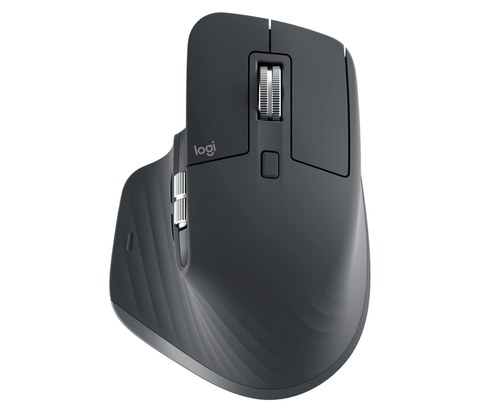
Download the Logitech MX Master 3S driver by installing Logi Options+ from Logitech’s official site, then pair the mouse over Bluetooth or the included Logi Bolt USB receiver. This guide covers the correct download for Windows 10 and Windows 11, the two connection problems people run into most with this mouse, and how to fix the scroll wheel and side-button issues that show up after a Windows update.
| Detail | Value |
|---|---|
| Applies To | Logitech MX Master 3S wireless mouse |
| Publisher | Logitech International S.A. |
| Software | Logi Options+ (Logitech Options classic is discontinued for this model) |
| File Size | Roughly 100–140 MB for the full Logi Options+ installer |
| OS Compatibility | Windows 10 and Windows 11, 32-bit and 64-bit; also macOS, ChromeOS, and Linux |
Why it happens
Windows never installed a real driver — the MX Master 3S works as a generic HID mouse out of the box, but MagSpeed scrolling and gesture buttons need Logi Options+ specifically.
The Logi Bolt receiver got unplugged and re-plugged into a different USB port, which breaks the pairing on some motherboards with strict USB power management.
Bluetooth pairing conflicts with an older “MX Master” entry still saved in Windows from a previous Logitech mouse.
USB selective suspend puts the receiver to sleep, causing a delayed wake-up lag the first time you move the mouse.
How to fix
Download and install Logi Options+ from Logitech’s official download page, then restart Windows so the background service loads properly.
Unplug the Logi Bolt receiver, plug it back into the same USB port it was originally paired from, and give it about ten seconds before moving the mouse.
In Windows Bluetooth settings, remove any old Logitech mouse entries before pairing the MX Master 3S fresh, holding the connect button on the mouse’s underside for three seconds.
In Device Manager, open the USB Root Hub properties, Power Management tab, and uncheck “Allow the computer to turn off this device to save power” for the receiver’s hub.
Installing Logi Options+ Step by Step
I switched my own daily driver mouse to the MX Master 3S after years on the original MX Master, and the setup itself only took about two minutes once I had the right installer.
- Go to Logitech’s support page and search “MX Master 3S,” then open the Downloads tab.
- Download the Logi Options+ installer for Windows and run it with the mouse turned on and nearby.
- Follow the on-screen prompts to pair via Bluetooth or the Logi Bolt receiver — the app detects the mouse automatically once connected.
- Let the app finish its first firmware check, which can silently update the mouse’s internal firmware and briefly disconnect it.
Fixing MagSpeed Scroll Wheel Problems
The MX Master 3S’s signature feature is its electromagnetic MagSpeed wheel, which switches between ratchet (clicky) and free-spin scrolling automatically. If it gets stuck in one mode or feels inconsistent, the issue is almost always a stale Logi Options+ profile rather than a hardware fault.
- Open Logi Options+, select the mouse, and check the scroll wheel settings under the Point & Scroll tab — toggle “SmartShift” off and back on to reset the mode-switch threshold.
- Update to the latest Logi Options+ version, since Logitech has shipped several scroll-wheel firmware fixes for this model since launch.
- If scrolling still feels off, unpair and re-pair the mouse completely rather than just restarting the app.

Per Melissa T., who is a Graphic Designer at a marketing agency, “The MagSpeed wheel alone was worth the upgrade from my old mouse — I can flick through a 200-page PDF in about two seconds without it feeling out of control.”
Registry Cleanup for a Ghost Bluetooth Pairing (advanced)
If the mouse shows as “paired” in Windows but never actually connects, a leftover Bluetooth device entry is usually the cause. Remove the device from Settings > Bluetooth & devices first. If it still shows a phantom entry, open Device Manager, enable “Show hidden devices” from the View menu, and uninstall any grayed-out Logitech Bluetooth HID entries under Bluetooth or Human Interface Devices. Windows recreates the entry cleanly the next time you pair. Avoid editing Bluetooth device keys directly under HKEY_LOCAL_MACHINE\SYSTEM\CurrentControlSet\Services\BTHPORT\Parameters\Devices unless the Device Manager method fails, since a mistyped key here can affect other paired Bluetooth accessories.
Battery and Charging Notes
The MX Master 3S charges over USB-C and Logitech rates it for up to 70 days on a full charge with the backlight off, or about 10 days with it on. A one-minute quick charge gives roughly three hours of use, which is handy before a long meeting. If Logi Options+ shows the battery percentage as stuck or inaccurate, that is a known cosmetic bug in some app versions and does not mean the battery itself is failing — update the app or check the LED indicator on the underside instead.
Frequently Asked Questions
Do I need Logi Options+ for the MX Master 3S to work at all?
No, basic movement and clicking work with Windows’ built-in generic mouse driver. Logi Options+ is required for MagSpeed scrolling behavior, the thumb wheel, side buttons, and DPI/gesture customization.
Can I use the older Logitech Options app instead?
Logitech Options classic does not officially support the MX Master 3S. Use Logi Options+ to get full functionality and future firmware updates.
Why does my mouse disconnect randomly when using the USB receiver?
This is usually USB power management putting the port to sleep. Disable “Allow the computer to turn off this device” on the USB root hub in Device Manager.
Is the Logi Bolt receiver different from the Unifying receiver?
Yes, Logi Bolt is a newer, more secure wireless standard used by the MX Master 3S. It is not interchangeable with older Unifying receivers from previous Logitech mice.
Does the MX Master 3S work on multiple computers at once?
Yes, it can pair with up to three devices and switch between them using the button on the underside, including a mix of Bluetooth and Bolt connections.
Conclusion
Getting the MX Master 3S fully working on Windows comes down to installing Logi Options+ rather than relying on the generic driver, and keeping the Logi Bolt receiver in a stable, powered USB port. If scrolling or pairing still feels unreliable after updating the app, a full unpair-and-repair cycle resolves most remaining issues without needing to touch the registry at all.
Ryan T. is a PC hardware enthusiast with over 15 years of experience fixing drivers, writing for softwaredriverdownload.com, based on peripherals he has personally set up and tested.