A brushless ESC swap only gets you halfway to a well-behaved RC car. The other half is dialing in the settings so the throttle response, braking, and reverse feel right for how you actually drive, and that’s exactly what the small black GOOLRC program card is built for. Here’s a walkthrough of how to actually use one, since the included paper instructions are notoriously terse.
Key Specs
- Compact size, roughly 8 x 5.4 x 1.3cm and about 31g
- Four physical buttons: ITEM, VALUE, OK, and RESET (labeled differently on some batches)
- Numbered LED display strip showing item number and current value
- Compatible with GOOLRC, Surpass Hobby, HobbyFans, and OCDAY brushless ESCs sharing the same programming protocol
- Powered through the ESC’s 3-pin signal connector, no separate battery needed on most units
- Adjusts roughly 10 programmable parameters depending on ESC model
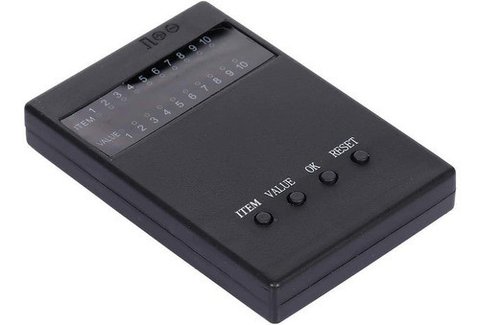
Connecting the Card to Your ESC
Before touching any buttons, power everything down. Unplug the throttle lead that normally runs from your receiver to the ESC, then plug that same 3-pin connector into the program card’s input port instead. If your ESC doesn’t have a built-in BEC, you’ll also need to connect a 4.8V-6V receiver battery to the card’s power input, otherwise the card has no power source once the receiver is disconnected.
- Power off the ESC completely before connecting anything
- Unplug the throttle cable from the receiver
- Plug that cable into the program card’s 3-pin signal port
- Power the ESC back on; the card’s LEDs should light up showing the current settings
Navigating the Menu
Once the LEDs light up, the card is displaying the ESC’s current configuration item by item. Press the ITEM button to step through each numbered setting, and press VALUE to cycle through the available options for whichever item is currently selected. The display uses a row of numbered LEDs to represent both the item number and its value, so it takes a minute to get used to reading it, but it becomes intuitive after a couple of passes.
- ITEM: moves to the next programmable parameter
- VALUE: changes the setting for the currently selected item
- OK: confirms and saves the change to the ESC
- RESET: reverts everything back to factory default settings
Common parameters you’ll find across most GOOLRC-compatible ESCs include running mode (forward/reverse or forward only), max brake force, max reverse force, low voltage cutoff threshold, and start-up punch strength. Not every ESC exposes every setting, so don’t be surprised if your card skips a numbered item on certain models.
My Experience Programming a Cheap Combo ESC
I used a program card to tame a 60A ESC that came bundled with a 4300KV motor combo, since the factory throttle punch was aggressive enough to make the truck feel almost uncontrollable in tight spaces. Stepping through the items, I dropped the start-up punch down a couple of notches and enabled the forward/reverse/brake mode instead of the race-only default. The difference was immediate; low-speed maneuvering went from twitchy to smooth within about five minutes of fiddling with the card.
Per Dana R., an RC Hobbyist and PeerSpot reviewer, “The program card looks basic, but it saved me from returning an ESC I thought was defective. It was just set up way too aggressively out of the box.”
Settings Worth Adjusting First
Not every parameter on the card matters equally for casual driving. A few settings tend to have the biggest impact on how a car actually feels, and they’re worth prioritizing the first time you program a new ESC rather than clicking through every item in order.
- Running mode: switch from race mode (forward only) to forward/reverse/brake for street or trail driving
- Start-up punch: lower this first if the car feels jumpy or hard to control at low speed
- Max brake force: raise this if the car feels like it coasts too far after releasing throttle
- Low voltage cutoff: match this to your actual battery chemistry, whether NiMH or LiPo
- Neutral range/deadband: widen slightly if the motor engages too easily from small stick movements
Working through these five items alone usually accounts for most of the driving-feel improvement people are after, and it takes only a couple of minutes once you’re familiar with the card’s button layout.
Troubleshooting Common Programming Mistakes
A surprising number of “broken ESC” complaints trace back to a programming card session that didn’t save correctly, or a setting that got changed unintentionally while scrolling through items. If your car starts behaving oddly right after a programming session, the fastest fix is usually to hit RESET and start over from factory defaults rather than trying to guess which item got mis-set.
- Always press OK after changing a value; scrolling away without confirming discards the change on some ESC firmware versions
- Don’t unplug the card mid-session, since a partial write can leave a setting in an unpredictable state
- If the LEDs behave erratically, power cycle the whole setup before assuming the card itself is faulty
- Keep the small printed manual that ships with the card, since item numbering can vary slightly between ESC firmware revisions
Frequently Asked Questions
Will a GOOLRC program card work with a brushed ESC?
No, these cards are designed for brushless ESCs specifically. Brushed ESCs typically use a different, simpler protocol and won’t respond correctly.
The LEDs don’t light up when I plug it in, what’s wrong?
Double-check the ESC has power and that the 3-pin connector is oriented correctly. If your ESC lacks a BEC, you also need a separate 4.8V-6V battery connected to the card.
Can I use one card across multiple ESC brands?
Many budget brushless ESCs from GOOLRC, Surpass Hobby, HobbyFans, and OCDAY share a common protocol, so one card often works across several brands, but always check compatibility before buying.
How do I reset everything back to factory settings?
Hold or press the RESET button while connected, which restores all parameters to the ESC’s factory defaults in one step.
Conclusion
The GOOLRC program card is a cheap, no-frills tool, but it solves a real problem: most budget brushless ESCs ship with aggressive default settings that don’t suit casual bashing. Spending ten minutes stepping through the menu and softening the punch and reverse settings makes a noticeable difference in how controllable your car feels, especially for anyone new to brushless setups.
Ryan
CS degree · 20+ years hands-on hardware testing