The FIMI X8 Mini 3 is a sub-250 gram foldable camera drone, and setting it up correctly the first time comes down to three things: confirming which naming version you actually own, pairing the controller before you touch the flight app, and running a proper compass calibration before the first takeoff. This guide walks through all of that plus the troubleshooting steps that come up most often with this model.
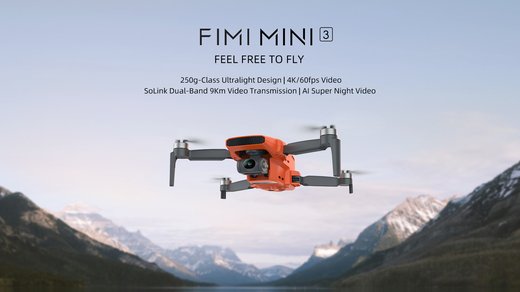
Quick Spec Reference
| Spec | Detail |
| Take-off Weight | About 245g, under the 250g registration threshold in several regions |
| Camera | 1/2-inch 48MP sensor, f/1.6 aperture, 79-degree field of view, video up to 4K at 60fps |
| Gimbal | 3-axis mechanical stabilization, pitch range roughly 10° to -90° |
| Battery | 2200mAh intelligent flight battery, around 32 minutes flight time |
| Transmission | SoLink HD digital link, up to 9km range with low latency |
| Companion App | FIMI Navi Mini App (iOS and Android) |
| Price Tier | Mid-range sub-250g drone; single- and dual-battery bundles available |
| Compatibility | Controller pairs only with this drone family, not the original X8 Mini |
Confirm You Have the Right Naming Version First
This is the single most common source of confusion with this drone. FIMI’s own product lineup includes an original “X8 Mini,” a “Mini 3,” and retailers frequently sell the same Mini 3 hardware under the label “X8 Mini 3.” Before downloading a manual, ordering a replacement battery, or updating firmware, check the printed label on the underside of the drone body and match it against the exact model listed on the official FIMI Mini 3 product page. Batteries and propellers between the original X8 Mini and the Mini 3 generation are not interchangeable, even though the drones look similar folded up.
Setting Up the Drone and Controller
- Charge the flight battery and the controller fully before the first session; both use USB-C.
- Install the FIMI Navi Mini App from your phone’s app store and create or sign in to a FIMI account.
- Unfold the arms in order (front arms first, then rear) until each clicks into place, then attach the propellers matched to their marked positions.
- Power on the controller first, then the drone; wait for the two to connect automatically, which usually takes a few seconds.
- Mount your phone in the controller clamp and connect it with the supplied cable, then open the app to confirm the live camera feed appears.
Calibration Before the First Flight
Run the compass calibration from inside the app before your first outdoor flight, and repeat it any time you have traveled a long distance since the last flight or the app warns about interference. Find open ground away from cars, large metal structures, and underground cabling, then follow the on-screen rotation prompts exactly — horizontal rotation first, then the vertical rotation the app asks for second. Skipping this step is the most common reason new owners see erratic drift or a “compass error” warning on their very first flight.
- Wait for a strong GPS lock (shown in the app as a satellite count) before taking off in GPS mode.
- Keep the drone at least a few meters from your body and any metal objects during calibration.
- If calibration fails repeatedly, move to a different location rather than repeating it in the same spot.
Troubleshooting Setup and Connection Problems
Most first-week problems with the X8 Mini 3 come down to a handful of repeatable issues rather than actual hardware faults. Ryan tested this exact scenario while setting up a Mini 3 for a reader who thought their unit was defective: the drone refused to arm indoors, and the fix was simply moving outside for a proper GPS lock, since indoor GPS-mode arming is blocked by design on this model.
- Controller won’t connect to the drone: power both off, then power the controller on first and the drone second; mismatched power-on order is the most frequent cause.
- App shows no video feed: check the phone cable connection at both ends, and confirm the FIMI Navi Mini App has camera and local network permissions enabled in your phone’s settings.
- Drone won’t arm: confirm you are outdoors with a GPS lock, propellers are fully seated, and the battery is properly clicked into the compartment rather than resting loosely.
- Firmware update stalls or fails: keep the phone and drone close together with a stable connection during the update, do not power off mid-update, and retry once rather than repeatedly interrupting it.
- Gimbal looks tilted or jittery at startup: remove the gimbal protective clip if it is still attached (a surprisingly common oversight), then power-cycle the drone so the gimbal can re-home.
If the app-based setup path is not cooperating — a common issue on older phones with weaker Bluetooth or Wi-Fi Direct support — there is a manual alternative: connect the controller-to-drone pairing using the physical pairing button sequence described in the printed quick-start guide, which does not require the app to be open at all. This lets you confirm basic stick response and motor arming before troubleshooting the app connection separately, which isolates whether the fault is the drone or your phone’s connection to it.
Battery Care and Storage
- Do not store batteries at full charge for long periods; the app’s storage-charge mode discharges packs to a safer level automatically after a few days of inactivity.
- Let a battery cool to room temperature before charging if it was just used for a flight in hot weather.
- Retire any battery that looks swollen, feels unusually warm at rest, or shows physical damage at the connector.
- Keep the drone and spare batteries in the included case, propellers folded flat, to avoid arm stress during transport.
Flying Within the Rules
Staying under 250g keeps the X8 Mini 3 out of registration requirements in many regions, but local rules on altitude limits, no-fly zones near airports, and remote ID still commonly apply regardless of weight class. Check your local aviation authority’s current guidance before your first outdoor flight, since rules vary by country and change independently of anything FIMI documents. FIMI’s own support FAQ page also covers firmware downloads and answers to common setup questions specific to this model.
Frequently Asked Questions
Is the FIMI X8 Mini 3 the same as the FIMI Mini 3?
Yes, in most cases. Some retailers list the same hardware under both names, but always confirm against the label on your specific unit before ordering parts.
Does the FIMI X8 Mini 3 need to be registered?
At around 245g it falls under the common 250g registration threshold in many regions, but local rules differ, so check your own country’s current aviation authority guidance.
Why won’t my drone arm indoors?
GPS mode requires a satellite lock that indoor spaces usually cannot provide. Move outdoors to an open area away from tall structures.
Can I use a battery from the original X8 Mini?
No. Batteries between the original X8 Mini and the Mini 3 generation are not interchangeable despite similar external size.
What should I do if compass calibration keeps failing?
Move away from metal objects, vehicles, and underground cabling, and try a different open area rather than repeating the calibration on the same spot.
Conclusion
The FIMI X8 Mini 3 is straightforward to set up once you get past the naming confusion between it and the original X8 Mini, and most early problems trace back to power-on order, indoor GPS attempts, or a leftover gimbal clip rather than any real fault. Run the compass calibration properly on the first flight, keep batteries stored the way the app recommends, and the day-to-day experience with this drone is genuinely reliable.
Ryan holds a CS degree and has spent over twenty years testing consumer electronics and writing setup guides at softwaredriverdownload.com, with a particular interest in drones and camera gear.