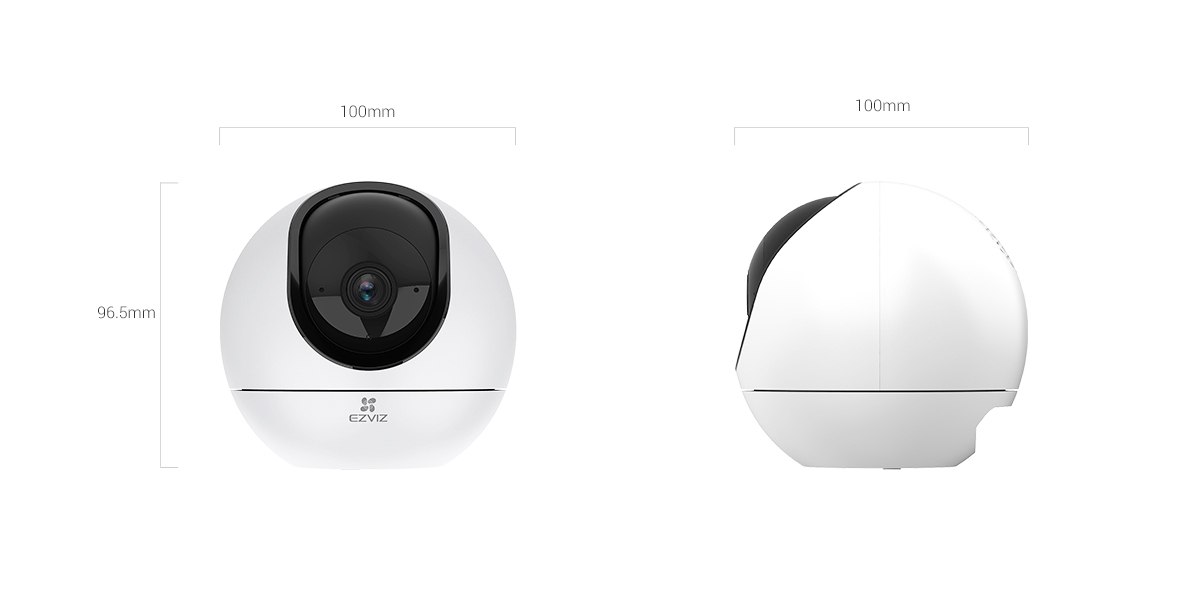
The EZVIZ H6 and H6c are both indoor pan-tilt cameras from the same family, but the H6’s 5MP sensor and higher 3K output resolution put it a clear step above the H6c’s 3MP sensor and 1080p output. Both rotate to cover a full room and support motion tracking, so the real question is whether the H6’s sharper image and extra features justify its higher price over the H6c.
| Spec | EZVIZ H6 (5MP) | EZVIZ H6c (3MP) |
|---|---|---|
| Resolution | 3K (2880 x 1620) | 1080p (1920 x 1080) |
| Sensor | 1/2.7″ CMOS, 5MP | 1/3″ CMOS, 3MP |
| Lens FOV | 87° horizontal / 53° vertical / 104° diagonal | 80° horizontal / 43° vertical / 90° diagonal |
| Pan-tilt range | Pan 353°, tilt 133° | 360° horizontal rotation |
| Night vision | 10m, dual IR lights | 10m, IR-cut auto-switching |
| Detection | Human shape, pet detection, waving-hand, voice activity | Motion detection with auto-tracking |
| Storage | microSD up to 512GB, plus CloudPlay | microSD up to 512GB, plus CloudPlay |
| Connectivity | Dual-band Wi-Fi (2.4/5GHz) + Ethernet | 2.4GHz Wi-Fi only + Ethernet |
| Power | DC 5V/2A (USB-C), max 8W | DC 5V/1A, max 5W |
| Size / weight | 100 x 100 x 96.5mm, 255g | 88 x 88.2 x 119mm, 218g |
What the H6 Adds Over the H6c
Beyond the resolution jump, the H6 includes several detection features the H6c simply doesn’t have: dedicated pet detection (useful if false alerts from a cat or dog are a recurring annoyance on the H6c’s generic motion detection), waving-hand detection to trigger a video call without touching your phone, and voice activity detection that can pick up on unusual sounds. The H6 also supports dual-band Wi-Fi, meaning it can join a 5GHz network for a more stable connection on a busy modern router, where the H6c is limited to 2.4GHz only.
Where the H6c Still Makes Sense
If 1080p is genuinely enough for your use case — a general baby monitor or pet camera where you just want to confirm activity rather than examine fine detail — the H6c covers the core pan-tilt, night vision, and app features at a lower price and with lower power draw (max 5W versus 8W). For anyone mounting several cameras around a home on a budget, that price difference across multiple units adds up.

Image Quality Side by Side
Placed in the same room, the difference between the H6’s 3K output and the H6c’s 1080p is most obvious when zooming into recorded footage after the fact — reading a note on a whiteboard, identifying a face across a large living room, or checking fine detail on a package label. In everyday live viewing on a phone screen, both look reasonably sharp and the gap narrows since a phone display doesn’t always show the full resolution difference. The H6’s slightly wider field of view (104° diagonal versus the H6c’s 90°) also means it captures marginally more of a room from the same mounting spot, which adds up in a larger space.
Power and Network Considerations
The H6’s max 8W draw versus the H6c’s 5W is a modest difference for a single camera, but becomes more relevant if you’re running several cameras off the same power strip or a limited USB hub setup. On the network side, the H6’s 5GHz Wi-Fi support matters more in homes with many connected devices, since 5GHz networks tend to have less congestion and interference than an overloaded 2.4GHz band. If your router only broadcasts 2.4GHz, or your walls are thick enough that 5GHz signal struggles to reach the mounting spot, this advantage disappears and the H6c’s simpler 2.4GHz-only design isn’t a real downside.
Common Setup Problems
- H6 won’t connect to 5GHz Wi-Fi: confirm your router’s 5GHz band doesn’t have unusual characters in the network name, and that band steering isn’t forcing all devices onto 2.4GHz automatically.
- H6c motion detection triggers constantly on pets: since the H6c lacks dedicated pet detection, narrow the detection zone or lower sensitivity in Device Settings to reduce false alerts from a moving pet.
- Auto-tracking loses the subject behind furniture: this is expected on both models; tracking resumes once the subject is back in clear view, but dense rooms with lots of obstructions will see more tracking interruptions.
- Camera won’t pair during setup: keep your phone close to the camera during QR code scanning, and make sure you’re joining the correct Wi-Fi band each model supports.
Frequently Asked Questions
Can the H6c be upgraded to H6 features with a firmware update?
No, the resolution and detection differences come from different hardware (sensor and lens), so no firmware update can add H6-level features to an H6c.
Do both cameras work with the same EZVIZ app?
Yes, both use the standard EZVIZ app, and you can manage an H6 and H6c side by side on the same account without issue.
Is pet detection accurate enough to fully replace general motion detection?
Pet detection on the H6 works well for distinguishing common pet sizes from humans, but very small pets or unusual breeds can occasionally be misclassified, so it’s best used alongside general motion alerts rather than as a total replacement.
Which camera is better for a baby monitor?
Either works, but the H6’s sharper 3K resolution and voice activity detection make it the stronger pick if you want to pick up on subtle sounds or examine footage in more detail.
Quick take
Want the sharpest video and most detection features?
Get the H6
Watching your budget across multiple cameras?
Get the H6c
Need 5GHz Wi-Fi support?
Only the H6 supports it
Want dedicated pet detection?
Only the H6 has it
Conclusion
Both the H6 and H6c handle the core job of an indoor pan-tilt camera well — full room coverage, motion tracking, and app-based live view. The H6 pulls ahead with sharper 3K video, pet-specific detection, and dual-band Wi-Fi, making it the better pick if image quality and smarter alerts matter to you. The H6c remains a solid, cheaper option if 1080p is genuinely enough for your needs and you’d rather save the difference, especially across several cameras in one household.
Ryan
CS degree · 15 years hardware troubleshooting