| Applies To | Motherboard Chipset Driver |
|---|---|
| File Name | n/a |
| Requirements | Windows XP, 7, 8 |
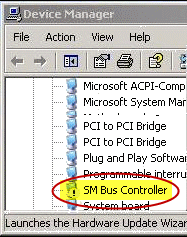
| Description | If you open the Device Manager window and see a yellow exclamation mark with entry SM Bus Controller, it means your motherboard chipset driver is not installed properly. Refer to image below:
In order to solve this problem, go to your motherboard manufacturer website and download the chipset driver, or if it is not available there, you can download from the chipset manufacturer website instead, which include Intel and AMD, the two main chipset manufacturers nowadays. |