Entry-level components rarely get taken seriously in high-end audio, but the Iris 15th is one of those rare cases where the cheapest item in a manufacturer’s lineup is genuinely worth a closer look. It’s Denafrips’ current digital-to-digital converter (DDC), succeeding the Iris 12th, and it packs in flagship-derived engineering at what is, by this hobby’s standards, a fairly accessible price.
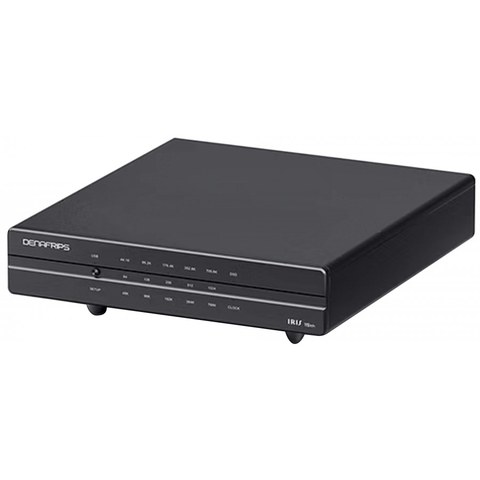
Quick Specs: Denafrips Iris 15th
- Model / Applies to: Denafrips Iris 15th digital-to-digital converter (DDC), successor to the Iris 12th
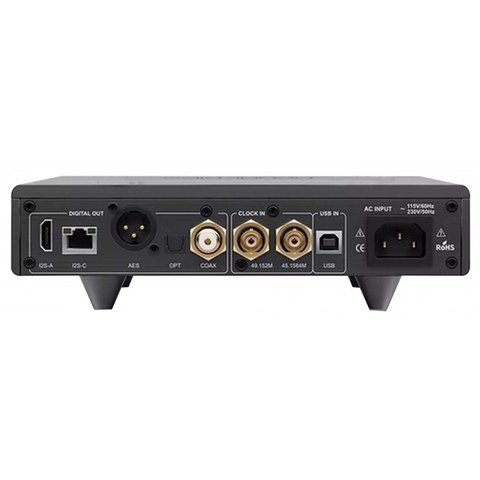
- Outputs: I2S, coaxial, optical
- Input: USB from a computer or streamer
- Housing: aluminum enclosure shared with Denafrips’ higher-tier DAC lines
- Price tier: list pricing around $559, Denafrips’ most affordable current product
- Compatibility: any DAC with a matching digital input; check the I2S pinout standard before connecting via HDMI-style I2S cables
| Model | Denafrips Iris 15th |
| Type | Digital-to-digital converter (DDC) |
| Predecessor | Iris 12th |
| Outputs | I2S, coaxial, optical |
| Input | USB from computer or streamer |
| Housing | Aluminum enclosure |
| List price | Around $559 |
What’s new versus the Iris 12th
The Iris 15th carries the same core mission as its predecessor — cleaning up a noisy USB signal from a computer or streamer and reclocking it before handing it off to your DAC — but Denafrips describes it as adopting design philosophy from their flagship DAC line rather than treating it as a scaled-down accessory. Highlights include:
- A completely new FPGA architecture for digital signal reconstruction
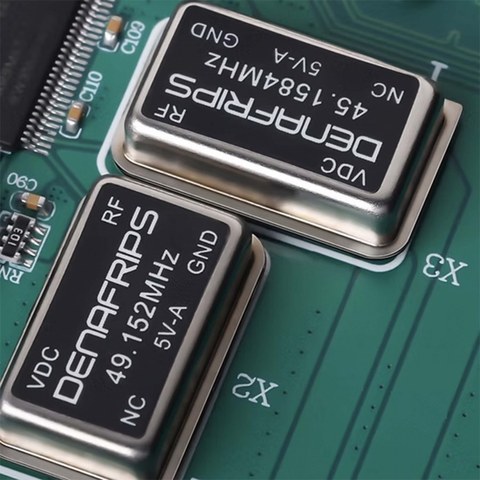
- Precision clock technology shared in spirit with Denafrips’ higher-tier DACs
- FIFO buffering and re-clocking to reduce transmission jitter and timing errors
- An aluminum housing shared with the higher-end model lines, rather than a cost-reduced enclosure
- List pricing around $559
Why the housing choice actually matters
It sounds like a cosmetic detail, but chassis design affects electrical noise more than most buyers realize. A well-shielded, rigid aluminum enclosure reduces the amount of ambient RF and mechanical vibration reaching the sensitive clock circuitry inside. By reusing the same enclosure family as their pricier DACs instead of a thin cost-reduced case, Denafrips is making a real engineering choice here, not just a styling one.
Should you buy a DDC at all?
I’ll repeat the same caveat I’d give for any DDC purchase: this is a problem-solving component, not a blanket upgrade. It makes the most sense in these situations:
- Your source computer has known USB noise issues (common with laptops running on battery power near a switching charger, or desktops with a lot of internal electrical noise).
- Your DAC’s internal USB receiver and clocking are relatively basic, which is more common on budget and mid-tier DACs than flagship ones.
- You want to add I2S connectivity to a DAC that only has USB, coaxial, or optical inputs.
If none of those describe your setup, spend the money on the DAC or amplifier itself first — the returns will likely be larger and more audible.
Setting It Up (and Troubleshooting Common Issues)
Installation is straightforward: USB in from your computer or streamer, then whichever digital output your downstream DAC prefers (I2S generally offers the lowest additional jitter if your DAC supports it and the pinout matches). A few practical notes from setting one up:
- Check your DAC manufacturer’s I2S pinout standard before connecting via HDMI-style I2S cables — not all brands use the same pin assignment, and a mismatch can cause no signal or, in rare cases, damage.
- Use a quality USB cable for the source connection; this is the one cable in the chain worth spending a little more on.
- Give the unit a short warm-up period, as with any precision clock circuit, before doing critical listening comparisons.
Common problems and fixes:
- No sound or “no signal” on the DAC: almost always an I2S pinout mismatch between brands — double-check Denafrips’ pinout against your specific DAC’s documentation before assuming a hardware fault.
- Clicking or dropouts right after power-on: give the unit its short warm-up period before critical listening; clock circuits can behave erratically in the first few seconds after power-up.
- Intermittent USB dropouts from the source: swap to a known-good, shorter USB cable first, since USB is the most cable-sensitive connection in this chain.
If I2S keeps giving you a no-signal result and you cannot confirm the pinout matches, the manual fallback is to switch to the coaxial or optical output instead. Both are far more universally standardized than I2S, so if you get sound through either of those, you have confirmed the DDC itself is working correctly and the issue is specifically an I2S pinout mismatch, not a broken unit.
Denafrips’ own Iris 15th product page has the full pinout and format compatibility chart, and Audiophonics carries current stock with region-specific pricing.
Comparing DDCs at this price point
The DDC category has gotten more competitive in the sub-$600 range over the past couple of years, with several brands releasing budget digital interfaces aimed at the same audience. What sets the Iris 15th apart from generic competitors is the direct engineering lineage from Denafrips’ own DAC lines rather than a licensed off-the-shelf reference design that gets rebadged across multiple brands. That pedigree is genuinely worth something if you’re already invested in the Denafrips ecosystem, since the design philosophy — and often the sonic character — carries through consistently.
- Budget DDCs from unfamiliar brands can vary wildly in build quality; sticking with an established DAC manufacturer’s own DDC reduces that risk
- Check whether a competing unit at a similar price actually publishes real clock specifications, rather than vague marketing claims about “ultra-low jitter”
- Consider resale value — established brands with strong community followings, like Denafrips, tend to hold value better on the used market
Long-term reliability expectations
DDCs are relatively simple devices electronically — no moving parts, no volume control mechanism, and a lower parts count than a full DAC. That generally translates into strong long-term reliability, with most reported issues in this category coming from USB port wear or cable damage rather than internal component failure. Treating the USB and output cables gently, and avoiding unnecessary connect/disconnect cycles, is about the extent of maintenance this kind of unit needs.
A note on expectations
It’s worth being realistic about what a $559 DDC can and can’t do. It will not turn a mediocre DAC into a great one, and it won’t fix fundamental design shortcomings elsewhere in your chain. What it can genuinely do is remove one specific variable — USB-borne noise and jitter — from the equation, which matters most when that variable is actually the weak link in your particular setup. Going in with that narrow, specific expectation will leave you far more satisfied with the purchase than expecting a blanket sonic transformation.
FAQ
How is the Iris 15th different from the Iris 12th?
It’s the anniversary-edition successor with a new FPGA architecture and clock design, sharing the chassis language of Denafrips’ higher-end models.
What’s the retail price?
Around $559 at the time of writing, positioning it as Denafrips’ most affordable current product.
Do I need this if I’m running a Pontus or Venus DAC?
Probably not much benefit — those DACs already have strong internal reclocking, so a DDC is more useful paired with entry-level DACs.
Does it decode audio itself?
No, a DDC does not perform digital-to-analog conversion; it only reformats and reclocks the digital signal before your DAC does the actual conversion.
What outputs does it offer?
Typical DDC outputs including I2S, coaxial, and optical, letting you match whatever input your downstream DAC supports.
Small, unglamorous boxes like this rarely get the attention they deserve in audio coverage, but I’ve found the entry-level DDC category to be one of the more genuinely useful categories once you understand what problem it’s actually solving.