The DDPAI N2 Dual and 70mai A410 are closely matched mid-tier dual-channel dash cams, both offering 2.5K front recording with GPS and dedicated screens. Here’s a detailed breakdown of where they actually differ.
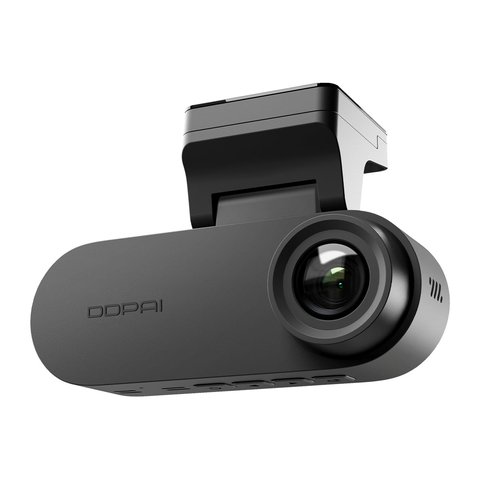
Spec Comparison
| Spec | DDPAI N2 Dual | 70mai A410 |
|---|---|---|
| Front resolution | 2.5K (2560x1440P) | True 2.5K (2560x1440P) HDR |
| Rear resolution | 1080P | 1080P |
| Display | 1.9″ IPS screen | 2″ built-in screen |
| GPS | Optional/regional | Multi-satellite (GPS/Galileo/GLONASS/QZSS) |
| Emergency recording buffer | Standard G-sensor lock | Up to 3 minutes buffered |
| Storage | Up to 256GB | Up to 256GB |
HDR Processing: A Real Differentiator
70mai markets the A410’s HDR as hardware-level sensor processing rather than software post-processing, which generally produces more natural results in mixed-lighting scenes like driving out of a tunnel into bright daylight, or facing oncoming headlights at dusk. The N2 Dual relies more on its AI ISP software processing for similar scenarios, which can still perform well but is a fundamentally different approach with different tradeoffs in how it handles extreme contrast.
In everyday moderate lighting, the difference between the two approaches is minimal. It becomes more apparent specifically in high-contrast edge cases, which is where the A410’s hardware HDR claim earns its keep.
Emergency Recording: A510’s Buffered Advantage
The A410’s extended 3-minute buffered emergency recording captures a longer window around a collision — pre-impact, the impact itself, and 30 seconds after — compared to the N2 Dual’s more standard G-sensor-triggered clip locking. This extra buffer matters if an incident’s cause isn’t obvious from the immediate impact moment alone, giving you more context both before and after the event when reviewing what happened.
A longer emergency recording buffer is worth prioritizing if you’ve ever needed to prove fault in an accident — the seconds leading up to impact often show critical context like brake lights or turn signals that a shorter buffer window might cut off entirely.
GPS Accuracy for Route and Speed Logging
The A410’s multi-satellite GPS support (GPS, Galileo, GLONASS, and QZSS combined) generally locks position faster and holds accuracy better in dense urban areas with tall buildings than a single-constellation GPS module would. If precise route and speed logging matters to you — for insurance disputes or simply tracking your own driving data — this is a meaningful practical advantage over a standard single-GPS setup.
For full specs, see DDPAI’s official N2 Dual product page and 70mai’s official A410 product page.
Installation Time and Included Accessories
Both cameras ship with the standard mounting bracket, cabling, and a 12V car charger, so out-of-box installation time is roughly comparable between the two at around 20 to 30 minutes for a typical DIY install. Neither requires professional installation for basic use, though a hardwire kit install for extended parking mode is easier with some basic wiring experience or a quick trip to an installer regardless of which model you choose.
When Setup or Pairing Fails
Most problems with either dash cam trace back to the Wi-Fi pairing step between the camera and its companion app, not a hardware fault. Work through these steps before assuming a unit is defective.
The App Won’t Find or Pair With the Camera
- Make sure the camera has finished booting (the screen shows a live preview) before opening the app’s add-device flow, since scanning too early can cause the pairing QR code or Wi-Fi hotspot to be missed.
- Turn off mobile data temporarily on the phone during first-time pairing so it does not compete with the camera’s local Wi-Fi hotspot for the connection.
- Move closer to the dash cam. Both the N2 Dual and A410 broadcast a short-range Wi-Fi signal for setup that weakens quickly through a windshield or car body.
GPS or Emergency Recording Doesn’t Seem to Trigger
- Confirm GPS is actually enabled in the app settings; on the N2 Dual it is bundle-dependent and not always active out of the box.
- Give the camera a clear view of the sky for the first few minutes after install, since an initial GPS lock can take longer in a garage or covered parking area.
- Check that G-sensor sensitivity is not set unusually low, which can prevent minor bumps from triggering a locked emergency clip.
Alternate Manual Pathway: Format and Reset
If pairing still fails after the checks above, format the microSD card from the camera’s own menu rather than on a computer, since a card formatted externally can use a file system the camera does not fully recognize. If the app still cannot connect afterward, use the camera’s physical reset button (a small pinhole on most models) to return it to factory Wi-Fi settings, then repeat the pairing steps as if setting it up for the first time.
Frequently Asked Questions
Is the A410 strictly better than the N2 Dual?
Not strictly — the A410 edges ahead on HDR, GPS accuracy, and emergency buffer length, but pricing and app experience preferences may still favor the N2 Dual for some buyers.
Does the N2 Dual support hardware HDR at all?
It relies primarily on AI ISP software processing rather than dedicated hardware-level HDR; check current firmware notes for specifics.
Which one has a larger screen?
The A410’s 2″ screen is slightly larger than the N2 Dual’s 1.9″ display, though the difference is modest in practice.
Can I disable the multi-satellite GPS to save power?
GPS power draw is minimal compared to overall camera consumption, so disabling it typically isn’t necessary or offers negligible savings.
Is either one better suited to fleet or rideshare use?
The A410’s more precise GPS logging is arguably more useful for fleet or rideshare route documentation specifically.
Do both support the same rear camera accessories?
No, rear camera compatibility is brand-specific; check each manufacturer’s current accessory list before assuming interchangeability.
Is the buffered emergency recording adjustable on the A410?
Buffer length settings are typically configurable within limits through the 70mai app; check current firmware options.
Does the N2 Dual’s screen show live GPS speed?
If GPS is enabled on your bundle, speed and location data typically display on-screen alongside the video feed.
Is the A410’s HDR mode always active?
HDR processing typically runs automatically based on scene conditions rather than needing manual activation.
Does either support cloud backup of footage?
Neither includes cloud backup at this tier; footage stays local to the SD card and your phone once downloaded.
Is a car charger included with the A410?
Yes, a standard 12V car charger is typically included in the base package.
Does either model come with a printed quick-start guide?
Yes, both typically include a printed quick-start guide alongside the standard packaging materials in the retail box.
A Closer Look at Everyday Practicality
Beyond the spec sheet, everyday practicality often comes down to small details like how quickly you can check footage after a minor bump or how easy the app is to navigate one-handed while standing outside your car. Both the N2 Dual and A410 handle these basics competently, so it’s worth reading a few recent hands-on reviews for each to gauge current app polish, since software experience tends to shift more over time than the underlying hardware specs.
Weighing Brand Preference Against Feature Gaps
Since the gap between these two isn’t dramatic, existing brand familiarity is a reasonable tiebreaker if you’ve owned a DDPAI or 70mai camera before and know what to expect from their app and support experience. For a first-time buyer with no prior brand loyalty, the A410’s specific feature advantages give it a slight edge worth taking seriously in the final decision.
Conclusion
The A410 has a modest edge in this comparison thanks to its hardware HDR, longer emergency buffer, and multi-satellite GPS, making it the stronger pick if those specific features matter to your driving situation. The N2 Dual remains competitive and worth considering if you already prefer DDPAI’s app ecosystem.
Ryan
Computer Science graduate · longtime smart home and PC hardware tester