The BlackVue DR770X is a compact, cloud-connected dash cam that trades bulky mirror-style hardware for a discreet windshield-mount body, recording Full HD at 60fps up front on a Sony STARVIS sensor built for low-light clarity. It’s one of BlackVue’s more accessible models, sitting below the flagship 4K lineup while keeping the same cloud-ready design philosophy.
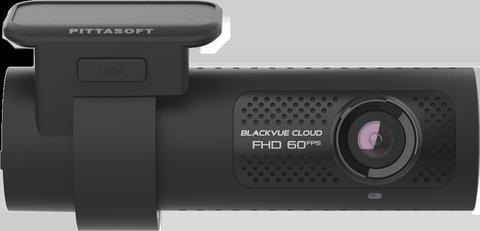
Key Specs
- Full HD front recording at 60fps, rear camera at 30fps (2-channel models)
- 2MP Sony STARVIS sensor, 139° field of view
- Always-on WiFi and built-in GPS, with optional BlackVue Cloud connectivity
- Supports microSD cards up to 1TB
- Impact and motion detection with up to 50 protected event files
- Time Lapse parking mode (requires hardwiring)
- SigmaStar CPU with dedicated ISP tuning for improved video clarity
What Cloud Connectivity Actually Adds
With BlackVue Cloud enabled, the DR770X can push live view and event notifications to your phone over a cellular connection (via an optional LTE module), rather than requiring you to be near the car and on its local WiFi to check footage. For most users, though, the local WiFi app connection covers day-to-day needs without the added cloud subscription. Cloud features are genuinely useful for fleet vehicles or anyone who wants remote peace-of-mind monitoring, but they add recurring cost that casual daily drivers may not need.
The 1TB storage ceiling is worth taking advantage of if you drive frequently — a larger card means far more days of loop recording history before old footage gets overwritten, which matters if an incident isn’t noticed and reported until well after it happened.
60fps Front Recording: Why It Matters
Most budget dash cams cap front recording at 30fps, which is fine for general documentation but can blur fast-moving details like license plates on vehicles passing at highway speed. The DR770X’s 60fps front capture captures twice as many frames per second, making motion smoother and individual frames sharper when you need to freeze on a specific moment, like the exact instant of a lane change or a plate number during a hit-and-run.
The tradeoff is larger file sizes at 60fps, which is part of why the 1TB card support matters more here than on cameras that record at a flat 30fps throughout.
Installation Basics
- Mount the front unit behind the rearview mirror using the included adhesive bracket
- Route the rear camera cable (2-channel models) along the headliner to the back window
- Connect power via the 12V adapter, or a hardwire kit for parking mode
- Pair the BlackVue app over WiFi to configure settings and pull footage
- Register the device in the app if you plan to use optional BlackVue Cloud features
For full specs, see BlackVue’s official DR770X product page.
Motion and Impact Detection in Detail
The DR770X’s motion and impact detection system automatically locks event files — up to 50 of them — so they’re protected from being overwritten by the normal loop recording cycle. This works both while driving and in parking mode, meaning a bump from another vehicle while you’re parked and away from the car will still be captured and preserved without you needing to manually protect the clip afterward.
Sensitivity for impact detection can typically be adjusted in the app, which is worth doing after install — a setting that’s too sensitive will lock unnecessary event files from normal bumps like potholes, eating into your protected-file limit faster than actual incidents warrant.
Choosing Between the 1-Channel and 2-Channel Bundles
If you’re deciding between the single-camera and dual-camera versions, think about how much of your driving happens in traffic where rear coverage would actually matter. City drivers who deal with frequent lane changes and stop-and-go traffic tend to get more practical use out of the 2-channel version, since rear-end collisions and cut-off disputes are common in that environment. Highway-heavy drivers with less rear-adjacent traffic may find the 1-channel version sufficient, saving some money without meaningfully losing evidence quality for their typical driving pattern.
Frequently Asked Questions
Is BlackVue Cloud required to use the DR770X?
No, the camera records and connects to the local app over WiFi without a cloud subscription; Cloud features are optional and require additional hardware.
Does parking mode work without hardwiring?
No, continuous parking mode recording requires a hardwire kit connected to the vehicle’s constant power and battery-saver circuit.
What’s the difference between the 1-channel and 2-channel versions?
The 2-channel version adds a rear-facing camera for backseat and rear coverage; the 1-channel version records front-only.
Is a 1TB card necessary, or is a smaller one fine?
A smaller card works fine for typical use; 1TB mainly benefits drivers who want a long parking-mode recording history without swapping cards often.
Does the DR770X support the newer BlackVue app features?
Yes, it’s fully compatible with BlackVue’s current app, including firmware updates pushed directly through the WiFi connection.
Is the WiFi connection always broadcasting, even when the car is off?
By default, WiFi stays on to allow easy connection, though this can be adjusted in settings if you’re concerned about parked battery drain over extended periods.
Can the DR770X be used as a security camera when parked long-term?
With a hardwire kit and parking mode enabled, yes, though extended parking without driving will still draw down your vehicle’s battery over time unless the hardwire kit includes low-voltage cutoff protection.
Does firmware update automatically?
Firmware updates are typically pushed through the BlackVue app rather than automatically over the air, so it’s worth checking the app periodically for new releases.
Conclusion
The DR770X is a solid pick if you want reliable low-light recording in a compact, non-intrusive form factor rather than a bulky mirror replacement. Skip the Cloud subscription unless remote live-view genuinely matters to you — the core recording and app experience work well without it, and the 60fps front capture is a genuine step up over typical budget dash cams. For most everyday drivers, this camera hits a sensible balance between recording quality and price without pushing you into recurring subscription costs.
Ryan T. is a PC hardware enthusiast with 15+ years of experience fixing drivers and testing consumer tech. He writes for softwaredriverdownload.com.