A DDC, or digital-to-digital converter, is one of the least understood boxes in a desktop audio chain. It doesn’t decode anything to analog and it has no volume control, so it’s easy to look at the price tag and wonder what it’s actually doing. The Denafrips Iris 12th was the company’s first attempt at this category, and understanding what it fixes will tell you whether you actually need one.
| Category | USB digital-to-digital converter (DDC) |
| Core Processing | Custom FPGA DSP with FIFO buffering and re-clocking |
| USB Interface | STM32F466 ARM MCU |
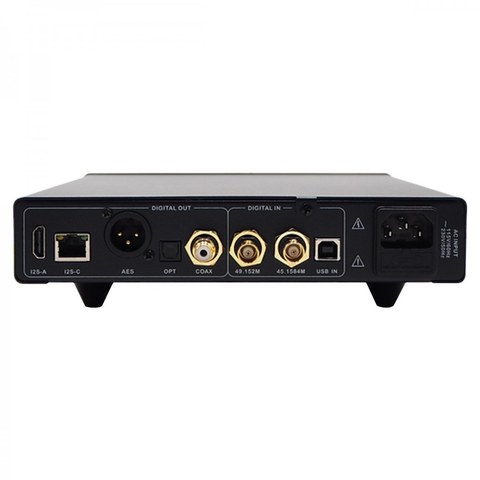
| Digital Outputs | I2S, coaxial, optical |
| Matched Pairing | Originally sold alongside the Ares 12th Anniversary DAC |
| Successor | Iris 15th (current production model) |
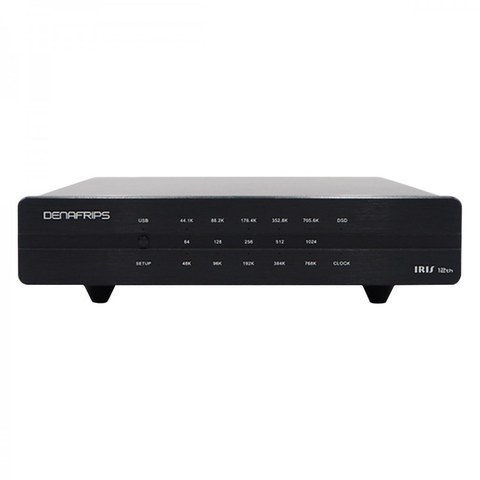
What a DDC does and why the Iris 12th exists
Computer USB outputs are electrically noisy and their timing (jitter) is rarely as clean as dedicated digital audio hardware. A DDC sits between your source (usually a computer or streamer) and your DAC, takes in the USB signal, re-clocks it using a purpose-built oscillator, and re-transmits it over a cleaner digital format like I2S, coaxial, or optical. The DAC downstream then has an easier, lower-jitter signal to decode.
Denafrips spent roughly three years developing the Iris before releasing the 12th Anniversary Edition, borrowing FPGA design work from their DAC lineup rather than treating it as an afterthought accessory. Key specs:
- Custom FPGA DSP processing with FIFO buffering and re-clocking
- USB audio interface built around an STM32F466 ARM MCU
- Companion piece originally paired with the Ares 12th Anniversary DAC
- Multiple digital outputs to match whatever input your downstream DAC accepts
Does it actually make an audible difference?
This is the honest, slightly frustrating answer: it depends heavily on your existing chain. If your DAC already has excellent internal reclocking (most higher-end R2R DACs, including Denafrips’ own Pontus and Venus tiers, already do a lot of this work internally), adding a DDC in front of it delivers diminishing returns. Where a DDC like the Iris 12th earns its keep is with cheaper or older DACs that have weaker internal clocking, or in setups where USB noise from a noisy computer is audibly bleeding into the signal.
I’d frame it this way: buy a DDC to solve a specific, identifiable noise or jitter problem, not as a blanket “upgrade” purchase. If your current setup already sounds clean and quiet, a DDC is one of the lower-priority additions you can make.
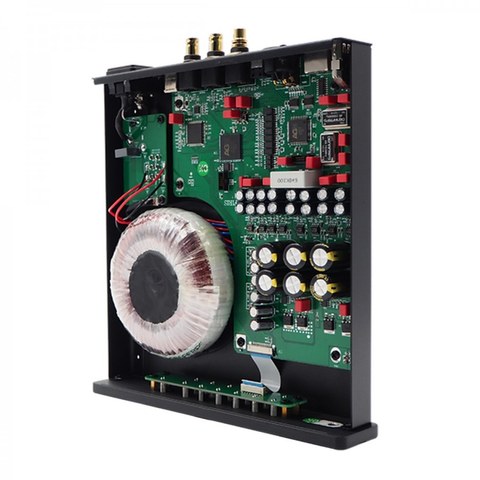
Pairing with Ares 12th and other Denafrips DACs
The Iris 12th was originally sold and marketed alongside the Ares 12th DAC as a matched pair, both sharing the anniversary-edition design language and chassis finish. That said, it works with any DAC that accepts I2S, coaxial, or optical digital input — it’s not locked to Denafrips products. If you’re running a Pontus or Venus tier DAC, you’ll likely hear a smaller improvement than someone running an entry-level Ares.
- Check your DAC’s supported digital input formats before buying — I2S implementations in particular vary by manufacturer and aren’t always pin-compatible between brands.
- Keep the USB cable from your computer to the Iris as short and well-shielded as practical; that first hop is where most of the noise gets introduced.
- If your downstream DAC lacks I2S entirely, coaxial or optical from the Iris is still a valid, if slightly less optimal, connection.
Denafrips’ official Iris review page covers the original design rationale in more depth, and Audiophonics lists the full current spec sheet including supported sample rates.
Iris 12th vs the newer Iris 15th
Denafrips has since released the Iris 15th as the anniversary-edition successor. If you’re buying new today, the 15th is the current production model and the one most retailers stock going forward; the 12th shows up mostly on the used market now. Functionally they solve the same problem, with the 15th carrying refinements consistent with the rest of the 15th Anniversary refresh across Denafrips’ catalog.
Diagnosing whether you actually have a noise problem
Before spending money on a DDC, it’s worth actually confirming your system has the noise or jitter issue a DDC would fix, rather than buying one speculatively. A few practical diagnostic steps:
- Listen for a faint background hiss or hum with the volume turned up and no music playing — if it’s inaudible at normal listening levels, a DDC is unlikely to deliver an audible improvement.
- Try switching your DAC’s input from USB to optical or coaxial if your source supports it, and listen for a difference — if optical sounds notably cleaner, that points to USB-specific noise a DDC could address.
- If you’re running a laptop, try listening on battery power alone versus plugged into the charger — a difference here strongly suggests power-supply-borne noise entering through USB, which is exactly the kind of problem a DDC like the Iris 12th is designed to isolate.
Used market considerations
Since the Iris 12th has been succeeded by the Iris 15th, most units available today are on the secondhand market. A few buying tips specific to this category:
- Ask the seller to confirm all outputs are functioning, not just the one they personally used
- DDCs have relatively simple internals compared to full DACs, so used units are generally lower risk, but still worth testing thoroughly before finalizing a purchase
- Factor in that a used Iris 12th should cost meaningfully less than a new Iris 15th to be a sensible buy, given the newer unit’s updated FPGA architecture
FAQ
Do I need a DDC if I already have a good DAC?
Not necessarily — many higher-tier DACs already reclock internally, so a DDC is most useful for entry-level DACs or troubleshooting a specific noise issue.
What formats does the Iris 12th support?
It handles standard PCM and DSD formats up to the DAC’s own input ceiling, converting USB input into I2S, coaxial, or optical output.
Can I use the Iris 12th with non-Denafrips DACs?
Yes, as long as the DAC accepts one of the Iris’s output formats, though I2S compatibility should be checked carefully since implementations vary between brands.
Is the Iris 12th still available new?
Mostly it’s found used now, since the Iris 15th has taken over as the current production model.
Does it add its own sound coloration?
A well-designed DDC shouldn’t add coloration; its job is strictly noise reduction and reclocking, not tonal shaping.
I got asked about DDCs more than almost any other accessory category when I started covering desktop audio gear, mostly because the marketing around them oversells what’s a genuinely narrow, situational upgrade.