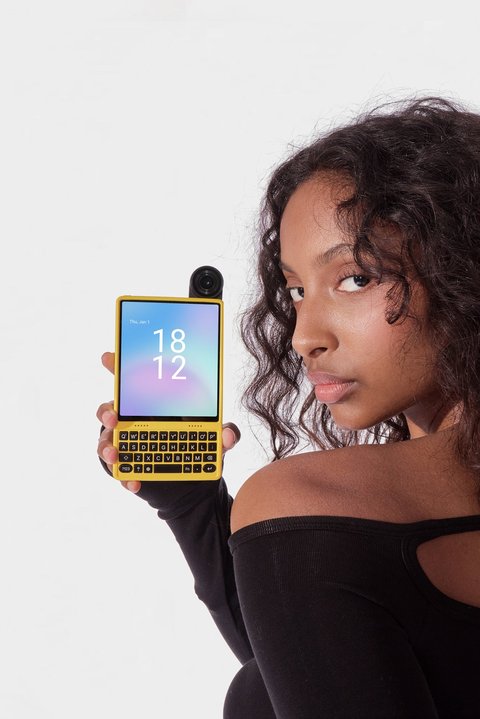
IKKO’s MindOne line now has two models, and the naming makes it easy to assume the Pro is just a spec bump. It’s more than that — the Pro changes the display glass, adds water and dust resistance, and swaps in a meaningfully better camera module, while both phones keep the same core idea: a card-sized Android device with an AI-first interface and an optional snap-in keyboard case. I spent time with both to work out whether the Pro’s extra cost is genuinely worth paying, or whether the standard MindOne already covers what most everyday buyers actually need day to day.
Full spec comparison
| Spec | MindOne | MindOne Pro |
|---|---|---|
| Display | 4.02″ AMOLED, ~1080p, standard glass | AMOLED, 1240×1080, 90Hz, sapphire glass (9H hardness) |
| RAM / Storage | 8GB / 256GB | 8GB / 256GB |
| Camera | 50MP Sony sensor, 180° flip hinge, no OIS | 50MP Sony sensor (f/1.88), OIS, flip camera |
| Battery | 2,200mAh | 2,200mAh, up to 16 hrs video playback |
| Durability rating | None disclosed | IP54 dust/splash resistance |
| OS | Android 15 + IKKO AI OS | Android + IKKO AI OS |
| Connectivity | USB-C, Wi-Fi, Bluetooth, dual SIM | USB-C, Wi-Fi 802.11ac, Bluetooth 5.2, NFC, GPS, dual SIM + vSIM |
| Weight | Similar card-sized footprint | 136g |
| Launch price | Starting around $369 (Kickstarter), $499 retail | $429 (sale), $499 regular |
Specs sourced from IKKO’s official product pages and crowdfunding listings; final retail units can vary slightly from campaign-stage specs.
Where the Pro actually earns its price
Three things separate the Pro from the standard model in practice, and they’re not the things most spec sheets lead with.
- Sapphire glass matters more on a phone this small than it would on a normal-sized flagship, because MindOne is designed to be dropped in a pocket loose, without a case, far more often than a full-sized phone. The extra scratch resistance is a real practical upgrade, not a marketing line.
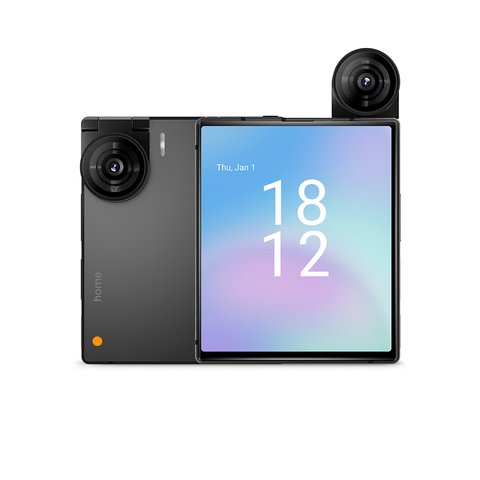
- OIS on the flip camera is the single biggest quality-of-life difference for anyone who actually uses the camera regularly — the base model’s photos get noticeably softer in anything other than good light, since there’s no stabilization to compensate for hand shake.
- IP54 resistance means the Pro can survive rain or a spilled drink that would risk killing the standard model outright. For a device this size that’s easy to leave on a counter near a coffee cup, that’s not a trivial addition.
Where the standard MindOne holds its own
If you’re mainly buying MindOne as a lightweight secondary device — something to carry on a run or a night out instead of a full phone — the base model covers the same core software experience: the same AI assistant features, the same square display concept, the same optional keyboard case compatibility, and comparable battery capacity. You’re giving up display durability, camera stabilization, and a formal water resistance rating, but the fundamental “what is this phone for” experience doesn’t change between the two.
According to a hands-on writeup from Forbes, the Pro’s keyboard case pairing was highlighted as one of its more genuinely useful traits for a “fun, useful second phone” role rather than a primary daily driver. That framing tracks with my own impression — neither model is meant to replace your main phone, and choosing between them mostly comes down to whether the camera and durability upgrades matter for how you’ll actually carry it.
Which one should you buy
- Pick the standard MindOne if the appeal is purely the compact form factor and AI features at the lowest entry price
- Pick the MindOne Pro if you’ll use the camera regularly, carry the phone without a case, or want peace of mind around drops and moisture
- Either way, budget separately for the Snap-In Case keyboard accessory if typing comfort matters to you — it’s sold apart from both phones
Design and color options
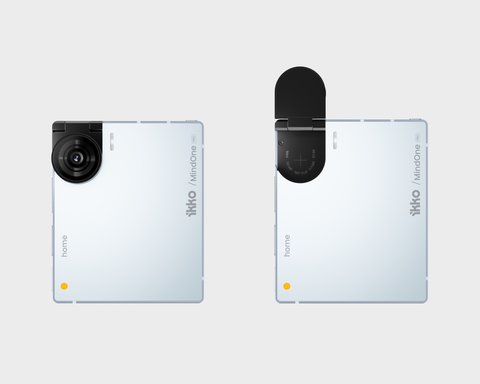
Both phones share the same overall silhouette — a nearly square body dominated by the display, with a distinct hinge mechanism on one corner that flips the camera module between rear-facing and selfie orientation instead of using two separate lens arrays. That single flip camera is part of what keeps both devices thin; there’s no camera bump on either model, which is unusual for anything shooting 50MP stills. Color options have varied by launch batch, with black, blue, and pink finishes showing up across both models depending on region and whether you’re buying through the crowdfunding campaign or retail channels.
One thing worth flagging honestly: neither model is aimed at someone who wants a conventional smartphone experience with a tiny screen. The square aspect ratio means video content and many apps letterbox or crop awkwardly, and typing without the optional keyboard case is genuinely slower than on a normal-sized phone. If that trade-off doesn’t bother you — because you mainly want quick AI lookups, messaging, and a lightweight secondary device — either MindOne or MindOne Pro delivers on that narrow but real use case.
When Setup or Pairing Fails
Both MindOne models occasionally need a bit of troubleshooting during first setup, especially around the AI OS account sign-in and the Snap-In keyboard case pairing. None of the issues below point to a defective unit on their own.
- AI assistant setup won’t complete: confirm Wi-Fi is connected before starting account sign-in, since the AI features require an active internet connection to finish provisioning on first boot.
- Snap-In keyboard case not responding: detach and reattach the case fully, making sure the pogo pins on the phone’s edge are clean and free of lint, which is the most common cause of a case that connects physically but does not register keystrokes.
- Phone won’t finish the initial update: plug into a wall charger rather than a USB port on a laptop during the first system update, since low or fluctuating power can interrupt the process partway through.
Alternate Manual Pathway: Factory Reset
If the AI OS becomes unresponsive or a setting gets stuck, both models support a manual factory reset through the Settings menu under System, or by holding the power button for an extended press if the touchscreen is unresponsive. This clears local data and returns the phone to its out-of-box setup flow, which resolves the large majority of first-setup issues that a simple restart does not fix.
Frequently asked questions
Is the Pro’s storage actually bigger than the base model? Both currently list 8GB RAM and 256GB storage in most listings, so storage capacity isn’t the differentiator — durability and camera hardware are.
Does the keyboard case work with both phones? Yes, the Snap-In Case is built to the shared MindOne chassis dimensions and attaches to either model.
Can I install regular Android apps on either model? Yes, both run Android under IKKO’s custom AI interface layer, so standard Play Store apps install normally, though some may not be optimized for the square aspect ratio.
Is the price difference between the two models large? Not dramatically — sale pricing has put them within roughly $60 of each other at times, which is part of why the Pro tends to be the better value pick if you can stretch the budget slightly.
Are accessories interchangeable between models? Cases, lanyards, and the snap-in keyboard are all built to the shared chassis dimensions, so most accessories cross over fine between MindOne and MindOne Pro without needing a model-specific version.
Ryan
CS degree, follows compact and unusual phone form factors closely