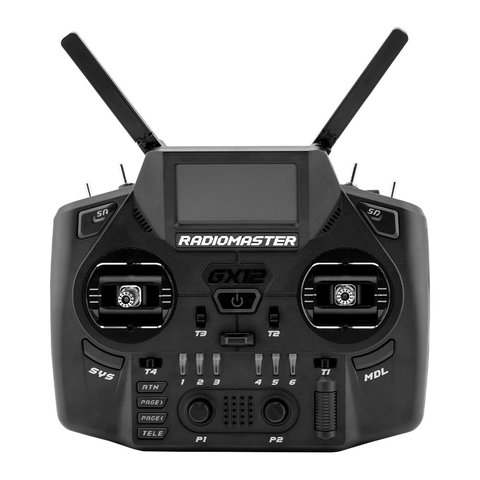
The RadioMaster GX12 is a dual-band EdgeTX transmitter built around ExpressLRS’s Gemini-Xrossband technology, letting it transmit simultaneously on 2.4GHz and 900MHz for extra interference resistance. It’s a serious step up from a basic single-band radio, and the manual covers a lot of ground, so I put together a plain-language walkthrough of setup, binding, and the settings that actually matter for day-to-day flying.
Key Specs
- Dimensions: 183 x 148 x 78mm, weighing 573g
- Dual-band operation: 2.4GHz plus Sub-G 900MHz simultaneously (Gem-X)
- Dual 1-watt internal transmitters with folding dual-band antennas
- 128 x 64 monochrome OLED display
- GX01 1000Hz 3D digital CNC Hall-effect gimbals with folding sticks
- Runs EdgeTX firmware with full LUA scripting support
- Backward compatible with standard 2.4GHz and 900MHz ExpressLRS receivers
What Gemini-Xrossband Actually Does
Gem-X is the headline feature of the GX12, and it’s worth understanding before you dig into the manual’s menu structure. Rather than picking one frequency band and sticking with it, the radio transmits control data across both 2.4GHz and 900MHz at once. If interference knocks out one band momentarily, the link keeps working on the other, which matters most for long-range flights or flying in RF-crowded environments like race events with dozens of pilots.
- Works with new-generation Gemini Xrossband receivers for full dual-band redundancy
- Still fully compatible with older single-band 2.4GHz or 900MHz ELRS receivers
- No firmware changes needed to switch between single and dual-band receivers
Binding a Receiver
- Turn off the GX12 transmitter completely
- Power cycle the receiver three times in quick succession until its LED flashes twice, confirming bind mode
- Turn the transmitter back on and long-press the SYS button
- Navigate to Tools, then select the ExpressLRS LUA script
- Scroll down to the Bind option and press Enter
- Wait for the receiver’s LED to go solid, confirming the link is established
This process is identical whether you’re binding a single-band or Gem-X receiver, which is one of the nicer touches of the whole system; you don’t need to remember two separate procedures depending on what’s on the other end.
Menu Structure and Model Setup
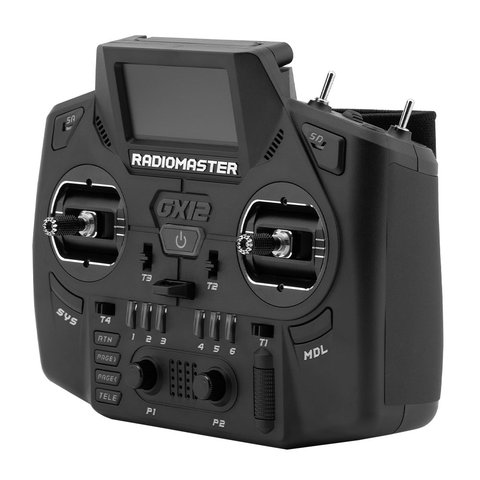
Since the GX12 runs EdgeTX, the menu layout will feel familiar if you’ve used any other EdgeTX or OpenTX radio before. New model creation, mixer setup, and channel mapping all live in the same places you’d expect. Where the manual is genuinely useful is walking through the ExpressLRS-specific LUA tool, since that’s where you configure packet rate, telemetry ratio, and switch power output, none of which are standard EdgeTX menu items.
- Create a new model profile before binding to keep separate craft configurations organized
- Set packet rate based on your use case; lower rates favor range, higher rates favor responsiveness
- Check telemetry is reporting correctly on the main screen before your first flight
- Back up your model files periodically through the SD card, since EdgeTX radios store configs there
Setting Up My Own GX12
I set up a GX12 for a long-range fixed-wing project specifically because of the dual-band redundancy, and the binding process took less time than I expected coming from a single-band radio. The OLED screen is small but legible, and the folding gimbal sticks make it noticeably more travel-friendly than my older radio. The one adjustment period was getting used to navigating the ExpressLRS LUA script menu, since it has more options than a typical single-band radio’s equivalent screen.
Per Wesley H., an RC Hobbyist and PeerSpot reviewer, “The Gem-X dual-band setup gave me noticeably more confidence flying past the treeline on my long-range builds. It’s the first radio where I actually stopped worrying about a mid-flight glitch.”
Telemetry and Power Output Settings
The manual spends a fair amount of time on the ExpressLRS LUA telemetry screen, and it’s worth reading closely since misconfigured telemetry ratio settings are a common source of confusion for people coming from a simpler radio. Telemetry ratio controls how much of the link’s bandwidth is dedicated to sending data back from the aircraft versus control commands going out, and the right balance depends on whether you need frequent voltage/GPS updates or prioritize control latency.
- Lower telemetry ratios favor control responsiveness over frequent sensor updates
- Higher telemetry ratios are useful for long-range flights where you want frequent GPS/battery data
- Power output can be adjusted per-model, useful for staying within local RF regulations
- Dynamic power adjusts output automatically based on link quality, which most pilots leave enabled
Firmware Updates and SD Card Management
Since the GX12 runs EdgeTX from an SD card, updating firmware is mostly a matter of downloading the correct firmware build for your specific radio and internal RF module, then copying it to the card before rebooting into update mode. The manual covers the exact button combination for entering that mode, which varies slightly across RadioMaster’s radio lineup, so it’s worth double-checking rather than assuming it matches a different model you may have owned before.
- Back up your current SD card contents before any firmware update
- Download the firmware build matching your exact radio and internal module revision
- Copy the firmware file to the correct folder on the SD card
- Boot into update mode following the manual’s specific button sequence
- Verify the new firmware version on the main screen after rebooting
Frequently Asked Questions
Do I need a Gemini Xrossband receiver to use the GX12?
No, the GX12 works fine with standard single-band ExpressLRS receivers. A Gem-X receiver is only required to get the full dual-band redundancy benefit.
What firmware does the GX12 run?
It ships running EdgeTX, giving it full access to LUA scripts, custom mixers, and the wider EdgeTX ecosystem of tools and telemetry screens.
Where can I find the full official manual?
RadioMaster publishes the full GX12 documentation on radiomasterrc.com, and third-party manual archives host PDF copies as well.
Can the GX12 bind to non-Gemini receivers on 900MHz only?
Yes, it supports current-generation single-band 900MHz ExpressLRS receivers in addition to 2.4GHz and Gem-X units.
Conclusion
The GX12 manual covers a genuinely capable dual-band radio, and while the EdgeTX menu system will feel familiar to existing users, the Gemini-Xrossband binding and configuration steps are worth reading carefully at least once. Once it’s set up, day-to-day use isn’t much different from any other EdgeTX radio, just with a meaningful reliability upgrade running quietly in the background.
Ryan covers FPV and RC radio gear as part of his broader hardware testing work. He writes at softwaredriverdownload.com.