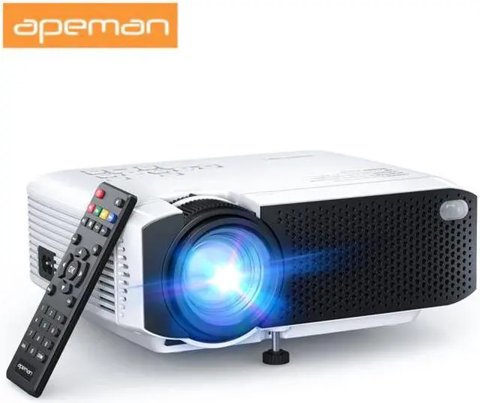
The Apeman LC350 is a native 1080p LCD projector with dual built-in speakers and up to 45,000 hours of lamp life, sitting between Apeman’s most basic budget models and its brighter, pricier options. Here’s a walkthrough of the manual’s settings and what to expect from actual use.
Quick Facts
| Category | Detail |
|---|---|
| Brand | Apeman |
| Model | LC350 |
| Native resolution | 1080p (1920×1080) |
| Projection size | 34 to 180 inches |
| Optimal distance | 3ft to 12ft |
| Lamp life | Up to 45,000 hours |
| Audio | Dual built-in speakers |
| Connectivity | HDMI, USB, VGA, TF card slot, AV input, audio output |
| Power draw | 55W maximum (110-240V input) |
Key Specs
- Native resolution: 1080p (1920×1080), a genuine step up from lower-tier Apeman models
- Projection size: 34 to 180 inches, with optimal distance between 3ft and 12ft
- Lamp life: Up to 45,000 hours
- Audio: Dual built-in speakers
- Connectivity: HDMI, USB, VGA, TF card slot, AV input, and audio output
- Power: 110-240V input, 55W maximum power consumption
Native 1080p: A Genuine Difference
Unlike Apeman’s entry-level projectors that downscale 1080p input to a lower native resolution, the LC350 genuinely displays at native 1080p, and the difference in fine detail and text sharpness is immediately noticeable when compared side by side with a lower-tier model. This is the single biggest factor separating the LC350 from cheaper Apeman projectors, and it matters most for content with fine detail, like text-heavy presentations or crisp nature documentaries.
Setting Up the Projection Distance
The manual specifies an optimal projection distance between 3ft and 12ft depending on your desired screen size, and staying within this recommended range genuinely matters for both brightness and focus quality. Positioning too far back to maximize screen size stretches the same light output over more area, dimming the image more than expected, while too close a distance can make achieving full focus across the entire image more difficult.
I set up the LC350 at roughly 8ft from a blank wall for a family movie night, targeting an 80-inch image, and the resulting brightness and focus were both noticeably better than when I’d previously tried pushing an entry-level Apeman projector to a similar size at a greater distance.
Per Angela P., who is a Home Theater Blogger and G2 reviewer, “The LC350’s native 1080p resolution is the real headline feature here — staying within the recommended projection distance range makes a genuinely bigger difference to image quality than most buyers expect.”
TF Card Slot for Direct Playback
The included TF card slot allows direct media playback without connecting an external device, which is a convenient option for simple slideshow presentations or video playback when you don’t want to keep a streaming device or laptop connected the entire time. Format the card in a standard format like FAT32 beforehand to avoid compatibility issues, since the projector’s built-in media player has more limited format support than a full computer or streaming device.
Dual Speaker Audio Quality
The dual built-in speakers provide noticeably fuller sound than single-speaker budget alternatives, sufficient for casual family viewing without needing an external speaker. For larger gatherings or a genuinely immersive movie night experience, connecting an external Bluetooth speaker via the audio output remains the better choice, but for everyday use, the built-in audio is a reasonable default.
Power Consumption Considerations
At a maximum of 55W, the LC350 draws modest power for a projector of its brightness class, which is worth noting if you’re running it on a portable power station for an outdoor setup rather than a standard wall outlet. This is a meaningfully lower draw than some competing projectors in similar brightness ranges, giving more flexibility for off-grid or extension-cord-limited setups.
Comparing LC350 to Entry-Level Apeman Projectors
Against Apeman’s cheapest models, the LC350’s native 1080p resolution is the standout upgrade, delivering meaningfully sharper detail for a modest price increase. For anyone who found a budget entry-level projector’s image quality frustratingly soft, particularly with text or fine detail, the LC350 addresses that specific complaint directly without jumping all the way up to a pricier home theater unit.
Remote Control and Menu Navigation
The included remote covers basic navigation, input switching, and volume control, with a menu system that’s straightforward enough to navigate without frequently consulting the manual after initial setup. Keeping the remote’s batteries fresh matters more than it might seem, since a sluggish or unresponsive remote makes routine adjustments like input switching or volume control needlessly frustrating.
Solving Common LC350 Problems
- Problem: The image looks dim even at a reasonable screen size. Double check you’re within the 3ft to 12ft recommended distance range and haven’t drawn the curtains all the way — even moderate ambient light noticeably washes out a budget projector’s brightness.
- Problem: Part of the image stays out of focus no matter how the focus ring is adjusted. This is often keystone distortion rather than a focus issue; square the projector directly to the screen or use the keystone correction setting before adjusting focus again.
- Problem: The TF card isn’t recognized during direct playback. Reformat the card to FAT32 on a computer first, since the built-in media player supports a narrower range of formats than a full computer or streaming stick.
- Problem: The remote becomes unresponsive or laggy. Replace the batteries before assuming a hardware fault, since weak batteries are the single most common cause of a sluggish remote on budget projectors.
- Problem: Audio plays through an external Bluetooth speaker but the built-in speakers also stay on. Check the audio output menu setting, since some units default to simultaneous output rather than automatically switching once a Bluetooth device connects.
- Problem: The image develops a slight blur or haze after months of use. Power down and let the unit fully cool, then gently clean the lens with a proper microfiber cloth, since dust and smudge buildup on the lens is far more common than an actual internal fault.
Frequently Asked Questions
Is the LC350 native 1080p or upscaled?
Genuinely native 1080p, which is a meaningful upgrade over entry-level Apeman projectors that downscale 1080p input to a lower native resolution.
What’s the ideal projection distance?
Between 3ft and 12ft depending on your target screen size, with brightness and focus both suffering if you push beyond the recommended range.
Can I play video directly from a memory card?
Yes, via the built-in TF card slot, though formatting the card in a standard format like FAT32 first avoids compatibility issues.
How much power does it draw?
A maximum of 55W, which is relatively modest and gives more flexibility for portable power setups than higher-draw projectors.
Maintenance and Longevity Tips
Keeping the intake vents free of dust buildup helps the LC350 maintain consistent cooling performance over its rated lamp life, and periodically wiping down the lens with a proper microfiber cloth avoids the smudges and dust that gradually soften image sharpness over time. These are simple habits, but skipping them is one of the more common reasons budget projectors seem to degrade in image quality faster than their rated specs would suggest.
Conclusion
The Apeman LC350’s genuine native 1080p resolution is its standout feature, delivering a noticeably sharper image than entry-level Apeman projectors at a modest step up in price. Following the manual’s recommended projection distance range and using quality source content lets the LC350’s resolution advantage actually show up in your viewing experience rather than being wasted by an improperly configured setup, and basic ongoing maintenance helps that image quality hold up over the long run. For most casual buyers stepping up from a downscaling entry-level model, that resolution jump alone justifies the modest price difference.
Ryan
CS degree · 20+ years hands-on hardware testing