The WOLFBOX G900 Pro is a 12″ rearview mirror dash cam built around Sony’s STARVIS 2 IMX678 sensor, recording 4K up front and 2.5K out back, aimed at drivers who want the sharpest footage currently available in the mirror-cam category. It sits at the top of WOLFBOX’s mirror dash cam lineup, above the standard G900 and the ADAS-focused G850 Pro.
| Spec | Value |
|---|---|
| Display | 12″ IPS touchscreen mirror |
| Front camera | 4K/30fps, STARVIS 2 IMX678 8MP sensor |
| Rear camera | 2.5K/30fps, STARVIS 2 IMX678 sensor |
| Storage | 128GB microSD included, supports up to 512GB |
| Connectivity | 5.8GHz WiFi, WOLFBOX companion app |
| Voice control | 12 built-in voice commands |
| Safety features | GPS logging, G-sensor collision detection, loop recording |
| Power | 12V vehicle power, optional hardwire kit for parking mode |
| Warranty | 18 months |
| Price tier | Roughly $250–$360 depending on bundle |
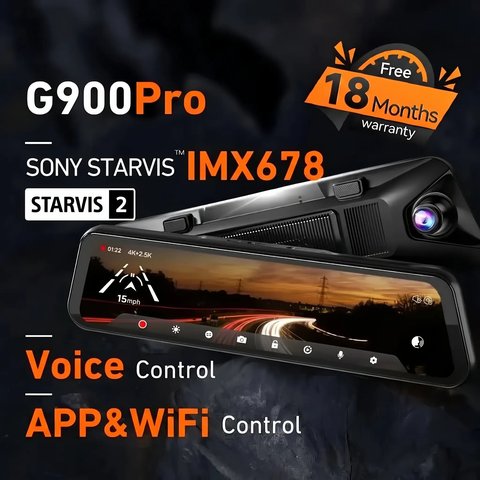
Key Specs
- 12″ IPS touchscreen mirror display
- 4K/30fps front camera, 2.5K/30fps rear camera, both using the STARVIS 2 IMX678 8MP sensor
- 5.8GHz WiFi for fast footage transfer to the WOLFBOX app
- 12 voice commands for hands-free operation
- 128GB microSD card included, supports up to 512GB
- Built-in GPS, G-sensor collision detection, and loop recording
- 18-month manufacturer warranty
- Price tier: Premium mirror dash cam, roughly $250-$360 depending on bundle and promotions
- Compatibility: Fits most standard rearview mirror widths via included straps; works with 12V vehicle power or an optional hardwire kit for parking mode
Why the Sensor Choice Matters
STARVIS 2 is Sony’s newer low-light sensor generation, and it’s the main reason the G900 Pro holds up better than older mirror cams once the sun goes down. License plates and road signs that would blow out or wash into noise on a cheaper sensor stay legible on this one, which is really the whole point of paying extra for a “Pro” version. In practice, this shows up most clearly at night in oncoming headlight glare, tunnel exits, and dimly lit parking garages, where cheaper sensors tend to either blow out highlights or lose detail in the shadows entirely.
The 8MP resolution of the sensor also matters beyond raw pixel count. It gives the camera more data to work with when processing high dynamic range scenes, which is why WOLFBOX markets this as one continuous improvement over the standard STARVIS sensor rather than just a resolution bump.
The included 128GB card is a real convenience over models that ship with 32GB or 64GB — you get several days of loop recording before old footage starts overwriting, instead of needing to buy a bigger card on day one.
Touchscreen and Voice Control in Daily Use
The 12″ IPS touchscreen doubles as your rearview mirror, showing a live feed from the rear camera by default. This is wider and less distorted than a standard mirror in most cases, since the rear camera’s field of view covers more of what’s directly behind the vehicle. The 12 built-in voice commands cover the basics — taking a photo, locking the current clip, toggling WiFi, and switching between front and rear views — so you rarely need to touch the screen while driving.
- Voice commands work reliably in a quiet cabin but can struggle over loud road or wind noise at highway speed
- The touchscreen response is generally smooth, though cold weather can slow touch sensitivity slightly on some units
- Screen brightness auto-adjusts for day and night driving, which helps avoid glare at night
Installation Basics
- Slide the G900 Pro over your factory mirror and secure it with the included straps
- Route the rear camera cable along the headliner and A-pillar to the back window or license plate
- Connect power through the 12V adapter, or a hardwire kit for parking mode
- Pair the WOLFBOX app over WiFi to pull clips without removing the card
- Format the included microSD card on first use to ensure it’s optimized for continuous loop recording
Most installs take under 30 minutes for someone comfortable with basic cable routing. The straps that hold the unit over your factory mirror fit most standard mirror widths, though it’s worth double-checking measurements if your vehicle has an unusually narrow or wide mirror.
For full specs and current pricing, see WOLFBOX’s official G900 Pro product page.
GPS, G-Sensor, and Loop Recording Explained
The built-in GPS logs your route, speed, and timestamp alongside the video, which is useful evidence if you ever need to dispute a traffic citation or insurance claim. The G-sensor works alongside this by automatically locking a clip when it detects a sudden impact or hard braking, protecting that footage from being overwritten by the normal loop recording cycle.
Loop recording itself works in fixed-length segments, typically 1 to 3 minutes each, continuously overwriting the oldest unprotected segment once the card fills up. This is standard behavior across most modern dash cams, but it’s worth understanding so you know why footage from days or weeks ago may no longer be available unless it was manually protected or downloaded.
Who Should Consider a Different Model
If active safety alerts matter more to you than raw video quality, the G850 Pro’s ADAS suite (lane departure, forward collision, and blind spot warnings) will likely serve you better despite its lower rear-camera resolution. And if you don’t need the 12″ mirror form factor at all, WOLFBOX’s compact X5 dash cam offers similar sensor technology in a smaller, less conspicuous body.
Frequently Asked Questions
Does the touchscreen replace the actual rearview mirror function?
No, the display shows the rear camera feed by default, functioning as a mirror replacement, though you can toggle back to a reflective view depending on the unit’s settings.
Is parking mode included out of the box?
Parking mode needs a hardwire kit for continuous power; check whether your specific bundle includes one.
Can I use a card larger than 128GB?
Yes, the G900 Pro supports up to 512GB, though you’ll need to buy a larger card separately if you want more than the included 128GB.
Does 5.8GHz WiFi work with every phone?
Most modern smartphones support 5.8GHz WiFi, but it’s worth checking your phone’s specs if it’s an older model.
How long does footage stay before it’s overwritten?
This depends on your card size and recording resolution, but the included 128GB card typically holds several days of loop recording before the oldest clips start getting overwritten.
Is the G900 Pro difficult to remove if I sell the car?
No, the strap-mount design is meant to be removable without leaving adhesive residue, so it transfers easily between vehicles.
Common Setup Problems and a Manual Fix
Most G900 Pro complaints trace back to a small set of setup issues rather than actual hardware faults, and nearly all of them are fixable without contacting support.
- App won’t connect over WiFi: confirm your phone is joining the dash cam’s own 5.8GHz network rather than trying to connect through your home or car WiFi, since the G900 Pro creates its own direct hotspot for app pairing.
- Voice commands stop responding: road and wind noise at highway speed can drown out the microphone, so speak the command clearly and slightly louder, or fall back to the touchscreen if the cabin is especially loud.
- Rear camera image is flipped or mirrored incorrectly: check the image orientation setting in the on-screen menu, since this can toggle unexpectedly after a firmware update.
- MicroSD card errors or won’t record: reformat the card directly through the G900 Pro’s own menu rather than a computer, since dash cams need a specific formatting structure for reliable loop recording.
- Touchscreen feels unresponsive in cold weather: this is a known limitation of capacitive touchscreens in low temperatures, and it typically improves once the cabin warms up.
If the touchscreen or app becomes unusable for any reason, the manual fallback is simple: the G900 Pro still functions as a basic always-on dash cam even without app access, continuing to record and loop footage to the microSD card, which you can then remove and view directly on a computer with a card reader.
Conclusion
The G900 Pro earns its “Pro” label mainly through the STARVIS 2 sensor and generous included storage, both of which matter more in daily use than the spec sheet alone suggests. It’s a strong pick if low-light clarity and fast WiFi transfers are priorities over price, though drivers who specifically want ADAS collision warnings should look at the G850 Pro instead, since this model skips those features in favor of raw video quality.
Ryan
CS graduate · tests every camera and driver he writes about firsthand