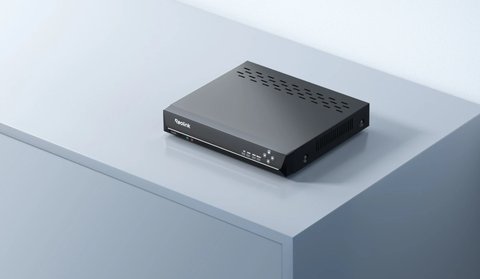
Reolink NVRs ship with a matched power adapter rated specifically for that model’s power draw, which matters more than it might seem since an NVR has to power both its own operations and, on PoE models, potentially several connected cameras through the same unit. Here’s what the default adapters look like and when a third-party replacement is actually a reasonable option.
| Factor | Default Reolink Adapter | Third-Party Adapter |
|---|---|---|
| Voltage Match | Exact, factory-matched to the model | Varies; must verify manually before buying |
| Wattage Rating | Sized for NVR draw plus full PoE camera budget | Often generic; may undersize PoE headroom |
| Upfront Cost | Moderate, sold as an official replacement part | Usually cheaper |
| Build Quality Control | Consistent, factory-tested | Inconsistent across unbranded brands |
| Camera Dropout Risk | Low, when adapter is healthy | Higher if underpowered or mismatched |
| Cable Length Options | Fixed, standard length | Sometimes longer, useful for awkward mounts |
| Best Use Case | Primary, long-term power source | Emergency backup or budget-constrained setups |
Default Reolink NVR Power Adapters
- Reolink’s PoE NVR models, like the RLN8-410 and RLN16-410, typically ship with a 48V or 53V DC adapter rated to cover both the NVR’s own draw and power delivery to connected PoE cameras
- The adapter’s wattage is matched to the number of PoE ports and their maximum combined power budget for that specific model
- Reolink documents the exact voltage and wattage specification for each NVR model in its official product specification sheets
Using a Third-Party Adapter Instead
PROS
- Useful as a backup if the original adapter fails and a replacement isn’t immediately available
- Can be cheaper upfront than an official Reolink replacement part
- Some third-party adapters offer a longer cable length, useful for awkward mounting locations
CONS
- An underpowered adapter can cause connected PoE cameras to drop out or fail to power on, especially with several cameras drawing power at once
- Voltage mismatches, even small ones, can cause instability or long-term wear on the NVR’s power circuitry
- Cheap unbranded adapters have more inconsistent quality control than the matched original part
PoE NVRs are the case where adapter mismatch actually causes visible symptoms — an underpowered replacement often shows up as cameras dropping out under load rather than the NVR itself failing outright, which can be confusing to diagnose if you don’t suspect the power supply first.
What to Check Before Buying a Replacement
- Match voltage exactly; even a small difference from the original spec isn’t worth the risk
- Match or exceed the original wattage rating, especially on PoE models with several connected cameras
- Confirm the connector type and polarity match your specific NVR model
- Prefer a well-reviewed replacement from a known electronics brand over the cheapest unbranded option available
For exact power specifications by model, see Reolink’s official RLN8-410 product page or your specific NVR’s specification sheet on Reolink’s site.
Why PoE NVRs Are More Sensitive to Adapter Mismatch
A standalone device like a router or modem draws a fixed, predictable amount of power, so a slightly generic adapter rarely causes visible issues. A PoE NVR is different, since it has to distribute power out to every connected camera through the same supply that also runs its own processor, hard drive, and network chip. When several cameras power on at once, or a camera briefly draws more current during an IR night vision switch, the total demand spikes, and an adapter with thin wattage headroom can struggle to keep up.
This is why Reolink sizes its default adapters with the full camera count and PoE budget of each specific model in mind, rather than shipping a one-size-fits-all supply across its NVR lineup. An 8-channel and a 16-channel NVR from the same product family often ship with meaningfully different wattage ratings for exactly this reason.
Signs Your Adapter Is the Problem
Power issues on an NVR rarely present as an obvious failure message, so it helps to know the subtler symptoms:
- One or more cameras randomly drop offline, especially during periods when several cameras are recording motion simultaneously
- Cameras reboot or flicker briefly when another camera on the same NVR triggers night vision or an alert
- The NVR itself reboots unexpectedly under normal operation, unrelated to firmware updates
- A camera that works fine on its own PoE injector drops out only when connected through the NVR
Troubleshooting Power-Related NVR Problems
If you’re already seeing symptoms, work through these steps before assuming the NVR itself has failed.
- Cameras dropping out under load: Reduce the number of cameras actively recording at once if possible, or upgrade to a higher-wattage matched adapter rather than assuming a camera or cable fault.
- NVR won’t power on at all: Test the outlet with another device, check the adapter’s DC barrel connector for corrosion or looseness, and try a different cable if the adapter has a detachable one.
- Intermittent reboots with no clear pattern: Check ambient temperature around the NVR, since heat can compound marginal power issues; also inspect the adapter for warmth or a burning smell, which signals it’s being overworked.
- One camera consistently underperforms compared to others on the same NVR: Swap its PoE port with a working camera’s port to isolate whether the issue is the port, the cable run, or the camera itself, rather than the main adapter.
- New third-party adapter causes immediate instability: Double-check polarity and connector size match exactly, since a reversed or loose-fitting DC plug can cause instability even at the correct voltage and wattage.
Frequently Asked Questions
Can I buy a replacement adapter directly from Reolink?
Yes, Reolink sells matched replacement adapters for most NVR models through its official store or support channels.
How do I know if my adapter is underpowered?
Cameras dropping out under load, especially when multiple cameras are active at once, is a common symptom of an underpowered supply.
Does adapter choice affect hard drive reliability?
Indirectly; unstable power can affect any component in the NVR, including the drive, so a stable matched adapter is the safer choice long-term.
Is it risky to use a higher-wattage adapter than the original?
A higher-wattage adapter at the correct voltage is generally safe, since the device only draws what it needs; the voltage match matters more than exact wattage.
Conclusion
The default Reolink adapter is matched specifically to your NVR’s power needs, and that matters more on PoE models actively powering several cameras than it might on a simpler device. A third-party replacement can work fine as a backup if you match voltage and wattage carefully, but an official or well-reviewed matched adapter is the safer long-term choice.
Ryan T. is a PC hardware enthusiast with 15+ years of experience fixing drivers and testing consumer tech. He writes for softwaredriverdownload.com.