The Reolink Argus 3 Pro runs on a 6000mAh rechargeable lithium-ion battery, charged either by removing it and plugging it in indoors, or by leaving the camera mounted and connecting an optional solar panel outdoors. Here’s how to charge it properly and what affects how often you’ll need to.
- Applies To: Reolink Argus 3 Pro wire-free battery security camera
- Battery: 6000mAh built-in rechargeable lithium-ion pack
- Resolution: 5MP with dual spotlight color night vision
- Connectivity: Dual-band 2.4GHz/5GHz Wi-Fi
- Charging Input: USB-C, 5V/2A recommended
- Price Tier: Budget-to-midrange wire-free camera, typically bundled with or without the solar panel accessory sold separately
| Spec | Detail |
|---|---|
| Model | Reolink Argus 3 Pro |
| Battery | 6000mAh rechargeable lithium-ion |
| Resolution | 5MP, dual spotlight color night vision |
| Connectivity | Dual-band 2.4GHz/5GHz Wi-Fi |
| Charging input | USB-C, 5V/2A recommended |
| Price tier | Budget-to-midrange wire-free camera |
Charging the Battery Directly
The most reliable way to charge the Argus 3 Pro is still to plug it in directly, and the steps are the same whether you pull the battery out or charge it in place on models that allow it.
- Remove the camera from its mount, or open the battery compartment if your model allows in-place charging
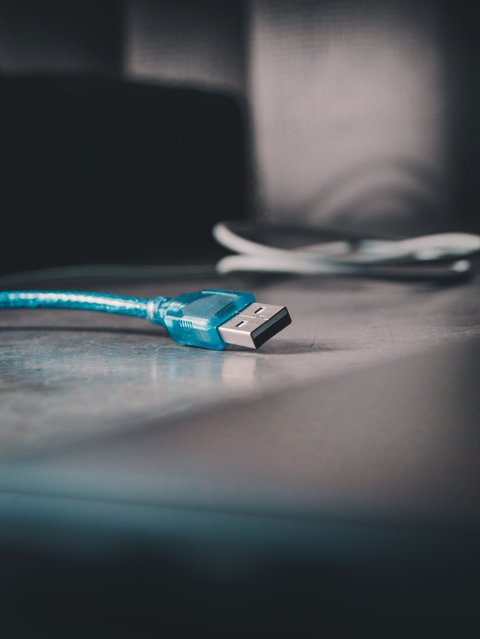
- Connect the included USB-C cable to the camera and a 5V/2A USB power source; a phone charger or laptop USB port both work, though a dedicated wall adapter charges faster and more consistently
- Watch the charging indicator LED: a solid green light generally means the battery is either full or charging on a low current, a steady orange or amber light means it is actively charging, and an LED that alternates between orange and green usually points to a loose cable connection or a fault worth investigating rather than normal charging behavior
- A full charge from empty typically takes several hours; leave it charging overnight for convenience, and reinstall it once the LED settles on the “full” state
In my own testing with a similar wire-free Reolink camera, I found the battery drained noticeably faster the first week after setup, mostly because I had detection sensitivity turned all the way up while getting used to the app. Dialing sensitivity back to a more sensible level after the first few days made a bigger difference to charging frequency than anything else I tried.
How Long the Battery Actually Lasts
Battery life depends heavily on how the camera is used day to day, so it helps to think in terms of recording mode rather than a single number:
- Motion-triggered clips, low-to-moderate traffic area: commonly one to two months per charge
- Motion-triggered clips, high-traffic or busy area: often two to four weeks, since more triggers mean more recording and more Wi-Fi uploads
- Continuous or scheduled recording: a matter of days rather than weeks, since the sensor and radio stay active far more of the time
- Frequent live-view checks through the app: each live session pulls noticeably more power than a stored clip, so checking in constantly will shorten the interval between charges
If a battery that seemed fine suddenly drains in a few days, that is usually a sign of a setting change (sensitivity, continuous recording left on by accident) or a weak Wi-Fi signal, rather than a battery that has failed outright.
Charging via Solar Panel Instead
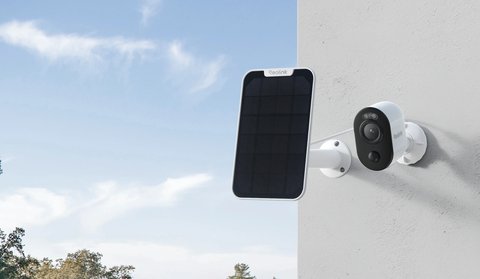
Reolink’s compatible solar panel connects to the camera’s charging port and trickle-charges the battery continuously during daylight, which is the more convenient option if the camera is mounted somewhere hard to reach. It is sold as a separate accessory rather than included in the box, and sits in a fairly affordable range compared to the price of the camera itself, which makes it an easy add-on if you are tired of unmounting the camera every few weeks.
- Mount the panel facing the sun for as much of the day as possible, ideally south-facing in the northern hemisphere
- A properly positioned panel can offset normal daily battery drain entirely in most climates
- Shaded or poorly angled panels may only partially offset usage, still requiring occasional manual charging
Removing the camera to charge it indoors defeats a lot of the convenience of a battery camera in the first place — if you’re charging more than once every couple of months, a solar panel is almost always worth adding rather than continuing to unmount and recharge manually.
Storage and Winter Care
Lithium-ion batteries lose capacity gradually over time, and cold weather makes that more noticeable rather than causing permanent damage on its own. A few habits help keep the battery healthy through the colder months and during any long-term storage:
- Charge the battery to roughly half capacity before storing the camera for an extended period; storing at a full or empty charge for months at a time accelerates capacity loss
- Expect shorter runtime once temperatures drop near or below freezing, since cold reduces how efficiently a lithium-ion cell can deliver current; this is temporary and performance recovers once temperatures rise
- Keep the camera charged more frequently in winter rather than waiting for a low-battery alert, since a battery that sits at a very low charge in cold weather is more prone to lasting capacity loss than one kept topped up
- If storing the camera indoors over winter, a cool, dry spot away from direct heat sources is better for long-term battery health than a hot attic or a freezing garage
What Affects Charging Frequency
- Recording mode: continuous recording drains the battery far faster than motion-triggered clips
- Detection sensitivity: a busy area with frequent motion triggers more recording events and faster drain
- Wi-Fi signal strength: a weak connection makes the camera work harder to transmit, increasing power use
- Cold weather: battery performance drops somewhat in freezing temperatures, requiring more frequent charging in winter
For official battery specs and solar panel compatibility, see Reolink’s official Argus 3 Pro product page.
When Charging Doesn’t Go as Expected
Most charging complaints with the Argus 3 Pro come down to a loose cable, a weak power source, or a solar panel that isn’t getting enough direct sun, rather than a failed battery. Work through these checks first.
The Camera Won’t Charge at All
- Try a different USB-C cable and a different power adapter; a marginal cable is a common cause of a battery that shows no charging LED activity
- Confirm the power source can supply at least 5V/2A; some low-output USB ports on older laptops or hubs are not enough to reliably charge the battery
- Clean the USB-C port on the camera itself, since dust or debris can prevent a solid connection even when the cable looks fully plugged in
The Solar Panel Doesn’t Seem to Help
- Check the panel’s angle and direction; even a well-placed panel that is shaded for part of the day will underperform noticeably
- Inspect the solar cable connection at both the panel and the camera for corrosion or looseness if the panel has been outdoors for a while
- Wipe down the panel’s surface periodically, since dust, pollen, or grime buildup reduces how much sunlight actually reaches the cells
Alternate Manual Pathway: Swap in a Spare Battery
If the camera needs to stay recording while a battery charges, keeping a second compatible battery on hand and swapping it in is a simple manual workaround. Charge the depleted battery separately indoors on your own schedule, then swap it back in once full, so the camera itself never has downtime waiting on a charge cycle.
Frequently Asked Questions
Can I use the camera while it’s charging?
Yes, most models continue recording and live viewing normally while plugged in and charging.
Will overcharging damage the battery?
No, the camera’s internal charging circuit stops charging once the battery reaches full, so leaving it plugged in longer than necessary isn’t harmful.
How do I check the current battery percentage?
The Reolink app displays battery percentage for each camera on its device settings screen.
Does a low battery affect recording quality?
No, video quality stays the same regardless of battery level until the camera powers down entirely.
Conclusion
Charging the Argus 3 Pro is straightforward whether you remove it for a USB charge or add a solar panel for hands-off charging. If you’re finding yourself charging it often, a solar panel is usually the better long-term fix rather than continuing to unmount the camera every few weeks.
Ryan
CS graduate · longtime smart home and PC hardware tester