Reolink, Amcrest, and Xiaomi all sell budget-to-midrange security cameras with local storage options and no mandatory subscription, but each brand leans differently on app polish, video quality, and how easy the ecosystem is to expand later. Here’s how the three actually stack up.
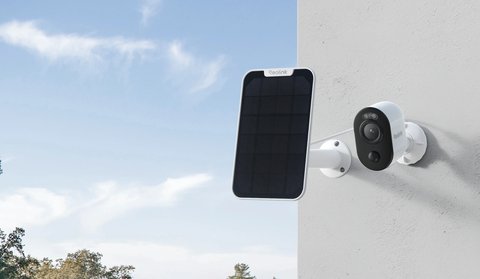
Reolink vs Amcrest vs Xiaomi: Side-by-Side Comparison
| Category | Reolink | Amcrest | Xiaomi |
|---|---|---|---|
| App experience | Generally polished and consistent across models | Functional, occasionally clunkier than Reolink’s app | Mi Home app, decent but more oriented around Xiaomi’s broader ecosystem |
| Video quality | Strong for the price, up to 4K on flagship models | Often edges out Reolink in raw image detail | Generally the most budget-focused of the three, lower typical resolution |
| Subscription requirement | None for local recording; optional cloud plans from $3.49 | Free tier available; paid plans from $1.99 add AI features | Varies by region; local SD recording generally free |
| Product range | Broadest — cameras, NVRs, locks, battery/solar options | Narrower, mostly cameras and NVRs | Tied into Xiaomi’s wider smart home lineup |
| Warranty | 2-year standard | 1-year standard | Varies by region and retailer |
| Ease of setup | Generally considered the easiest of the three | Slightly more setup steps in some models | Straightforward but ties you into the Mi Home ecosystem |
| Night vision | Color night vision on many models (starlight sensor), plus standard IR options | Mostly traditional IR (monochrome) night vision, with color night vision on select newer models | Standard IR night vision on most models, resolution-dependent range |
| Power options | Battery/solar wireless models plus PoE and plug-in wired models, depending on line | Primarily PoE wired, with some WiFi plug-in models | Mostly plug-in WiFi, limited battery or PoE options compared to the other two |
| Typical price range | Budget to midrange, roughly $50-$150 for most consumer models | Similar to slightly above Reolink on comparable resolution, often $60-$190 | Generally the most budget-oriented of the three |
None of the three brands are a clear universal winner. Reolink tends to win on ease of use and product range, Amcrest edges ahead on raw image quality in some head-to-head reviews, and Xiaomi appeals most to people already invested in the broader Xiaomi smart home ecosystem.
When Reolink Makes More Sense
- You want the widest range of compatible hardware — NVRs, locks, and both PoE and battery cameras from one brand
- Ease of setup and app polish matter more than squeezing out the last bit of image detail
- A longer 2-year warranty matters to you
When Amcrest or Xiaomi Make More Sense
- Amcrest is worth considering if you specifically want the sharpest image quality at a similar price point
- Xiaomi makes sense mainly if you’re already deep in the Xiaomi smart home ecosystem and want everything under one app
- Both are reasonable picks if you don’t need Reolink’s broader hardware lineup
Most side-by-side reviews land in a similar place: all three are competent budget-to-midrange options, and the deciding factor tends to be less about raw specs and more about which ecosystem you’re already invested in.
For current Reolink lineup details, see Reolink’s official camera comparison page.
Setting Up Each Brand: What Actually Differs
All three follow the same general pattern — download the app, create an account, power on the camera, and scan a QR code or enter a network name and password — but the details diverge enough to matter for a first-time buyer.
- Reolink: the app walks you through adding a camera with clear on-screen prompts, and battery models pair over WiFi directly without needing an intermediate hub for most single-camera setups. Adding an NVR later, if you expand your system, is a separate but similarly guided process.
- Amcrest: setup is functional but occasionally requires a firmware update mid-process before the camera fully connects, which can feel like an extra unexpected step compared to Reolink’s more linear flow. PoE models need a compatible PoE switch or injector, which is an added purchase some first-time buyers do not anticipate.
- Xiaomi: setup happens through the Mi Home app, and the process is straightforward if you are already using Mi Home for other devices, since the camera just joins your existing account and device list. If this is your first Xiaomi product, there is a bit of extra friction creating a regional Mi account correctly, since account region affects which servers and features are available.
Companion App Differences in Daily Use
Beyond initial setup, the apps differ in how pleasant they are to actually live with day to day. Reolink’s app groups multiple cameras cleanly, supports local playback scrubbing that feels responsive even over a modest home connection, and keeps push notification settings per-camera rather than as one global toggle. Amcrest’s app covers the same core functions but has a slightly more dated interface in places, and some users report needing to dig a bit further into menus to find motion zone or sensitivity settings that Reolink surfaces more prominently. Xiaomi’s Mi Home app is genuinely strong if you already have other Xiaomi smart home devices, since everything lives in one place, but as a single-purpose security camera app in isolation it carries more unrelated menu clutter than the other two.
All three support local SD card playback without a subscription, but the polish of that playback experience — how easily you can scrub to a specific timestamp, export a clip, or search by motion event — is noticeably better on Reolink and Amcrest than on Xiaomi in most side-by-side comparisons.
Real-World Use Case Scenarios
- Renter watching a front door with no wiring access: a Reolink or Amcrest battery/WiFi model makes the most sense, since neither requires drilling for a PoE run, and Reolink’s broader battery lineup gives more size and mounting options to choose from.
- Homeowner building a multi-camera PoE system from scratch: Amcrest’s stronger ONVIF compliance and NVR compatibility can be an advantage if you want flexibility to mix in other ONVIF-compatible hardware down the line, though Reolink’s own NVR lineup is a simpler same-brand path.
- Household already using Xiaomi smart plugs, bulbs, or a vacuum: a Xiaomi camera slots into the existing Mi Home app without adding a fourth or fifth app to manage, which is a real convenience even if the camera’s specs alone are not class-leading.
- Buyer prioritizing night-time footage detail: Reolink’s color night vision models generally produce more usable nighttime footage than a comparably priced Xiaomi camera, since full-color low-light footage tends to make identifying details, like clothing color, meaningfully easier than grayscale IR footage.
Common Setup Problems and an Alternate Path
A handful of setup issues show up across all three brands often enough to be worth calling out generally, along with a fallback if the standard app-based setup fails.
- Camera won’t join WiFi during setup: confirm you’re connecting to a 2.4GHz network specifically, since many budget cameras across all three brands do not support 5GHz for initial pairing even if the router broadcasts both bands under the same name.
- QR code pairing fails repeatedly: increase phone screen brightness and hold it steady at the distance specified in the app’s instructions, since a dim or too-close QR code is a common and easily fixed cause.
- Camera drops offline intermittently: move the router or a WiFi extender closer to the camera’s location, since marginal signal strength causes more dropouts than any brand-specific software issue.
- PoE camera not powering on (Amcrest and similar): confirm your PoE switch or injector actually supplies power on that port, since not every switch port is PoE-enabled even on switches that support it elsewhere.
- App shows camera as offline despite the light being on: force-close and reopen the app, and if that fails, power-cycle the camera itself, since a stuck app-to-camera handshake is more common than an actual hardware fault.
If app-based WiFi setup continues failing on any of the three brands, the manual fallback is a wired Ethernet connection during initial setup where the camera model supports it, which bypasses WiFi pairing issues entirely and lets you configure WiFi credentials afterward through the camera’s own settings menu instead.
Frequently Asked Questions
Which brand has the best free tier?
All three support local recording without a subscription; Reolink and Amcrest both offer clearly documented free tiers alongside optional paid cloud plans.
Can I mix brands on one NVR?
Generally no; each brand’s NVR is built primarily for its own cameras, with only limited ONVIF-based third-party support on select models.
Is Xiaomi as widely available as Reolink and Amcrest?
Availability varies more by region for Xiaomi compared to the more globally consistent availability of Reolink and Amcrest.
Which brand is easiest for a first-time buyer?
Reolink is generally considered the most beginner-friendly across setup, app design, and available documentation.
Conclusion
Reolink, Amcrest, and Xiaomi all cover the budget-to-midrange security camera space competently, and the right pick depends more on ecosystem fit than a single standout spec. If you want the broadest hardware lineup and easiest setup, Reolink is the safer default; if raw image quality is the priority, it’s worth comparing Amcrest models directly.
Ryan holds a Computer Science degree and has over 20 years of hands-on experience with PC hardware, software, and smart home devices.