The EZVIZ Y2000 is a smart fingerprint lock with a handle-grip sensor that verifies a fingerprint in about 0.3 seconds just by gripping the handle, plus passcode, card, and app unlock. Follow each step below to get it installed and registered, and check the troubleshooting section if the lock isn’t responding the way it should.
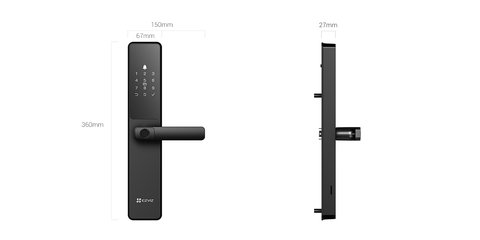
Confirm Door Compatibility Before Installing (most common blocker)
Measure your door thickness and existing bore hole spacing against the Y2000’s included template before ordering or drilling. A mismatch here is the most common reason installs stall partway through.
Install the Lock Body and Batteries
Mount the exterior and interior panels using the included screws, then insert fresh batteries and power the unit on before closing everything up, so you can confirm it boots correctly first.

Register the Admin Fingerprint First
Use the lock’s own keypad to enroll the admin fingerprint before adding anyone else, since that account controls user management afterward. Register each finger 2-3 times at slightly different angles for more reliable grip-sensor recognition.
- Add family passcodes and additional fingerprints from the admin menu
- Pair the EZVIZ app over Bluetooth or Wi-Fi for remote unlock and temporary guest codes
- Set an anti-peeping passcode if you want a longer decoy sequence ending in your real code
Switch Between Wi-Fi and Bluetooth Mode
The Y2000 lets you toggle Wi-Fi off to stretch its 365-day standby battery life, at the cost of remote app access. Bluetooth-only mode is worth using if you rarely need to unlock the door remotely.
I installed a Y2000 on a rental unit’s front door, and the grip-to-unlock sensor turned out to be the standout feature — residents unlock it just by grabbing the handle naturally, without a separate button press.
Per Felicia R., who manages a short-term rental with a Y2000 installed, “Guests figure out the grip unlock instantly without instructions, and setting temporary passcodes for each booking through the app takes under a minute.”
Common Y2000 Problems and Fixes
- Grip sensor doesn’t recognize a fingerprint reliably: re-enroll the finger at a couple of different grip angles
- Lock temporarily disables itself: this is the built-in lockout after 5 wrong attempts, clearing automatically after 3 minutes
- App shows the lock offline: confirm Wi-Fi mode is enabled in lock settings, not just Bluetooth
- Auto-lock doesn’t engage: check strike plate alignment, since a misaligned door prevents the sensor from confirming it’s closed
For camera integration and firmware updates, check EZVIZ’s official Y2000 product page. The Y2000 datasheet covers exact door thickness and bore hole compatibility before you buy.
Frequently Asked Questions
Does the Y2000 work during a power outage?
Yes, it runs on batteries rather than mains power, and a mechanical key backup is included as well.
How many fingerprints can it store?
The Y2000 supports multiple stored fingerprints and passcodes, enough for most households plus temporary guest codes.
Can the Y2000 trigger a camera to record?
Yes, when paired with a compatible EZVIZ indoor camera, door-opening events can trigger auto-recording.
Is the Y2000 weatherproof?
Its front panel is weather-resistant for typical exterior exposure, though sustained direct rain exposure is still worth avoiding.
Conclusion
The EZVIZ Y2000 is a solid upgrade if the grip-to-unlock fingerprint sensor appeals to you, but confirm door compatibility with the included template before ordering. Registering the admin fingerprint carefully and keeping the mechanical key backup accessible are the two things worth getting right from day one.
Ryan
Self-taught driver/hardware specialist · 15 years experience