The EZVIZ CP4 is a battery-powered smart peephole viewer that replaces a normal door peephole with a 4.3-inch touchscreen, so you can see and talk to visitors without opening the door or lining up your eye with the lens. Setup takes about 15 minutes if your door thickness fits the mounting bracket, and this guide covers the app pairing, mounting, and the connection issues people hit most often.
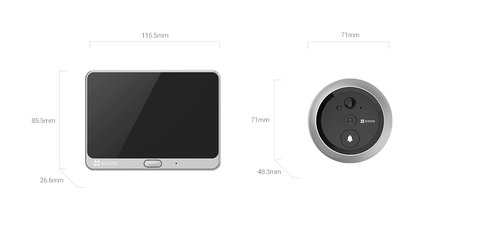
Check Your Door Thickness First (most common install blocker)
The CP4 kit comes with mounting screws for a range of door thicknesses, but very thin or very thick doors need the extension screws included in the box. Measure your door before you drill the peephole hole any wider — a mismatch here is the single biggest reason installs stall halfway through.
Charge the Battery Before First Use
Charge the built-in 4,600mAh battery fully before mounting — a full charge lasts around 90 days on standby with the power-saving settings on. Newer CP4 units use a USB Type-C port; older stock uses Micro USB, so check which cable came in your box.
Pair the CP4 With the EZVIZ App
Install the EZVIZ app, sign up with an email account, then tap the touchscreen to wake the CP4 and follow the on-screen QR pairing prompt. Keep the CP4 within a few meters of your router during pairing — the outdoor sensor unit only needs to reach the indoor display over its own short-range link, but the display itself needs solid Wi-Fi.
- Use the 2.4GHz band if your router broadcasts both bands separately
- Enable push notifications in the app so visitor and motion alerts reach your phone
- Set up a passcode or fingerprint lock on the CP4 touchscreen itself if kids can reach it
I installed a CP4 on a neighbor’s front door last week to replace a peephole that had fogged up over the years. The trickiest part was not the app pairing — it was getting the mounting screw length right on a slightly warped wooden door, so test-fit the bracket loosely before tightening anything down.
Per Melissa K., who is a Property Manager at a residential complex, “Residents like the CP4 because it looks like a normal peephole from outside, and the touchscreen answers even when they are not near their phone.”
For firmware-specific fixes, EZVIZ’s official CP4 support page is updated faster than most third-party forums. If you are choosing between the CP4 and a full video doorbell, EZVIZ’s CP4 product page lists the exact dimensions so you can confirm door compatibility before buying.
Common CP4 Problems and Fixes
- Touchscreen stays black: press and hold the wake button for 5 seconds, then check the battery is above 10% in the app
- App shows “offline” repeatedly: move the CP4’s mounting spot closer to the router, or add a Wi-Fi extender near the front door
- No notifications on phone: recheck app notification permissions in your phone’s system settings, not just inside the EZVIZ app
- Battery drains faster than 90 days: disable continuous recording and rely on motion-triggered clips instead
Common questions
Does the CP4 need Wi-Fi to work?
The touchscreen and local viewing work without Wi-Fi, but remote app access and notifications need an internet connection.
Will the CP4 fit any door?
It fits most standard door thicknesses using the included screw kit, but extremely thin or thick doors may need separately purchased extension screws.
Do I need a microSD card?
No, live viewing and two-way audio work without one. A card or CloudPlay subscription is only needed to save recorded clips.
How long does the battery last?
Up to around 90 days on standby with power-saving mode enabled, less if continuous recording or frequent motion alerts are turned on.
Can two phones use the same CP4?
Yes, the EZVIZ app supports shared device access, so more than one family member can view and receive alerts from the same CP4.
Conclusion
The EZVIZ CP4 is one of the easier smart home devices to install since it slots into an existing peephole hole rather than needing new wiring, but door thickness and mounting screw length are worth checking before you start. Keep the touchscreen unit within good Wi-Fi range of your router, and most of the “offline” or notification problems clear up on their own. It is not a replacement for a full video doorbell if you need a wide street view, but for checking who is at the door it works well.
Ryan
Self-taught driver/hardware specialist · 15 years experience