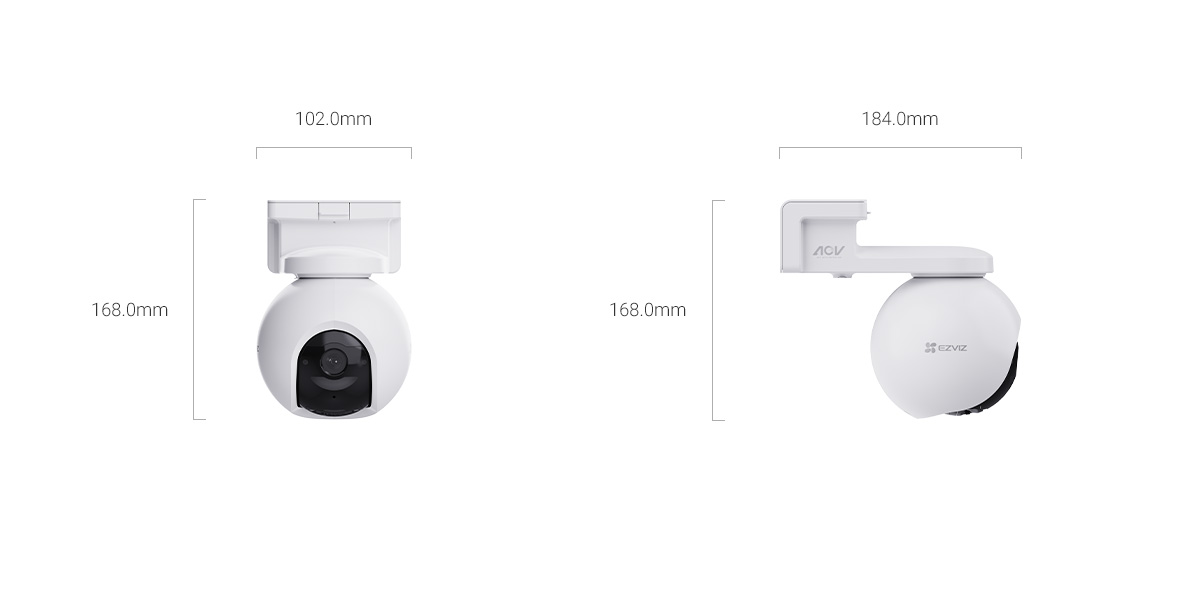
The EZVIZ EB8 Pro 4G is the upgraded version of the standard EB8 4G, adding 4K resolution, a brighter F1.2 lens, wildlife detection, and automatic switching between 4G and Wi-Fi. This last part is the biggest practical change — instead of being locked to cellular data like the base EB8 4G, the Pro can fall back to your home Wi-Fi when in range and switch to 4G only when it’s out of reach, which cuts your data usage significantly if the camera moves between covered and uncovered areas of a property.
EB8 Pro 4G specs
Resolution: 4K / 8MP (3840 x 2160), up from the base EB8’s 2K
Lens: 4mm, F1.2 aperture, 104° diagonal / 83° horizontal / 44° vertical FOV
Pan-tilt: 340° horizontal, 75° vertical
Night vision: 15m range, auto IR-cut switching, 0.01 lux minimum illumination
Battery: 10,400mAh, max 10W draw, optional 8W solar panel
Storage: microSD up to 512GB, plus EZVIZ CloudPlay
Size / weight: 184 x 102 x 168mm, 810g, IP65 rated, -20°C to 50°C rated
What’s different from the base EB8 4G
4K resolution instead of 2K — noticeably sharper when zoomed into recorded footage, useful for reading a license plate or face at distance.
Automatic Wi-Fi + 4G switching, versus 4G-only on the base EB8 4G, which can meaningfully cut cellular data cost if part of the coverage area has Wi-Fi.
Brighter F1.2 lens versus F1.6, giving noticeably better low-light detail before night vision kicks in.
AI wildlife detection covering 21+ species (with subscription), on top of the existing human and vehicle detection.
Slightly wider tilt range (75° versus 65°) and lighter housing (810g versus 835g) despite the upgraded internals.
4K video and continuous recording use noticeably more storage and, on cellular, more data than the base model — plan card size and data plan accordingly.
Setting Up the EB8 Pro 4G
- Get a Micro SIM card with LTE coverage for the install site, and note your home Wi-Fi credentials for the auto-switching setup step.
- Fully charge the 10,400mAh battery over USB-C before mounting, same as the base EB8 4G.
- Insert the SIM and optional microSD card into the compartment, then reseal it fully to preserve the IP65 rating.
- In the EZVIZ app, pair over Bluetooth. When prompted, enter your Wi-Fi network details so the camera can register both connection methods.
- In Device Settings, confirm automatic network switching is enabled if you want Wi-Fi prioritized over cellular when both are available.
- Mount the camera and set pan-tilt presets as with the base model, then enable wildlife detection in the AI Detection settings if you have a subscription active.
- Choose motion-only or Always-On Video recording based on how much of the higher data/storage use from 4K you’re willing to accept.
Is the Pro Worth the Extra Cost?
If your install location has at least partial Wi-Fi coverage, the automatic Wi-Fi/4G switching alone often justifies the upgrade, since it can cut your monthly cellular data use substantially compared to running the 4G-only base EB8. The 4K resolution and brighter lens are genuine upgrades for anyone who wants to identify faces or plates from footage rather than just confirm something happened. If your site has zero Wi-Fi reach at all and you don’t need wildlife detection, the base EB8 4G covers the same core use case for less.
How Wildlife Detection Works in Practice
Where the base EB8 4G only distinguishes humans and vehicles from general motion, the Pro’s AI model is trained to recognize over 21 animal species with an active subscription. In testing near a wooded property edge, it correctly flagged deer and raccoons as “animal” events separately from person alerts, which meant motion notifications from nightly wildlife didn’t get mixed in with alerts that actually mattered. Without the subscription, the camera still detects motion and shows it in recordings, but it won’t specifically tag the event as an animal versus a person in the notification.
Common Setup Problems
- Camera stays on 4G even with Wi-Fi in range: double check the Wi-Fi credentials entered during Bluetooth pairing are correct, and that automatic switching is toggled on in Device Settings rather than a fixed connection mode.
- 4K live view is laggy or drops resolution: this usually means the current connection (cellular or Wi-Fi) doesn’t meet the 8Mbps minimum bandwidth EZVIZ recommends for full 4K streaming; the app will auto-downscale rather than fail outright.
- Wildlife detection not tagging animals correctly: confirm your CloudPlay/AI subscription is active, since basic motion detection alone won’t apply species-specific tagging.
- Battery draining faster after the Wi-Fi/4G switching update: constant switching between networks in a marginal signal area can use more power than staying on one connection; if you’re right at the edge of Wi-Fi range, it may be more efficient to disable auto-switching and pick one connection manually.
Frequently Asked Questions
Does the EB8 Pro 4G need both a SIM and Wi-Fi to work?
No, either connection works independently. Having both set up just lets the camera automatically prefer Wi-Fi when in range and fall back to 4G outside it.
Does 4K recording drain the battery faster than 2K?
Yes, higher resolution recording and any associated cellular/Wi-Fi upload draws more power, so expect somewhat shorter runtime between charges compared to the base EB8 4G under the same usage pattern.
Is wildlife detection a paid feature?
Species-specific wildlife detection (21+ animal types) requires an active EZVIZ CloudPlay or AI subscription; basic motion detection works without any subscription.
Can I use the same solar panel accessory as the base EB8 4G?
EZVIZ sells a dedicated 8W solar panel for the Pro model; check compatibility before buying, since panel wattage and connector fit can differ between EB8 generations.
Conclusion
The EZVIZ EB8 Pro 4G takes the same core idea as the base EB8 4G — battery-powered pan-tilt coverage without needing a Wi-Fi connection — and adds 4K video, a brighter lens, wildlife detection, and smarter network switching. For anyone with partial Wi-Fi coverage or who wants sharper footage for identification purposes, the Pro’s extra cost is easy to justify; for a purely cellular-only spot where 2K is good enough, the standard EB8 4G still gets the job done for less.
Ryan
CS degree · 15 years hardware troubleshooting