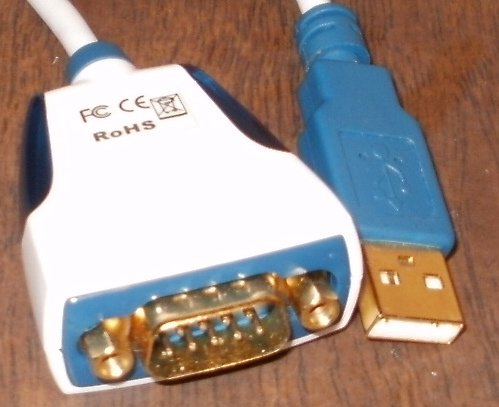
The FTDI FT232RL driver is the VCP (Virtual COM Port) driver from FTDI Chip that makes a USB to TTL serial adapter show up as a normal COM port in Windows, so Arduino IDE, PuTTY, or any serial terminal software can talk to it. Without the driver, the adapter is detected as a generic USB device but never gets a COM port number.
| Spec | Detail |
|---|---|
| Applies To | FT232RL USB-to-TTL breakout boards, USB-serial cables, Arduino programmers |
| Publisher | Future Technology Devices International (FTDI) |
| Driver Package | FTDI VCP (Virtual COM Port) driver |
| Version | Check FTDI’s site for the current signed release |
| File Size | Roughly 5–10 MB |
| Requirements | Windows 10 and Windows 11, both architectures |
I have used FT232RL breakout boards for years flashing bootloaders on bare AVR chips and talking to embedded Linux boards over serial console. On a genuine FTDI board the driver almost always installs itself through Windows Update, but I have also run into the well-known “fake FTDI chip bricking” issue on a batch of cheap breakout boards, where FTDI’s own driver deliberately disables counterfeit chips.
Download the Official VCP Driver
Get the current VCP driver from FTDI’s official VCP drivers page. Choose the setup executable version for the simplest install, rather than the manual zip unless you specifically need it.
Run the Setup Executable
Run the CDM installer as Administrator before plugging in the FT232RL board. This registers the driver with Windows so it applies automatically the moment the device is detected.
Plug In the Adapter
Connect the FT232RL board via USB. Windows should assign it a COM port automatically within a few seconds, visible in Device Manager under Ports (COM & LPT).
Note the COM Port Number
Check Device Manager for the assigned COM port number (e.g. COM5). You will need to select this same port inside Arduino IDE, PuTTY, or whatever serial tool you are using.
Per Alex M., who is a Firmware Developer at an electronics hobbyist company, “Once you get burned by a counterfeit FT232RL chip getting bricked by FTDI’s driver, you start buying only from trusted sellers — the genuine boards have never given me a single driver problem in years of use.”
Fixing “Device Not Recognized” or Missing COM Port
The Counterfeit Chip Problem
FTDI’s driver checks the chip’s internal ID during certain driver versions, and if it detects a known counterfeit chip signature, it can set the PID to 0000 so the device stops working entirely, even under a fresh driver reinstall. If your board suddenly stops enumerating after a driver update, this is the first thing to suspect — especially with very cheap boards from unknown sellers.
Wrong or Outdated Driver Version
- Uninstall the current driver from Device Manager with “Delete the driver software” checked
- Download the latest signed CDM driver fresh from FTDI’s site
- Reboot before plugging the adapter back in
Registry Conflicts from Multiple FTDI Devices
If you use several FT232RL boards, Windows can assign each one a different COM port and sometimes runs out of low numbers, jumping to COM20 or higher. This is stored under HKEY_LOCAL_MACHINE\SYSTEM\CurrentControlSet\Enum\FTDIBUS and can be reset by uninstalling unused “ghost” devices through Device Manager’s “Show hidden devices” view.
Manual Install via Device Manager (Fallback)
If the CDM setup executable will not run because of a policy restriction, download the manual driver zip from FTDI instead. Extract it, open Device Manager, find the unrecognized FT232RL device, choose Update Driver > Browse My Computer for Drivers, and point it at the extracted folder containing the ftdiport.inf and ftdibus.inf files.
FT232RL vs CH340 vs CP2102
| Chip | Driver Signing | Max Speed | Notes |
|---|---|---|---|
| FTDI FT232RL | Signed, official Windows Update support | 3 Mbaud | Widely trusted, counterfeit-chip issue exists |
| CH340 | Unsigned on older Windows builds | 2 Mbaud | Very cheap, common on Arduino clones |
| Silicon Labs CP2102 | Signed | 1 Mbaud | Reliable, common on ESP32 boards |
Frequently Asked Questions
Do I need a driver for FT232RL on Windows 11?
Usually Windows Update installs it automatically, but downloading the current VCP driver directly from FTDI avoids version mismatches with certain serial software.
Why did my FT232RL board stop working after a Windows update?
This is most often the counterfeit-chip detection in a newer driver version. Check if your board is genuine, and if it is a known clone, use an older driver version from FTDI’s archive that does not include the chip-blocking check.
How do I find which COM port my FT232RL is using?
Open Device Manager and expand Ports (COM & LPT) — it will list as “USB Serial Port (COMx).”
Can I use FT232RL with macOS or Linux?
Yes, FTDI provides VCP drivers for macOS, and Linux distributions typically include the ftdi_sio kernel driver built in already.
What is the difference between VCP and D2XX drivers?
VCP makes the device look like a standard COM port for general serial software, while D2XX is a direct API for custom applications that need lower-level access — most Arduino and hobbyist use cases only need VCP.
How do I check if my FT232RL chip is genuine?
FTDI’s FT_Prog utility can read the chip’s internal EEPROM and report its true manufacturer ID. A quick visual check also helps — genuine chips usually have crisp, evenly spaced laser-etched markings, while some counterfeits show slightly blurred or inconsistent text under a loupe.
Can I roll back to an older FTDI driver on purpose?
Yes, FTDI keeps older driver versions archived on its site. Uninstall the current driver completely, download the older version you need, and install it before reconnecting the board — useful for legacy equipment that was validated against a specific driver release.
Conclusion
Most FT232RL driver problems on Windows come down to either an outdated driver version or a counterfeit chip getting flagged by FTDI’s own protection logic. Download the current VCP driver directly from FTDI, install it before plugging in the board, and check Device Manager for the assigned COM port before opening your serial software. If you suspect a fake chip, sourcing a genuine board is usually less frustrating than fighting driver versions.
Ryan holds a Computer Science degree and has over 20 years of hands-on experience with PC hardware, software, and driver troubleshooting. He is the author behind softwaredriverdownload.com, where he helps everyday users fix driver issues quickly and accurately.