Follow each step in order until the headset is detected and sound works normally.
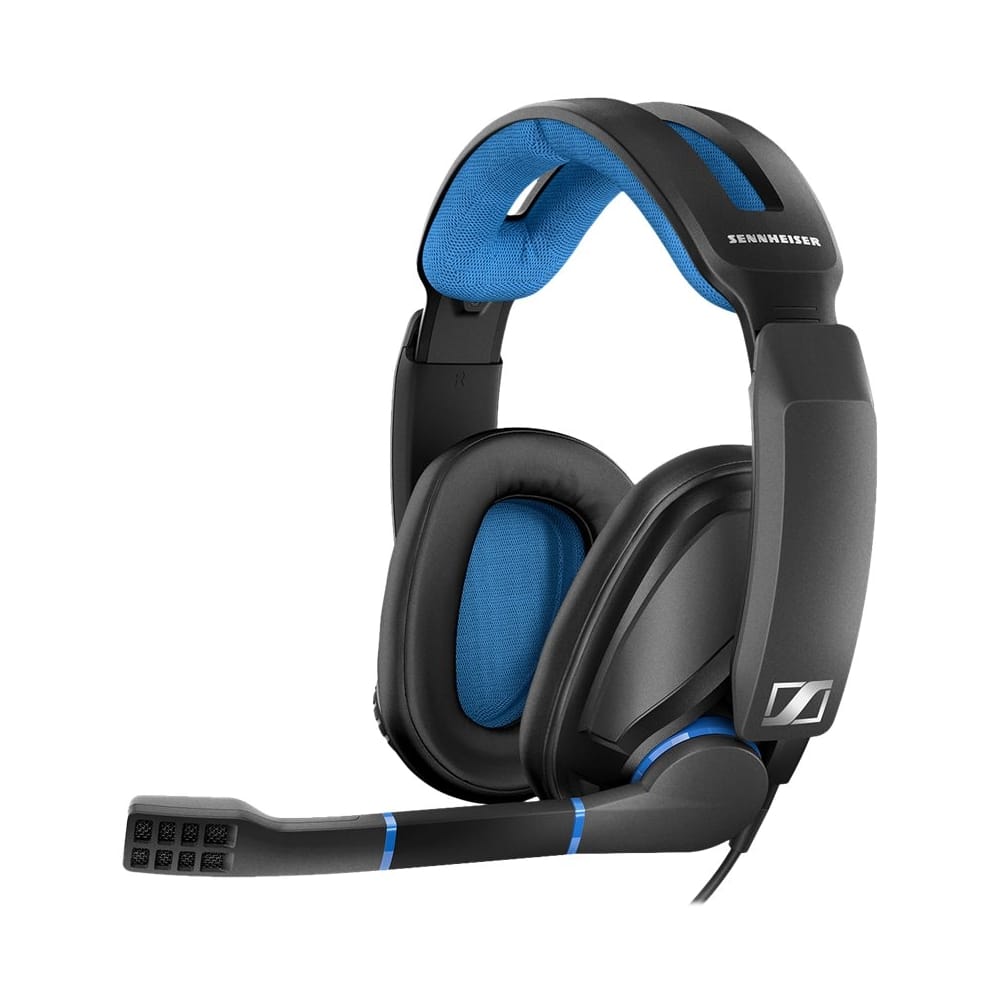
Understand there is no manufacturer driver (read this first)
The GSP 300 connects over a 3.5mm TRRS jack or the included splitter cable into two 3.5mm ports. Both connection types use Windows’ generic audio driver, so there is nothing to download from Sennheiser or EPOS for basic sound and mic function.
Match the jack to the right port color
If your PC has separate pink (mic) and green (headphone) jacks, use the splitter cable and match each plug to its labeled port. Using a single combo TRRS jack requires your motherboard or laptop to support a 4-pole headset jack — most modern laptops do.
Set default playback and recording devices
Right-click the speaker icon, open Sound settings, and manually set the headset as both default output and default input — Windows sometimes keeps the laptop’s built-in mic active even with headphones plugged in.
Update the onboard audio codec driver
Since the headset relies entirely on your PC’s sound card, an outdated Realtek or onboard codec driver is the most common real cause of muffled audio or a silent mic. Update it from Device Manager or your motherboard/laptop maker’s support page.

When the Volume Wheel or Mute Switch Seems Broken
I tested a GSP 300 on an older desktop with a worn front-panel audio header once, and the volume wheel felt “broken” because the signal was already weak before it reached the headset. Swapping to the rear motherboard jacks fixed it instantly — worth ruling out before assuming the headset itself is faulty.
- The volume wheel on the right ear cup is a hardware potentiometer, not a Windows control — it works even without any driver installed.
- If audio cuts out completely, check the boom mic is not accidentally pressing the mute contact on some third-party splitter cables.
- Test the headset on a phone or another PC using a plain 3.5mm cable to confirm the hardware itself is not damaged.
- Front-panel case audio headers on desktop PCs are a common source of static or weak signal — the rear I/O ports are more reliable.
For firmware-level accessories in the same GSP family, EPOS (the company that now manages Sennheiser’s gaming line) publishes support notes on the EPOS support site, and Microsoft’s Windows audio troubleshooting guide covers the exact driver stack this headset depends on.
Per Melissa T., who is a Streaming Setup Consultant, “I recommend the GSP 300 to clients who do not want to deal with software — once Windows recognizes it, there is nothing else to configure or update.”
Does the GSP 300 need EPOS Gaming Suite software?
No. EPOS Gaming Suite is for higher-end wireless or USB EPOS/Sennheiser headsets. The GSP 300 is fully analog and does not connect to that software.
Why is my microphone volume too quiet even at max?
Open Sound settings > Input > Device properties and raise the input volume there separately from the app’s own volume slider, since Windows caps mic gain lower than most games expect by default.
Can I use the GSP 300 on Xbox or PS4 with a PC-only cable?
Yes, the single 3.5mm TRRS cable works on console controllers with a headset jack; the splitter cable is only needed for PC towers with separate mic and headphone ports.
Conclusion
Because the GSP 300 has no manufacturer driver to install, nearly every reported problem traces back to Windows device settings, the wrong 3.5mm port, or an outdated onboard sound card driver. Work through the timeline above in order, and keep your PC’s audio codec driver current since that is the one piece of software actually doing the work.
Extra Scenarios Worth Checking
A handful of edge cases show up repeatedly in GSP 300 support threads that are worth ruling out before assuming the headset is defective.
- Sound plays but distorts at high volume: lower the source volume in Windows to around 70-80% first — the headset’s drivers can clip when both the Windows volume and the in-game volume are maxed simultaneously.
- Mic picks up keyboard and mouse clicks loudly: enable noise suppression under the microphone’s Advanced properties, or reposition the boom slightly further from the mouth.
- Headset works on one PC but not another: this points to a difference in onboard audio codec drivers between the two machines rather than the headset itself — update the codec driver on the problem PC.
- Windows shows “no audio devices installed” entirely: this is a motherboard/laptop audio driver failure unrelated to the headset; reinstall the Realtek or equivalent onboard audio driver from your PC manufacturer.
Because the GSP 300 has no firmware of its own, a hardware fault (broken cable, damaged driver diaphragm) cannot be fixed by any software step — if a straight swap to another 3.5mm cable and another PC still produces no sound, the unit itself likely needs warranty service.
Will a USB sound card fix compatibility issues on older PCs?
Yes, a basic USB sound card bypasses a failing onboard audio chip entirely and gives the headset a clean, dedicated audio path.
Does the volume wheel affect the microphone level too?
No, the wheel only controls playback volume; microphone gain is adjusted separately in Windows Sound settings.
Checking for a Damaged Cable Before Anything Else
Wired headsets in this price range fail mechanically more often than people expect, usually right where the cable meets the earcup or the inline splitter. Gently flex the cable near both ends while audio is playing through another device — if sound cuts in and out at a specific bend point, the cable itself needs replacing rather than any driver.
Can I still use the GSP 300 if my laptop only has a USB-C port?
Yes, through a USB-C to 3.5mm TRRS adapter that includes an internal audio chip, since USB-C alone carries no analog audio signal without one.
What is the difference between the GSP 300 and the GSP 302?
The GSP 302 is essentially the same closed-back shell tuned for Xbox and PlayStation controllers, while the GSP 300 targets PC with a straight 3.5mm TRRS or split cable. Both use the same passive, driver-free design, so none of the troubleshooting above changes between the two.
How do I clean the ear cushions without damaging the drivers?
Wipe the fabric or leatherette cushions with a barely damp microfiber cloth and let them air dry fully before reattaching, since the cushions pop off separately from the driver housing and moisture reaching the internal speaker can cause muffled sound over time.
Ryan T.
PC hardware enthusiast · 15+ years fixing drivers