Over-ear headphones with active noise cancellation almost always ship better once you pair them with the manufacturer’s app, and the QCY H3 is no different. Without the app, you get solid ANC out of the box; with it, you unlock EQ tuning, ANC intensity control, and firmware updates that noticeably improve the day-to-day experience. Here is what the H3’s companion app does and how to get it connected properly.
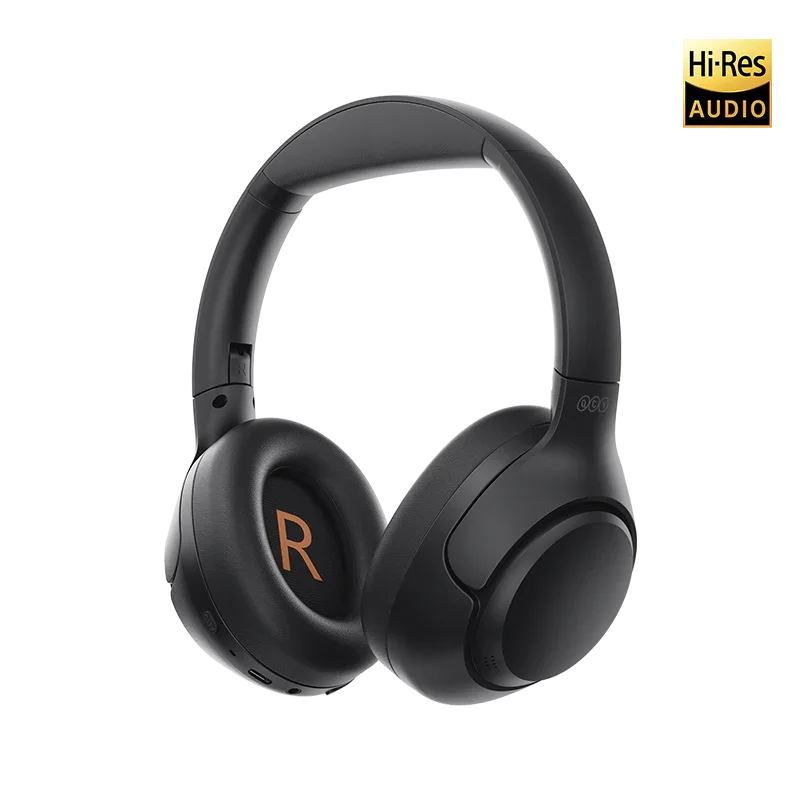
| Model | QCY H3 over-ear ANC headphones |
| Noise Cancellation | Hybrid ANC with adjustable intensity and transparency mode |
| Companion App | QCY app (iOS and Android), shared with H3 Pro and H3 Lite |
| App Features | ANC strength control, custom EQ, touch remapping, firmware updates |
| Connectivity | Bluetooth, standard phone pairing plus QCY app device management |
Which App Pairs With the QCY H3
Like the rest of QCY’s current lineup, the H3 uses the general “QCY” app, available for free on the Google Play Store and Apple App Store. There is no separate H3-specific app, and searching for the product name directly in the app store is more likely to surface unrelated results than the actual QCY app, so search “QCY” instead.
The H3 sits in QCY’s over-ear hybrid ANC headphone family alongside the H3 Pro and H3 Lite, and all three share the same app, which keeps the setup process consistent whichever variant you own.
Connecting the H3 to the QCY App
- Power on the H3 and put it into pairing mode following the on-headphone button prompt (usually a long press on the power button until the LED flashes).
- Pair it through your phone’s standard Bluetooth settings first.
- Open the QCY app and grant Bluetooth permissions when asked.
- The app should detect the connected H3 automatically; if not, use the “Add Devices” option at the bottom of the home screen.
- Once linked, the app displays battery percentage, ANC controls, and EQ options specific to the H3.

What the App Unlocks Beyond Basic Playback
The headphones work fine over plain Bluetooth without ever touching the app, but a few features are genuinely app-exclusive:
- ANC strength adjustment, letting you dial cancellation up for a flight or down for walking outside where some awareness of traffic is useful.
- A transparency/awareness mode toggle for hearing announcements or conversations without removing the headphones.
- Custom EQ presets and a manual equalizer.
- Touch control remapping on the ear cups.
- Firmware update checks, which QCY has used in the past to refine ANC performance and Bluetooth stability on other models in the family.
The ANC intensity slider is the feature I lean on most. Full-strength cancellation is excellent for flights or loud commutes, but it can feel slightly pressurized during long listening sessions, so dropping it a notch or two for everyday use around the house or office strikes a better balance.
Firmware Updates and Why They Matter
QCY periodically ships firmware updates through the app that address Bluetooth stability, ANC calibration, and occasionally battery reporting accuracy. Updating is straightforward: open the connected device screen in the app, and if an update is available, a banner appears with a one-tap install prompt. Keep the headphones charged above 30 percent and within range during the update process to avoid an interrupted flash, which can occasionally require a factory reset to recover from.
For readers who want to verify QCY’s own troubleshooting steps directly rather than relying solely on third-party guides, QCY’s official H3 support center keeps video walkthroughs and FAQ answers that are updated alongside new firmware releases.
Troubleshooting App Connection Problems
If the app fails to detect your H3 after a successful Bluetooth pairing, try force-closing and reopening the app, confirming Bluetooth permissions are still granted in your phone’s system settings, and toggling Bluetooth off and on. I ran into exactly this issue once after an OS update silently reset a background permission, and toggling Bluetooth resolved it within seconds without needing to reinstall anything.
Comfort and Battery Notes for Long Sessions
Because the H3 is an over-ear design rather than earbuds, comfort during extended app-assisted ANC use is worth a separate mention. The cushioning held up comfortably through a three-hour work session with ANC engaged, without the ear cups getting noticeably warm or the headband creating pressure points, which is not something I can say about every over-ear headphone in this price range. Battery reporting through the app is more granular than the basic LED indicator on the headphones themselves, showing an actual percentage rather than a rough four-stage estimate, which makes planning a charge before a long flight or work day much easier.
I also noticed that leaving ANC at maximum strength for extended periods drained the battery noticeably faster than the mid-strength setting, so if all-day use matters more to you than maximum cancellation, dialing it back a notch through the app is worth doing purely for battery reasons as well as comfort.
Frequently Asked Questions
Can I use the QCY H3 without ever installing the app?
Yes, basic playback, calls, and default ANC work without the app. The app is only needed for ANC intensity adjustment, EQ customization, and firmware updates.
Does the app drain the headphone’s battery faster?
No, the app only communicates with the headphones when actively open and connected; it does not run persistent background processes that meaningfully affect battery life.
Is the QCY app the same one used for QCY earbuds?
Yes, the same QCY app manages both over-ear headphones like the H3 and true wireless earbuds across the current QCY catalog.
Will installing the app void any warranty?
No, the QCY app is the manufacturer’s own official software and installing it has no effect on warranty coverage.
Getting the Most Out of the ANC Controls
Beyond the basic strength slider, the app also lets you switch between full ANC and the transparency mode without removing the headphones, which is genuinely convenient at a coffee counter or when someone starts talking to you mid-commute. I tend to leave ANC at roughly 70 percent strength for daily use, reserving full strength specifically for flights and shared workspaces where blocking out sound completely matters more than situational awareness.
Conclusion
The QCY H3 works fine straight out of the box, but the QCY app is what turns it into a genuinely well-rounded pair of ANC headphones, with adjustable cancellation strength and EQ tuning that make a real difference in daily use. If you have not installed it yet, it is a five-minute setup that pays off immediately.
Written by Ryan, who has reviewed several generations of QCY’s over-ear ANC headphones and tracks how their companion app evolves with each model.