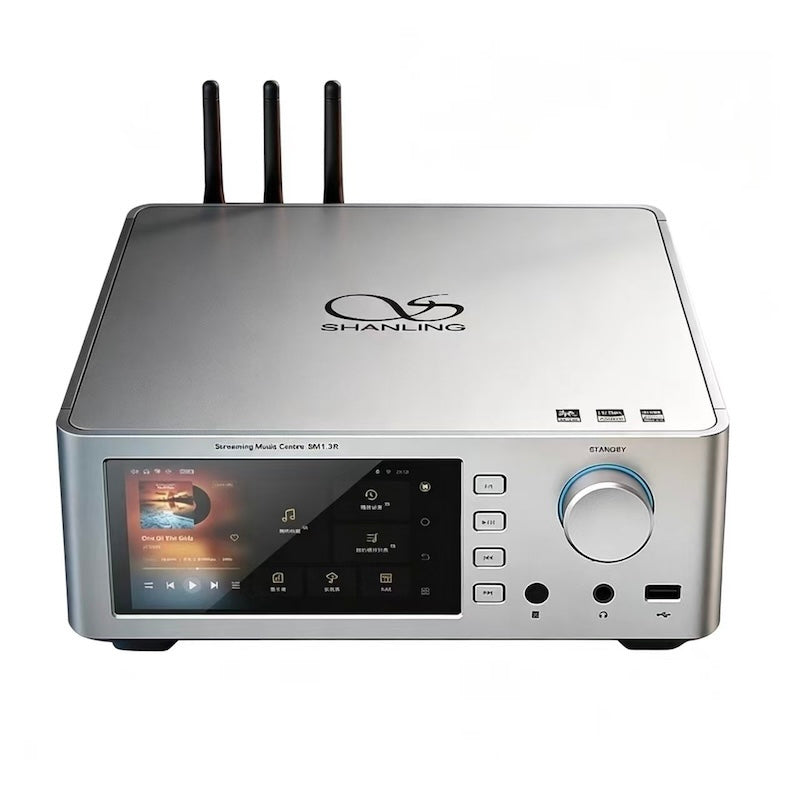
The Shanling SM1.3R is a departure from the portable players Shanling is best known for. It is a full desktop network streamer with a built-in R2R DAC, aimed at people building a proper home hi-fi rig rather than something you carry around. I spent time with it connected to a pair of active monitors, running it through Roon, Tidal, and a NAS full of local files.
| Spec | Detail |
| DAC Type | In-house R2R, 212 precision resistors, 24-bit module |
| Hi-Res Support | Up to 32-bit/768kHz PCM and DSD512 |
| Power Supply | Split design, dual 31W toroidal transformers |
| Display | 5.8-inch touchscreen, Android system |
| Memory / Storage | 4GB RAM, 64GB internal storage |
| Connectivity | Wi-Fi (3 external antennas), Ethernet, Airplay 2, DLNA |
| Streaming Certification | Roon Ready, Tidal Connect, Qobuz Connect |
What Makes It an R2R Streamer
Most DACs today use delta-sigma chips from ESS, Cirrus Logic, or AKM. R2R, or resistor-ladder, DACs work differently, converting the digital signal using a network of precision resistors rather than a modulated bitstream. The SM1.3R uses Shanling’s second-generation in-house R2R design, built around 212 ultra-precise 0.01 percent resistors in a 24-bit module with a 19-bit architecture and a compensating code to handle the remaining bits. It is a genuinely custom implementation rather than an off-the-shelf chip, which is part of what justifies the SM1.3R’s position near the top of Shanling’s desktop lineup.
Build and Power Supply
Inside, the SM1.3R uses a split power supply design, physically separating power delivery to the streaming and digital sections from the analog output stage, which helps keep digital noise out of the audio path. It runs on a pair of custom 31W toroidal transformers with an added potting process meant to reduce mechanical vibration and hum. The chassis houses a 5.8-inch touchscreen and runs a closed Android system with 4GB of RAM and 64GB of storage for apps and caching.
Streaming and Everyday Use
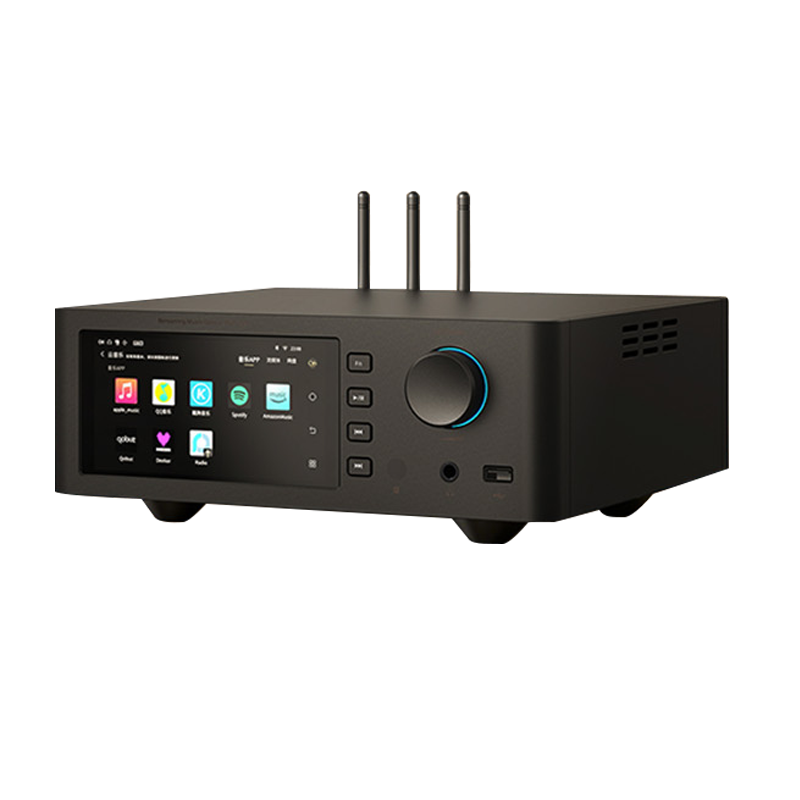
This is where the SM1.3R earns its keep as a genuine centerpiece rather than just a nice-sounding box. It has direct app access to Spotify, Tidal, Qobuz, Apple Music, Apple Classical, Amazon Music, Presto Music, and KKBox, alongside full Tidal Connect, Qobuz Connect, and Roon Ready certification. In practice, I mostly used it through Roon from a laptop, and the handoff was seamless, with the SM1.3R showing up as a proper Roon endpoint without any fiddling.
- Direct app support for most major streaming services without needing a separate device
- Roon Ready certification for users already invested in a Roon-based setup
- DLNA and Airplay 2 support for casting from phones and tablets
- Handles Hi-Res audio up to 32-bit/768kHz and DSD512
Sound Character
The R2R implementation gives the SM1.3R a distinct character compared to a typical delta-sigma streamer at a similar price. It leans toward a slightly more analog, relaxed presentation, with a natural sense of timing that R2R fans tend to describe as less “digital sounding,” though that phrase gets thrown around loosely in this hobby. What I noticed most concretely was a smooth, unforced treble and a midrange that did not feel etched or overly analytical even on denser orchestral recordings.
It is worth being clear that this is a preference-driven characteristic rather than an objective improvement, and listeners who prefer a more forward, detail-first presentation from delta-sigma DACs may find the SM1.3R comparatively laid back. For a broader look at how it stacks up against other streamers in this bracket, Darko Audio’s coverage is a useful additional reference point.
Who Should Consider the SM1.3R
This is a component for a fixed listening setup, not a portable device, and its price puts it in competition with dedicated streamer-DAC combos from more established desktop hi-fi brands. If you already like R2R DAC character from other gear, or you want a single box that handles streaming app access, Roon endpoint duty, and DAC conversion without stacking three separate components, it is a strong contender.
Network Setup and Reliability
Getting the SM1.3R onto a home network was straightforward through its touchscreen Wi-Fi settings, and the three external antennas visible on top of the chassis are there for a reason, since streamers with weak antenna setups are a common source of dropouts during playback. Over several weeks of use, I did not experience a single dropped stream during Roon playback, even with the streamer positioned in a media cabinet with the antennas partially obstructed by other gear, which speaks well of the wireless implementation.
Ethernet is also available if you prefer a wired connection for maximum reliability, and I would generally recommend it for any component this central to a listening setup if running a cable is practical in your room. Wi-Fi performance was solid in my testing, but a wired connection removes one more variable entirely, which matters more the more critically you listen.
Frequently Asked Questions
Does the SM1.3R need a separate amplifier?
Yes, it is a streamer and DAC combination, not an integrated amplifier, so you will need a preamp or active speakers/monitors with their own amplification to complete the chain.
Is Roon required to use the SM1.3R?
No, Roon is optional. The built-in touchscreen and app support cover most streaming needs directly without Roon, though Roon Ready certification is there for anyone who wants that ecosystem.
What is the practical benefit of the split power supply design?
Separating the streaming and digital circuitry’s power from the analog output stage reduces the chance of digital noise bleeding into the audio signal, which can show up as a raised noise floor or subtle grain in the sound if not handled well.
Standby Behavior and Daily Convenience
A component you plan to leave powered on most of the time needs sensible standby behavior, and the SM1.3R handled this well, waking from standby almost instantly when a Roon session started rather than requiring a slow boot sequence each time. The touchscreen also dims appropriately after a period of inactivity, which matters more than it sounds like if the unit is going to live somewhere visible in a living room rather than tucked away in a closed cabinet.
Common Setup Problems and Fixes
Most issues people run into with the SM1.3R trace back to network configuration or app authorization rather than the streamer hardware itself. Here is what I would check first.
Streamer doesn’t show up as a Roon endpoint
Confirm the SM1.3R and your Roon Core are on the same network subnet, since Roon discovery can fail across separate Wi-Fi bands or VLANs even when both devices technically have internet access. Restarting the Roon Core software after the streamer finishes booting usually resolves a stubborn discovery failure.
Wi-Fi drops during playback
Reposition the unit so the three external antennas are not blocked by other equipment in a media cabinet, and switch to the 5GHz band if your router supports it, since 2.4GHz can get crowded in homes with many smart devices. A wired Ethernet connection eliminates this category of problem entirely if dropouts persist.
Streaming app shows logged out after a period of use
Some services expire authorization tokens periodically for security reasons. Re-entering your login credentials for the affected app in the SM1.3R’s touchscreen settings typically restores access without needing a full factory reset.
No sound despite showing a connected source
Check that the correct output is selected in the SM1.3R’s audio settings menu, since it can be configured for different output paths depending on how it’s connected to your amplifier or active monitors. Also confirm the receiving equipment’s input is set to match the cable actually in use.
Touchscreen becomes unresponsive
A soft reboot from the settings menu clears up most touchscreen lag, and since the unit runs a closed Android system, a full power cycle behaves the same way a phone reboot would if the interface ever feels sluggish after extended uptime.
Conclusion
The Shanling SM1.3R is a serious desktop streamer that shows Shanling can compete outside the portable audio space it built its name on. The custom R2R DAC gives it a distinct sonic identity, and the breadth of streaming app support means it can realistically be the only source component many people need. It is a meaningful investment, but one that delivers a genuinely different listening character from typical delta-sigma competitors.
Evaluated over several weeks connected to active monitors and streamed through both Roon and native app playback. Background in computer science with a long-standing interest in desktop hi-fi.