The Shanling M1 Plus is easy to confuse with the older M1S, since both are compact Shanling players with similar names, but they are genuinely different products. The M1 Plus is the newer, larger design with a 3.2-inch screen, an ES9069Q DAC, and a feature set closer to Shanling’s bigger M-series players squeezed into a small body. If you already own one, keeping the firmware current matters more than it might seem, since Shanling has used updates to fix real playback bugs rather than just add minor tweaks.
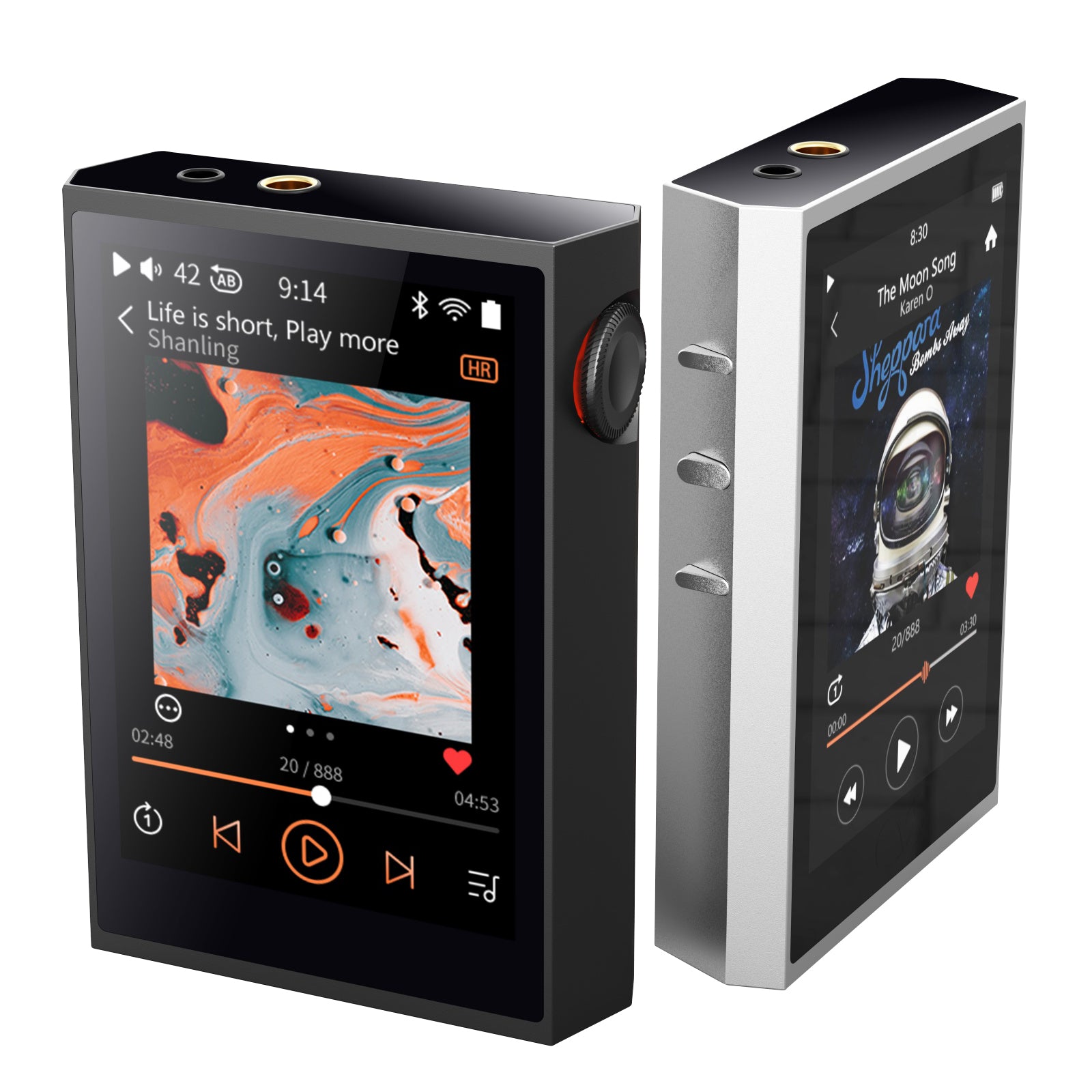
| DAC Chip | ESS ES9069Q, dual SGM8262 amp stage |
| Max Output | Up to 660mW at 32ohm balanced |
| Screen | 3.2-inch display |
| Dimensions / Weight | 86 x 61 x 17mm, 116 grams |
| Connectivity | Bluetooth 5.2 (bi-directional), Wi-Fi for DLNA/Airplay, coaxial SPDIF out |
| Battery Life | Around 12.5 hours continuous local playback |
| Headphone Outputs | 3.5mm single-ended, 4.4mm balanced |
| Processor | Ingenic X2000, MTouch system |
What Makes the M1 Plus Different From the M1S
The M1S is the smaller, clip-style player closer in spirit to the M0 line. The M1 Plus is a proper pocket DAP: it measures 86 by 61 by 17mm, weighs 116 grams, and runs Shanling’s MTouch system on an Ingenic X2000 processor with a 3.2-inch screen. It also adds Wi-Fi for DLNA and Airplay streaming, a coaxial SPDIF output, and Bluetooth 5.2 with two-way support, none of which the M1S offers in the same form. If a listing or forum post calls it just “M1,” check the exact model carefully, because these two get conflated constantly.
ESS ES9069Q with dual SGM8262 amp stage, up to 660mW at 32ohm balanced.
Bi-directional Bluetooth 5.2, Wi-Fi for DLNA/Airplay, coaxial SPDIF out.
Rated around 12.5 hours of continuous local playback.
3.5mm single-ended and 4.4mm balanced headphone jacks.
Checking Your Current Firmware Version
Before updating anything, confirm what you are running. On the M1 Plus, go into Settings, then About Device, and the firmware version is listed near the bottom of that screen. Write it down or screenshot it so you have something to compare against Shanling’s release notes.
How to Update the Firmware
- Charge the player to at least 50 percent before starting, since an interrupted update from a dead battery can be difficult to recover from.
- Connect the M1 Plus to a Wi-Fi network through Settings if you want an over-the-air update, or download the firmware file from Shanling’s support pages if you prefer a manual SD card update.
- For OTA updates, go to Settings, System Update, and check for updates; the player will download and prompt you to install.
- For manual updates, copy the firmware file to the root of a microSD card, insert it, and the player should detect it on the next boot or through the update menu.
- Do not remove power or the SD card while the update is installing, and let the device restart on its own once it finishes.
What Firmware Updates Have Actually Fixed
Firmware updates for players like the M1 Plus tend to fall into a few buckets: Bluetooth codec stability fixes, better gapless playback handling, improved battery reporting accuracy, and occasional UI responsiveness improvements. If your unit has been randomly dropping a Bluetooth connection to a specific pair of earbuds, or the battery percentage seems to jump around inconsistently, checking for a newer firmware version is usually the first troubleshooting step worth trying before assuming the hardware itself is faulty.
Shanling posts firmware changelogs on its official site, and it is worth reading through them even if you are not chasing a specific bug, since some updates quietly improve things like USB DAC mode stability that are easy to miss otherwise.
Backing Up Before You Update
Even though firmware updates are not supposed to touch your music files, I make it a habit to copy anything important off the microSD card before any firmware change on any DAP, not just the M1 Plus. It takes a few minutes and completely removes the anxiety of wondering what happens if an update goes sideways partway through. This is doubly true if you use the M1 Plus’s playlist or favorites features heavily, since those settings live on the device itself and a botched update that requires a factory reset would wipe them, even though your actual audio files on the SD card would be untouched.
It is also worth checking the battery percentage display right after an update completes, since a mismatch between the displayed percentage and actual charge level is one of the more common minor bugs that gets fixed in incremental firmware releases. If you notice the battery reading jumping unexpectedly after an update, give it a full charge and discharge cycle before assuming anything is wrong with the hardware itself.
Troubleshooting Common Firmware Update Problems
Most M1 Plus firmware updates go smoothly, but a few issues show up often enough to cover directly.
- OTA update won’t download: Confirm the player has a stable Wi-Fi connection with internet access, not just a local network; some home networks with captive portals or strict firewalls block the update server silently.
- Player doesn’t detect the firmware file on SD card: Make sure the file sits in the root directory rather than a subfolder, is unmodified from the download, and that the card is formatted as FAT32.
- Update appears to install but the version number doesn’t change: Reformat the microSD card and re-copy the firmware file; a corrupted download or a flaky card is the usual cause here.
- Device won’t boot after an update: Do not panic or keep power-cycling repeatedly. Locate the manual recovery firmware on Shanling’s support site and follow the SD card recovery process for the M1 Plus specifically.
- Bluetooth still drops after updating: Unpair and re-pair the affected earbuds or headphones from scratch rather than relying on the existing pairing, since a stale pairing profile can persist through a firmware update.
Frequently Asked Questions
Will updating the firmware erase my music library?
No, firmware updates on the M1 Plus do not touch the files stored on your microSD card. That said, it is good practice to back up anything important before any firmware change, just in case.
What happens if the update fails halfway through?
Most modern DAP firmware updates are designed to fail safely and let you retry, but a device that will not boot after a failed update usually needs a manual recovery file loaded via SD card. Check Shanling’s support page for a recovery firmware specific to the M1 Plus if this happens.
Is the M1 Plus getting regular firmware support?
Since its release, Shanling has continued issuing updates for the M1 Plus, following the same pattern they use for other current players in the lineup. There is no fixed schedule, but updates have not been rare.
Where to Find Official Firmware Files
Always download firmware directly from Shanling’s own site rather than a third-party forum mirror, even a well-intentioned one, since a corrupted or mismatched firmware file is one of the few things that can genuinely brick a device. If a forum thread links to a firmware version, cross-check the version number against Shanling’s own release notes before installing, and when in doubt, use the in-device OTA updater instead of a manual file, since it removes the guesswork about compatibility entirely.
Conclusion
The M1 Plus and the M1S share a naming pattern but are aimed at different users, and mixing them up when searching for firmware or troubleshooting help is a common and understandable mistake. If you own the M1 Plus specifically, keeping firmware current is a low-effort way to avoid Bluetooth and playback quirks that later updates have addressed, and the process itself is straightforward whether you go the OTA or SD card route.
Notes based on hands-on firmware update testing with a Shanling M1 Plus over several release cycles. I have a computer science background and have covered portable DAPs and dongle DACs for a number of years.