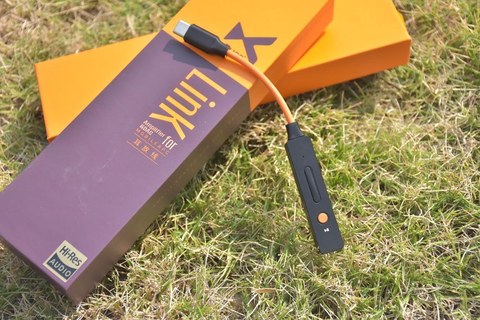
When people search simply for “xDuoo Link,” they are usually asking about the brand’s dongle DAC lineup as a whole rather than one specific SKU, since xDuoo has released several generations under this name: the original Link, the Link2 and Link2 Bal, and more recently the Link3. All of them share the same basic idea, a small USB-C stick that plugs between a phone or laptop and a pair of headphones, adding a proper DAC chip and amplifier stage that bypasses the weak built-in audio hardware most phones ship with.
- Applies To: xDuoo Link, Link2, Link2 Bal, and Link3 dongle DAC/amplifier series
- Current Flagship: xDuoo Link3, dual ES9039Q2M DAC chips with an XMOS XU316 USB receiver
- Dimensions / Weight (Link3): roughly 107 x 38 x 15mm, about 70g
- Output Power (Link3): up to 700mW at 32 ohms balanced, up to 1000mW at 32 ohms in Super Power Mode with external power connected
- Connectors: USB-C input; 3.5mm single-ended output on every model, plus a 4.4mm balanced output on the Bal and Link3 versions
- OS / Device Compatibility: Android (USB audio class, no driver needed), macOS, recent Windows builds (official driver recommended for the full sample rate range), iPhone via a Lightning-to-USB-C or camera adapter
What a Dongle DAC Actually Fixes
Most modern phones removed the headphone jack, and the USB-C to 3.5mm adapters bundled in the box (when they exist at all) usually contain a bare-minimum DAC chip with little to no amplification. A dedicated dongle like the Link swaps that weak adapter for a real DAC chip and a small but genuine headphone amplifier, which noticeably improves both detail and volume headroom, especially with harder-to-drive headphones or in-ear monitors.
How the Generations Differ
- Original Link: a Type-C to 3.5mm dongle supporting PCM up to 32-bit/384kHz and DSD256, aimed at budget-conscious buyers who just want a clear upgrade over stock phone audio.
- Link2 / Link2 Bal: steps up to an ESS9118EC DAC chip with up to 150mW of output power at 32 ohms, and the “Bal” variant adds a 4.4mm balanced output alongside the 3.5mm single-ended jack.
- Link3: the current flagship dongle, with dual ES9039Q2M DAC chips, an XMOS XU316 USB receiver, up to 1000mW in Super Power Mode, and even a MicroSD card slot for offline storage, reviewed in detail on Headfonics.
Picking the Right One
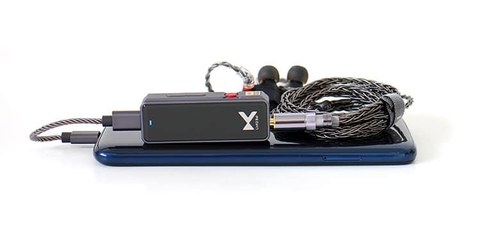
If your headphones or IEMs are easy to drive and you mainly listen through a phone on the go, the original Link or a Link2 covers the basics without overspending. If you use higher-impedance headphones, want a balanced output, or plan to use the dongle at a desk as a small standalone DAC, the Link2 Bal or Link3 make more sense. The Link3 in particular is aimed at people who want a single dongle to double as light desktop gear thanks to its higher power ceiling and storage expansion.
Build Quality Across the Range
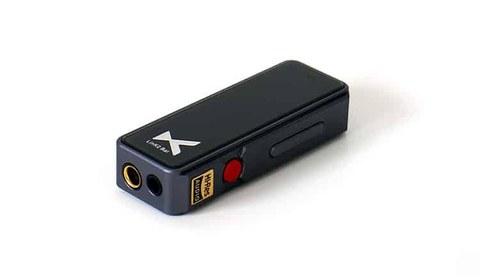
One thing that has stayed consistent across every generation of the Link series is a solid, mostly metal housing that feels sturdier than its low price would suggest. xDuoo has generally avoided the flimsy plastic shells that plague some budget dongle competitors, which matters more than it might seem, since a dongle DAC gets plugged and unplugged constantly and lives loose in a bag or pocket far more than a desktop component ever would. The cable and connector at the USB-C end has also held up well across review units, without the loose-connection issues that sometimes appear on cheaper third-party dongles after a few months of regular use.
Common Compatibility Questions
A frequent point of confusion with any USB-C dongle DAC is whether it will actually work with a particular phone, tablet, or laptop combination. In general, any device running a recent version of Android or a Mac with a USB-C or Thunderbolt port will recognize a Link dongle without additional drivers, since USB audio class support is baked into these operating systems. Windows laptops are usually fine too, though occasionally benefit from installing the official driver for full sample-rate support. The main devices to double check are older Android phones on outdated OS versions, some Chromebooks with limited USB audio support, and gaming consoles, which vary wildly in whether they recognize external USB audio devices at all.
Cable and Adapter Considerations
If you plan to use a Link dongle with an iPhone that still relies on Lightning, remember you will need Apple’s official Lightning to USB-C adapter or camera adapter, since third-party alternatives can be hit or miss with audio class devices specifically, even when they work fine for simple charging or file transfer. For USB-C to USB-C connections directly from a modern phone, the cable that ships in the box is generally sufficient, though a shorter, high-quality cable can reduce strain on the port during regular use if you plan to keep the dongle attached for long stretches.
Basic Setup Steps
- Plug the Link into your phone’s or laptop’s USB-C port; most modern Android phones and recent MacBooks will recognize it immediately.
- Wait for a driver prompt on Windows machines, since some versions may need a small driver install for full-resolution playback.
- Plug your headphones or IEMs into the appropriate jack, matching single-ended or balanced output to your cable.
- Play audio as usual; volume is typically controlled through your source device rather than a physical wheel on the dongle.
If the Dongle Isn’t Recognized or Sound Cuts Out
Most Link-series problems come down to the USB-C connection or a driver conflict rather than a faulty dongle. Work through these checks in order before assuming the unit is defective:
- Unplug the dongle, restart the phone or laptop, and reconnect directly to the device’s own USB-C port rather than through a hub or extension cable.
- On Windows, open Device Manager and look under “Sound, video and game controllers.” If the Link shows a yellow warning icon or is missing entirely, uninstall the entry, then reconnect the dongle so Windows re-detects it, or install the current driver package from xDuoo’s official support page.
- Try a different USB-C cable. A charge-only cable with no data lines will power the LED on some models but will never pass audio.
- Set the Link as the default playback device manually in the operating system’s sound settings, since some apps keep using the built-in speaker even after the dongle is plugged in.
- On Android, check that USB debugging or a restrictive power-saving mode is not blocking the accessory; toggling airplane mode off and on can force the OS to re-scan connected USB audio devices.
Manual Driver Reinstall as a Fallback
If Windows still will not recognize the dongle after a cable swap, the more reliable fix is a manual driver reinstall instead of relying on Windows Update. Download the correct driver package for the exact model from xDuoo’s support page, unplug the dongle, run the installer, then reconnect only after the installer finishes and asks for the device. This manual order avoids the situation where Windows grabs a generic driver first and locks out the proper one. If sound still does not pass through afterward, test the same dongle and cable combination on a second computer to confirm whether the fault is the dongle or the original machine’s USB controller.
FAQ
Do I need special drivers to use an xDuoo Link on Windows?
Most recent Windows versions detect it as a standard USB audio device, though installing the official driver from xDuoo’s site can unlock the full sample rate range on some models.
Will a Link work with an iPhone?
Yes, through the Lightning-to-USB-C adapter or directly on USB-C iPhone models, though iOS caps out at lower bit depths than Android in some playback apps.
What is the practical difference between single-ended and balanced output?
Balanced output generally delivers more clean power and better channel separation, which matters most with power-hungry or sensitive in-ear monitors.
Can these dongles charge my phone while playing audio?
Generally no, since the USB-C port is dedicated to the digital audio connection while the dongle is attached.
Is the newest model always the best choice?
Not necessarily; the Link3’s extra power and storage are genuinely useful for some people, but if you only use efficient IEMs on the move, an older and cheaper Link2 may sound just as good for your specific gear.
Do these dongles need a case to protect them?
A simple slip case or pouch is a reasonable precaution given how often a dongle rides loose in a bag pocket, though the metal housings on most Link models are reasonably resistant to everyday scuffs on their own.
I rotate through a handful of dongle DACs depending on which headphones I am carrying that day, and the Link lineup has been a reliable budget pick in that rotation for a while now.