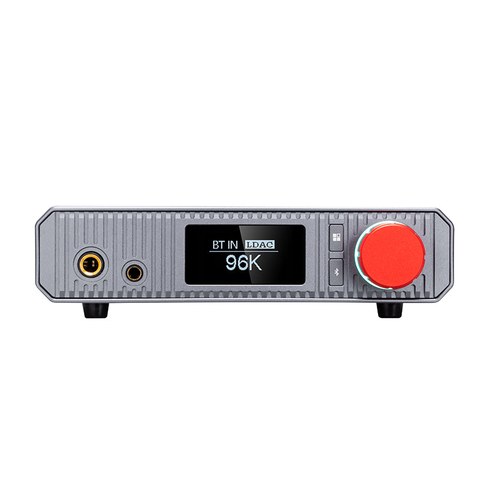
The XA-02 is xDuoo’s higher-performance balanced desktop DAC and headphone amp, built around an ESS ES9039Q2M chip and a Class A transistor-based amplifier circuit. It targets listeners who want serious power for demanding full-size headphones without stepping up to a separate DAC and amp stack, while still including Bluetooth streaming for casual convenience. It occupies a middle position in xDuoo’s desktop lineup, offering more raw power and a more modern DAC chip than the tube-based TA-30, while staying purely solid-state for listeners who prefer that character.
Specifications Overview
| Brand / Model | xDuoo XA-02 |
| DAC chip | ESS ES9039Q2M, PCM up to 32-bit/384kHz, native DSD up to DSD256, MQA up to 8x unfolding |
| Bluetooth | QCC5125 chip, Bluetooth 5.1, LDAC, aptX HD, and aptX LL |
| Power output | Up to 910mW on 6.35mm single-ended, up to 2000mW on balanced 4.4mm |
| Display | 1.3-inch OLED screen |
| Measured performance | THD+N roughly 0.0005%, signal-to-noise ratio around 121dB |
Why the Balanced Output Matters Here
With up to 2000mW available from the 4.4mm balanced jack, the XA-02 has enough headroom to drive genuinely difficult headphones, including many planar magnetic models that struggle to reach satisfying volume from weaker amps. The balanced circuit path also tends to reduce crosstalk and improve channel separation compared to single-ended output, which is part of why reviewers at Headfonics highlighted its power output as unusually strong for its size and price bracket.
Bluetooth Without Compromise
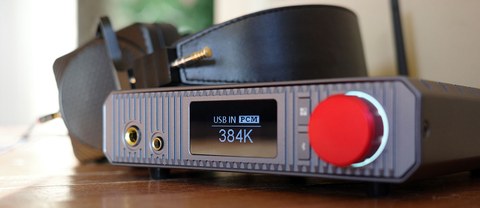
The QCC5125 Bluetooth chip supports LDAC, which matters for Android users who want the closest thing to wired quality over a wireless connection. Combined with aptX HD and aptX Low Latency support, the XA-02 covers most major codecs across both Android and iOS, making it a genuinely usable wireless DAC rather than a token feature bolted onto a wired-first design.
Using the Front Panel Controls
- Power on the unit and select your input source (USB, Bluetooth, coaxial, or optical) using the front panel button.
- If using Bluetooth, put the XA-02 into pairing mode and select it from your phone or laptop’s Bluetooth menu.
- Use the OLED display to check the incoming sample rate and confirm the correct source is active.
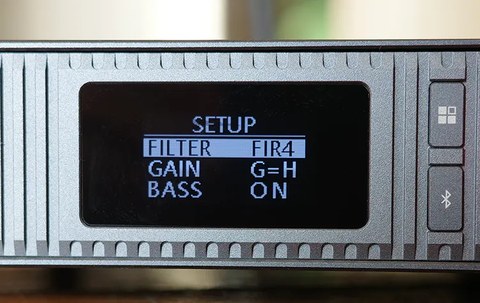
- Access the setup menu to adjust filter type, gain level, and bass settings to taste.
- Turn the volume knob gradually, especially with sensitive headphones, given the amp’s high maximum output.
Who the XA-02 Is Built For
This is a strong fit for anyone building a desktop headphone setup around power-hungry full-size or planar headphones, who also wants the flexibility to stream wirelessly from a phone without sacrificing sound quality. If your headphones are efficient in-ear monitors, you likely will not need anywhere near the XA-02’s full output capability, and a smaller dongle DAC or a lower-powered desktop unit may suit your needs just as well for considerably less money.
Measured Performance and What It Means Practically
The published THD+N figure of roughly 0.0005% and signal-to-noise ratio around 121dB place the XA-02 well within audibly transparent territory for a desktop DAC and amp at this price. In plain terms, this means the electronics themselves are extremely unlikely to be a limiting factor in your system’s sound quality; any coloration or character you notice will overwhelmingly come from your headphones and source material rather than distortion introduced by the XA-02 itself. This is a common trait among ESS Sabre-based DAC chips in this chip generation, and it is a big part of why solid-state desktop DACs at this level rarely differ dramatically from one another in raw measurements.
Desk Footprint and Aesthetics
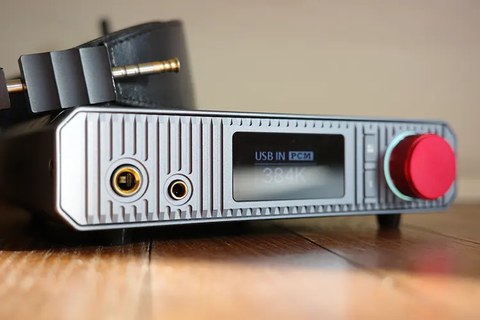
Compared to a full-size integrated amplifier, the XA-02’s compact chassis takes up a fraction of the desk space while still delivering genuinely serious output. The red volume knob and OLED display give it a distinct look on a desk, and the front-facing headphone jacks make it easy to plug and unplug without reaching around the back of the unit, a small but appreciated detail for anyone switching headphones frequently throughout the day.
Powering the XA-02 Reliably
Running from an AC 100 to 240V power supply rather than USB bus power means the XA-02 is not limited by whatever a connected laptop or phone can provide electrically, which supports its higher output figures compared to bus-powered dongles. This does mean it needs to stay near a wall outlet rather than being fully portable, positioning it firmly as a desktop unit rather than something to toss in a bag, which is worth keeping in mind if you were hoping for something dual-purpose between home and travel use.
Pairing the XA-02 With Different Headphone Types
Full-size dynamic headphones in the 32 to 150 ohm range will find plenty of headroom from either output, while planar magnetic headphones, which often demand more sustained current rather than just voltage, benefit specifically from the balanced 4.4mm output and its higher power ceiling. In-ear monitors, being far more efficient by design, will rarely need more than a small fraction of the available output, so pay attention to the gain setting in the menu to avoid an overly hot noise floor with very sensitive IEMs.
Common Problems and Fixes
- Problem: Bluetooth audio stutters or drops out. Fix: Move any other 2.4GHz devices, like a WiFi router or another Bluetooth peripheral, farther away, and reconnect from scratch rather than resuming an old pairing profile, since interference and stale connections are the two most common causes.
- Problem: No sound or very low volume from sensitive IEMs. Fix: Check the gain setting in the menu; the XA-02’s high maximum output means a high gain setting paired with efficient IEMs can produce an overly hot noise floor or an unexpectedly quiet-feeling volume curve until gain is lowered.
- Problem: USB input is not recognized by a connected laptop. Fix: Confirm the correct input is selected on the front panel first, and try a different USB cable, since a charge-only cable without data lines is a common and easy-to-miss culprit.
- Problem: Planar headphones still do not reach a satisfying volume. Fix: Switch to the balanced 4.4mm output rather than the single-ended 6.35mm jack; the balanced path delivers roughly double the power and is specifically what the higher-power planar models need.
- Problem: The OLED display shows an unexpected sample rate. Fix: Check the source app’s output settings, since many streaming and playback apps resample audio to a fixed rate by default regardless of the original file’s native sample rate.
FAQ
Can the XA-02 decode MQA files?
Yes, it supports MQA rendering up to 8x unfolding through its ES9039Q2M DAC chip.
Is 2000mW of balanced output overkill for most headphones?
For efficient headphones and IEMs, yes, but for harder-to-drive planar magnetic models it provides genuinely useful headroom rather than excess for its own sake.
Does Bluetooth playback sound noticeably worse than wired USB?
With LDAC and a good source, most listeners find the difference small, though a direct USB connection remains the most transparent path.
What filter settings are available on the XA-02?
Multiple digital filter options are accessible through the setup menu, letting you adjust the frequency response character slightly to taste.
Does it work as a preamp for powered speakers?
The line-level outputs can typically feed a set of powered speakers or a separate amplifier, in addition to its primary role as a headphone amp.
Is the OLED display readable from across a room?
At 1.3 inches it is designed primarily for close-up desk viewing rather than distance reading, though the sample rate and input indicators are large enough to check at a glance from a normal desk chair.
Balanced desktop amps used to feel like an unnecessary step up from a dongle, until I actually tried driving planar headphones off one, and the XA-02 made that difference obvious quickly.