The MU-604 is a desktop DAC, not a pair of headphones or an all-in-one amp, despite occasionally showing up in searches alongside headphone gear. Its job is narrower and more specific: take a digital signal in over USB, coaxial, or optical, and output a clean analog signal for a separate amplifier or active speakers to handle. It is aimed at people building a modest two-channel or headphone desktop system who want a dedicated conversion stage rather than an all-in-one box.
| Spec | Detail |
|---|---|
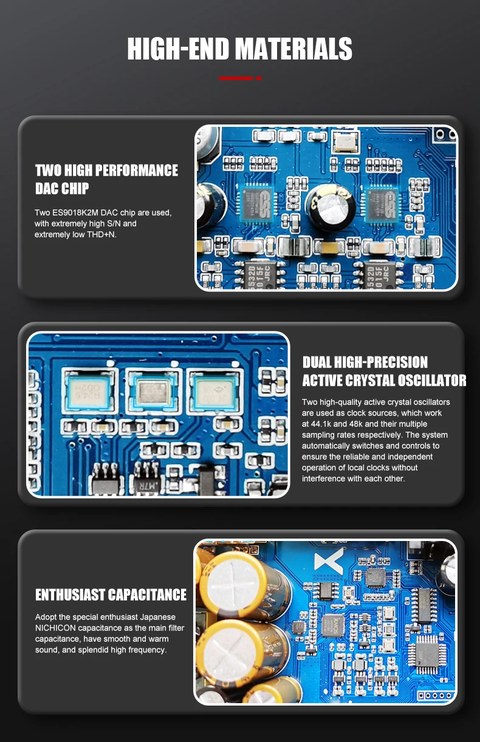
| DAC Chips | Dual ESS ES9018K2M |
| USB Receiver | XMOS XU208 (8-core) |
| Format Support | PCM up to 32-bit/384kHz, native DSD256 |
| USB Modes | USB1.0 (compatibility) and USB2.0 (full-res) |
| Digital Inputs | USB, coaxial, optical |
| Analog Outputs | Single-ended RCA, balanced 3-pin XLR |
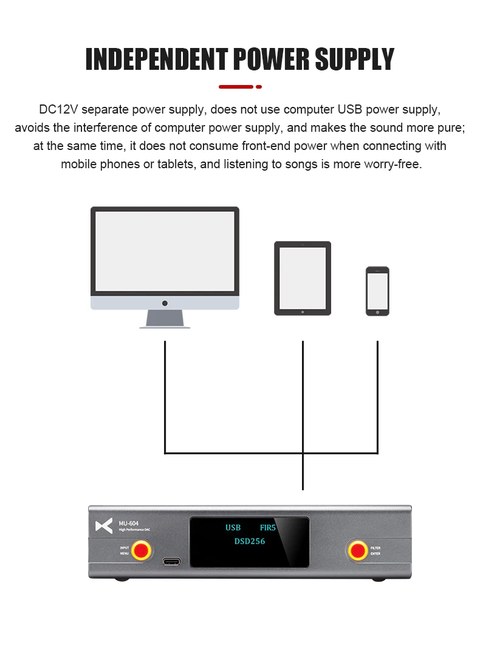
| Power | External DC12V supply |
Inside the MU-604
- Dual ESS ES9018K2M DAC chips
- XMOS XU208 USB receiver, an 8-core chip handling the USB audio stream
- Format support: PCM up to 32-bit/384kHz and native DSD256
- Two USB audio modes: USB1.0 for compatibility with older computers or game consoles, and USB2.0 for full-resolution playback
- Digital inputs: coaxial and optical, alongside USB
- Outputs: single-ended RCA and balanced 3-pin XLR
Why Two DAC Chips Instead of One
Running a dedicated DAC chip per channel, rather than one chip handling both left and right, is a design choice more often seen in higher-priced gear. It generally improves channel separation and reduces crosstalk compared to single-chip designs, since each channel gets its own conversion path rather than sharing internal circuitry. Whether this is audible in a given system depends on the rest of the signal chain, but it is a genuine engineering upgrade over cheaper single-DAC designs at a similar price point.
The Dual USB Mode Toggle
A physical or menu-based switch on the MU-604 lets you choose between USB1.0 and USB2.0 audio modes. USB1.0 mode caps out at a lower maximum sample rate but offers broader compatibility with older PCs, games consoles, and devices with less capable USB audio drivers. USB2.0 unlocks the full PCM 384kHz and DSD256 ceiling but requires a host device with proper USB2.0 audio class drivers. If you are connecting the MU-604 to an older computer or a console and experiencing dropouts, switching to USB1.0 mode is usually the first troubleshooting step.
Balanced vs Single-Ended Output
The rear panel offers both RCA (single-ended) and XLR (balanced) outputs simultaneously. If your downstream amplifier has balanced XLR inputs, using that connection typically reduces noise pickup over longer cable runs and can offer a small improvement in dynamic range. For short cable runs on a desk, the practical difference between RCA and XLR is much smaller, so do not feel pressured to buy new cabling if your amp only accepts RCA.
Fitting the MU-604 Into an Existing System
Because the MU-604 outputs line level only, it works best as a middle component between a source and a separate amplifier, rather than as a complete solution on its own. A common setup pairs it with a computer over USB as the source, then feeds a small class A/B or class D integrated amp driving a pair of passive bookshelf speakers, or alternatively a dedicated headphone amp for those who listen mostly through cans. If you already own an amplifier you like but have been feeding it from a receiver’s built-in DAC or a cheap USB adapter, swapping in the MU-604 as the conversion stage is a relatively low-risk, moderate-cost upgrade to try.
Build and Everyday Reliability
- The metal chassis keeps the unit stable on a desk and helps shield the internal circuitry from external electrical noise
- The physical USB mode switch is a nice touch for anyone who regularly moves the DAC between different computers with varying USB driver support
- Because it has no internal battery or moving parts beyond the switch and buttons, long-term reliability tends to be solid compared to more complex all-in-one units
Comparing the MU-604 to All-in-One Alternatives
It is reasonable to ask why anyone would choose a DAC-only component over an all-in-one DAC and amp combo unit, particularly when combo units often cost less for a comparable feature set. The answer usually comes down to future flexibility. Splitting your DAC and amplifier into separate components means you can upgrade or swap either one independently later, whereas an all-in-one unit ties both together permanently. If you already have a clear idea of the amplifier or speakers you want to pair long-term, a dedicated DAC like the MU-604 is a more modular way to build toward that end goal without repurchasing the whole chain when your tastes change.
Getting the Most Out of the Digital Inputs
Beyond USB, the coaxial and optical digital inputs on the MU-604 are worth using if you are connecting a television, a CD transport, or another external digital source that lacks native USB audio output. Optical is particularly convenient for TV setups since most modern TVs include a Toslink output specifically for this purpose, letting you route TV audio through the MU-604 and out to a proper amplifier and speakers rather than relying on a television’s built-in speakers.
Common Problems and Fixes
- Audio dropouts or crackling over USB: Switch from USB2.0 to USB1.0 mode first, especially on older PCs or game consoles, since a weak USB audio driver implementation is the most common cause of intermittent dropouts on this class of DAC.
- No sound from the XLR output: Confirm your amplifier’s balanced input is wired to the same pin configuration the MU-604 uses, since a pin-2 vs pin-3 hot mismatch between brands can cause silence or phase issues rather than an obvious failure.
- Computer does not recognize the DAC at all: Try a different USB cable and port, and confirm the external DC12V power supply is connected, since some desktop DACs will not initialize their USB interface without external power even if the USB cable itself is providing a data connection.
- Optical input produces no sound from a TV: Check the TV’s audio output settings are set to PCM rather than a compressed surround format like Dolby Digital, since many optical DAC inputs, including this one, expect a standard PCM signal rather than an encoded multichannel stream.
- DSD files will not play back: Confirm your playback software is actually set to output native DSD rather than converting to PCM automatically, and that USB2.0 mode is selected, since DSD256 playback requires the higher-bandwidth USB mode.
FAQ
Is the MU-604 a headphone amp on its own?
No, it is strictly a DAC with line-level outputs; you need a separate headphone amp or powered speakers to actually listen through it.
Does it support MQA decoding?
The MU-604 focuses on standard PCM and DSD decoding rather than MQA, so check current specifications if MQA support is a requirement for your library.
What is the benefit of the separate DC12V power supply?
Running on its own external power rather than pulling power from a computer’s USB port avoids electrical noise from the computer bleeding into the audio signal.
Can I use both RCA and XLR outputs at the same time?
Yes, both are active simultaneously, so you could feed a powered subwoofer from one and your main amplifier from the other if your setup calls for it.
Is this a good first standalone DAC for someone upgrading from a motherboard’s onboard audio?
Yes, the jump from typical onboard audio to a dedicated dual-DAC design like this is usually one of the more noticeable upgrades you can make in a budget desktop audio chain.
Desktop DACs like the MU-604 rarely get as much attention as flashier all-in-one amps, but I still think they are one of the smarter ways to build a system piece by piece.