Firmware updates rarely get much attention until something goes wrong mid-update, and the QCY MeloBuds Pro is a good example of a product where staying current genuinely changes how it performs day to day. Between LDAC stability improvements and dual-device connection fixes, the update history on this model is worth understanding before you just tap “update” and walk away.
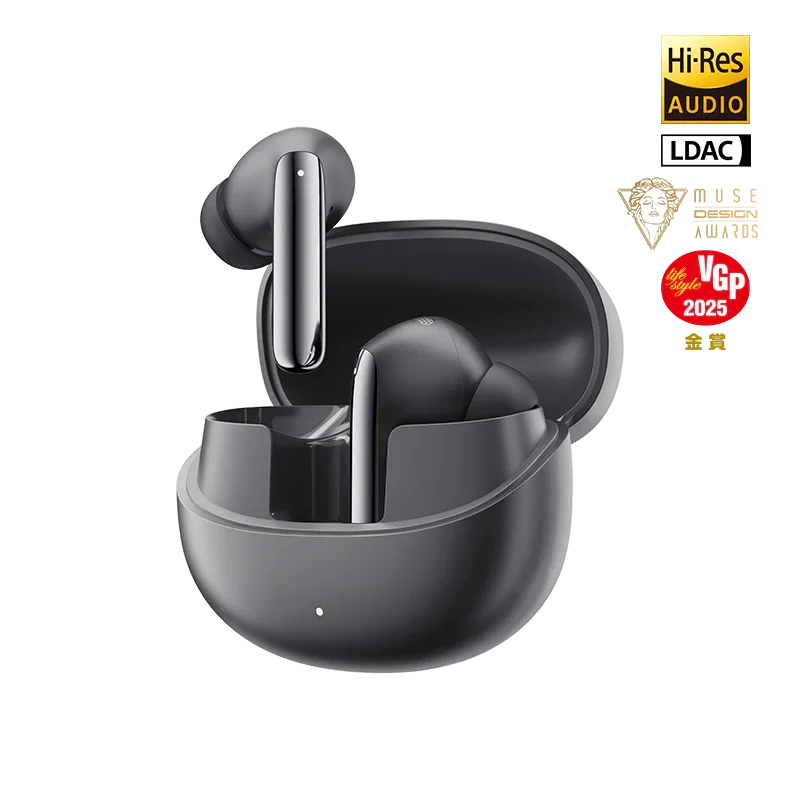
QCY MeloBuds Pro Quick Facts
| Certification | Hi-Res Audio certified |
| Codec support | LDAC |
| ANC | Hybrid ANC, rated around 46dB |
| Awards | MUSE Design Award, VGP recognition |
| Update method | QCY app only, no desktop updater |
| Multi-device | Dual-device connection supported |
Why the MeloBuds Pro Gets Firmware Updates
The MeloBuds Pro is one of QCY’s higher-tier true wireless earbuds, carrying Hi-Res Audio certification, LDAC codec support, and hybrid ANC rated in the 46dB range, along with award recognition from the MUSE Design Awards and VGP. Because it packs in more advanced codec and connectivity features than QCY’s entry-level models, it also has more surface area for firmware refinement, particularly around LDAC stability and how the earbuds handle being paired to two devices at once.
How to Update the Firmware
- Open the QCY app with the MeloBuds Pro connected.
- Navigate to Settings.
- Select Firmware Update.
- Tap Update if a new version is available, and keep the earbuds in range and above roughly 30 percent battery until the process completes.
The update typically takes a few minutes per earbud, and the app will indicate progress and confirm once both sides have finished flashing.
What Recent Firmware Versions Have Improved
QCY has used firmware updates on the MeloBuds Pro to address two recurring pain points reported by users: LDAC connection drops during playback, and instability when switching between two paired devices. Rather than a marketing changelog full of vague “performance improvements” language, the actual reported fixes have centered specifically on:
- More consistent LDAC codec negotiation, reducing the chance of the connection silently falling back to a lower-quality codec mid-song.
- Smoother dual-device connection handling, cutting down on the lag or dropout that some users experienced when switching between a phone and a laptop.
- General Bluetooth stability improvements that reduce the likelihood of one earbud disconnecting independently of the other.

An Important Note on One Specific Update
Some users have reported that after installing certain firmware versions, the earbuds require a factory reset from within the app before they behave properly again. If you install an update and the earbuds feel unresponsive or fail to reconnect immediately afterward, the fix is to trigger a factory reset through the app, place the earbuds back in the case, and then delete the existing Bluetooth pairing from your phone or laptop before pairing again from scratch. This is a slightly more involved process than a typical firmware update, so it is worth setting aside a few extra minutes rather than updating right before you need to use the earbuds.
If you want to verify the current state of QCY’s update rollout or read user-reported experiences before updating your own pair, Scarbir’s MeloBuds Pro review covers the model’s software behavior in more depth alongside its core audio performance.
Checking Your Current Firmware Version First
Before assuming you need an update, check what version is currently installed. The QCY app displays this under the same Settings menu used to trigger updates, usually listed as a version number a few lines above the update button itself. Comparing that number against the version mentioned in the app’s changelog notes tells you whether you are already current or several versions behind. I make a habit of checking this after any period where I have not opened the app in a few weeks, since updates do not always push a notification to your phone and can otherwise go unnoticed for a long stretch.
It is also worth checking both earbuds independently if the app allows it, since in rare cases one earbud can end up on a slightly different firmware version than its pair after an interrupted update, which is itself a common cause of the mismatched-behavior symptoms people report.
Troubleshooting Common Firmware Update Issues
Beyond the factory-reset scenario covered above, a handful of other issues come up often enough with MeloBuds Pro updates that it’s worth having the fix ready before you run into them.
- Update button is greyed out or won’t start: Move the earbuds closer to your phone and confirm Bluetooth is actively connected, not just paired. A weak connection is the most common reason the app refuses to begin an update.
- Update appears to freeze partway through: Give it a few extra minutes before assuming it’s stuck; flashing firmware to two separate earbuds sequentially can look paused between steps. If it genuinely hasn’t moved after five minutes or more, close and reopen the app, then retry rather than force-closing mid-flash.
- One earbud updates but the other doesn’t: Check both earbuds’ firmware versions independently in the app settings, then place the un-updated earbud back in the case and retry the update for that side specifically.
- LDAC still drops out after updating: Confirm your phone’s Bluetooth codec is actually set to LDAC in its developer or Bluetooth settings, since some phones quietly fall back to a lower-quality codec after any Bluetooth reconnect, independent of the earbuds’ own firmware state.
- App says a new firmware version is available but installing it changes nothing audible: Many firmware releases fix connection stability or bug issues rather than audio-facing features, so no perceptible difference in sound is normal and doesn’t mean the update failed.
Should You Always Install the Latest Firmware?
In general, yes. QCY does not appear to ship experimental or beta firmware to consumer units, so updates tend to be net improvements rather than a gamble. The one exception is timing: avoid updating right before an important call or listening session in case the post-update reset step described above is required, since you do not want to be scrambling to re-pair earbuds minutes before you need them.
Frequently Asked Questions
Do I need the QCY app to update firmware?
Yes, firmware updates for the MeloBuds Pro are delivered exclusively through the QCY app; there is no separate desktop updater tool.
What happens if a firmware update fails partway through?
Keep the earbuds in the case and within Bluetooth range, then reopen the app and attempt the update again. Interrupted updates usually resume without permanent damage as long as you do not force-close the app mid-process.
Will updating firmware delete my EQ or gesture settings?
Typically no, though if you experience the post-update factory reset scenario described above, custom settings will be cleared and need to be reconfigured afterward.
How often does QCY release firmware updates for the MeloBuds Pro?
There is no fixed schedule, and updates tend to arrive in response to reported issues rather than on a set calendar, which is why manually checking the app periodically is more reliable than waiting for a notification.
A Quick Word on Backing Up Your Preferences
Since a factory reset can occasionally follow an update, it is worth jotting down your custom EQ curve or gesture mapping somewhere before you start, especially if you spent time fine-tuning them. It takes thirty seconds to note down and saves the minor annoyance of trying to remember exactly how you had things configured after a reset wipes them clean.
Conclusion
Firmware updates on the QCY MeloBuds Pro are not just routine housekeeping — they have directly addressed real LDAC and dual-device connection issues reported by owners. Update through the QCY app when a new version is flagged, keep the earbuds charged and nearby during the process, and be ready for a possible factory reset step on certain releases.
Written by Ryan, who tracks firmware changelogs across QCY’s higher-tier earbud models to flag which updates are actually worth installing promptly.