The Blurams A31 is a 2K indoor pan-tilt camera offering 355° pan and 95° tilt coverage, human detection, and two-way audio, all running over 2.4GHz Wi-Fi without requiring a subscription for basic recording. This covers its core specs and how to get it running.
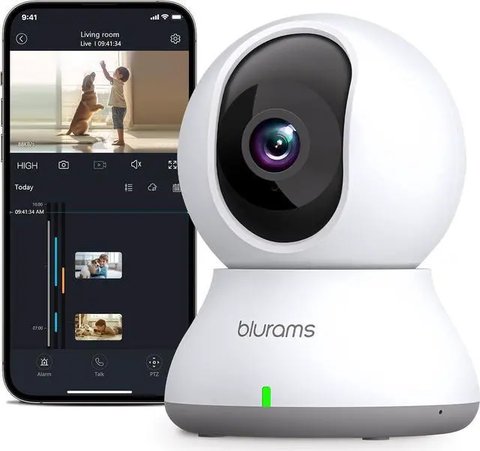
| Spec | Detail |
|---|---|
| Resolution | 2K with 109° wide-angle lens |
| Coverage | 355° pan, 95° tilt |
| Night Vision | 8 IR LEDs, IR-cut filter, up to roughly 27 feet |
| Detection | Smart motion tracking with human detection |
| Audio | Two-way audio, built-in sound alarm |
| Connectivity | 2.4GHz Wi-Fi only |
| Storage | MicroSD or Blurams Cloud, 24-hour loop-free option |
Key Specs
- 2K resolution with a 109° wide-angle lens
- 355° pan and 95° tilt for full-room coverage without blind spots
- Eight infrared LEDs with an IR-cut filter, visible range up to roughly 27 feet in the dark
- Two-way audio and a built-in sound alarm
- Smart motion tracking with human detection and phone push notifications
- 2.4GHz Wi-Fi only; no 5GHz support
- Local microSD storage or Blurams Cloud, including 24-hour loop-free cloud recording
Setting Up the A31
- Download the Blurams app and create a free account if you don’t already have one
- Plug in the camera and scan its QR code to connect it to your 2.4GHz Wi-Fi network
- Position the camera somewhere central to take advantage of its wide pan range
- Enable human detection in the app settings to reduce false alerts from pets or shadows
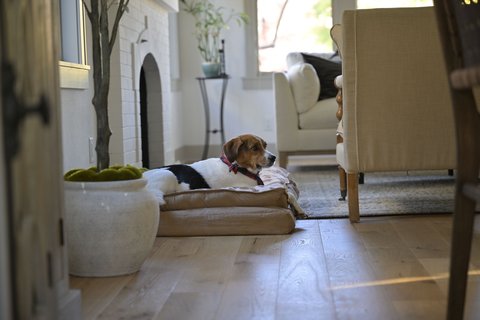
The 355° pan range means placement matters less than it does with a fixed-lens camera — a corner or shelf spot that would leave dead zones on a static camera can still get full room coverage here, since the motorized base does the work of reaching every angle.
Getting the Most Out of Motion Tracking
- Enable human detection specifically rather than generic motion to cut down on notifications from pets or moving curtains
- Give the camera a day or two of normal activity before judging tracking accuracy
- Use the app’s privacy shield feature to physically block the lens when you want guaranteed privacy, rather than just disabling the feed in-app
For full specs and the official app, see Blurams’ official A31 product page.
Video Quality and Night Vision in Practice
The 2K sensor produces noticeably crisper footage than the 1080p cameras still common at this price point, particularly useful for reading text on a package label or identifying a face across a room. The 109° lens is wide enough for most bedrooms and living rooms, and combined with the motorized 355° pan range, you rarely end up with a genuine blind spot the way you can with a fixed wide-angle camera poorly placed in a corner.
At night, the eight IR LEDs push visibility out to roughly 27 feet, which comfortably covers most single rooms. Footage in full darkness is black-and-white, as expected for IR-based night vision, but detail holds up well enough to clearly identify movement and shapes rather than just vague shadows.
Two-Way Audio and the Physical Privacy Shield
The built-in speaker and microphone work well for quick check-ins, whether that’s talking to a pet or a family member without walking into the room. The built-in sound alarm is a genuinely useful deterrent feature too, letting you trigger an audible alert remotely if the camera catches something you want to scare off immediately, like an unfamiliar person near a window.
The physical privacy shield stands out as a thoughtful touch compared to competitors that only offer a software toggle. Since the lens is mechanically covered rather than just software-disabled, there’s a visible, tamper-evident guarantee that the camera isn’t recording, which matters in shared spaces like a nursery or a room used by a nanny or cleaner.
Choosing Between MicroSD and Cloud Storage
The A31 supports both local and cloud storage, and picking between them comes down to a few practical trade-offs:
- MicroSD storage is a one-time cost with no ongoing fees, but footage is lost if the camera itself is stolen or damaged
- Blurams Cloud includes a free 24-hour loop-free recording tier, giving you a basic offsite backup without paying anything upfront
- Extended cloud history beyond the free tier requires a paid subscription, worth considering only if you need footage older than a day on a regular basis
- Using both together gives the best of both worlds: fast local access plus an offsite copy in case the camera is compromised
Troubleshooting Common Problems
Most A31 issues come down to Wi-Fi band, placement, or app settings rather than a hardware defect. Here’s how to work through the most common ones.
- Camera won’t pair during setup: Confirm your phone and router are both on the 2.4GHz band, since the A31 doesn’t support 5GHz at all; a combined-band router SSID is the most common cause of a stuck QR scan.
- Pan-tilt motor doesn’t respond or seems stuck: Power cycle the camera and confirm it isn’t mounted somewhere obstructing its rotation, since a physical obstruction can make the motor stall without an obvious error in the app.
- Too many false motion alerts: Switch from generic motion detection to human detection specifically in the app settings, and adjust detection zones to exclude high-traffic areas like windows with moving curtains.
- MicroSD card not recording: Reformat the card through the app rather than a computer, and confirm it meets the camera’s supported capacity and speed class requirements.
- Live view lagging or dropping: Move the camera closer to the router or add a Wi-Fi extender, and lower the stream resolution in the app if you’re viewing remotely on a slower connection.
Frequently Asked Questions
Does the A31 need a subscription?
No, local microSD recording and basic cloud recording both work without a paid subscription; extended cloud history is an optional paid upgrade.
Can I use it outdoors?
No, the A31 is an indoor-only camera and isn’t weatherproof.
Does it support 5GHz Wi-Fi?
No, it only connects to 2.4GHz networks.
Is the privacy shield a physical or digital feature?
It’s a physical mechanism that rotates to block the lens, giving a visible guarantee that the camera isn’t recording rather than just a software toggle.
Conclusion
The A31 is a capable, affordable indoor pan-tilt camera if full-room coverage and human detection matter more to you than 4K resolution. Its wide pan-tilt range genuinely reduces how much mounting placement matters compared to a fixed-lens camera.
Ryan
Self-taught driver/hardware specialist · 15 years experience