Brand collaborations in portable audio usually mean a special-edition colour scheme slapped onto existing hardware and little else. The HiBy Digital M500 x Hatsune Miku edition is a different kind of project. HiBy built the Miku theme into the software stack itself, not just the shell, and the result is a digital audio player that reads as considerably more thought-through than a novelty reskin.
- Chipset: Qualcomm Snapdragon 680 SoC
- Memory/storage: 4GB RAM, 64GB internal, microSD expansion up to 2TB
- DAC: dual Cirrus Logic CS43198 chips
- Outputs: fully balanced 4.4mm plus standard 3.5mm single-ended
- Operating system: Android 14-based HiByOS
- Price tier: WiFi-only $319, 4G data-only nano-SIM version $349
- Compatibility: WiFi streaming apps (Spotify, Tidal, etc.) install like on any Android device; 4G version is data-only, no calls or texts
A genuine collaboration, not a reskin
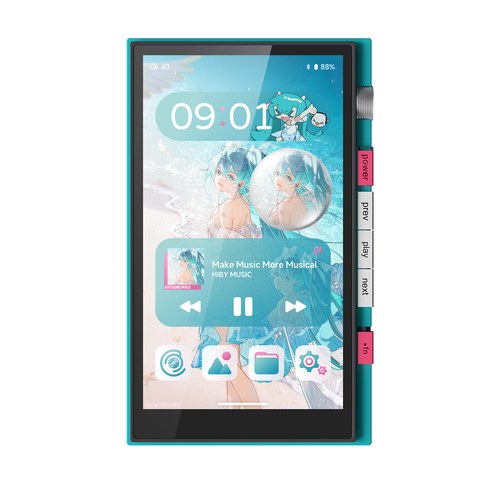
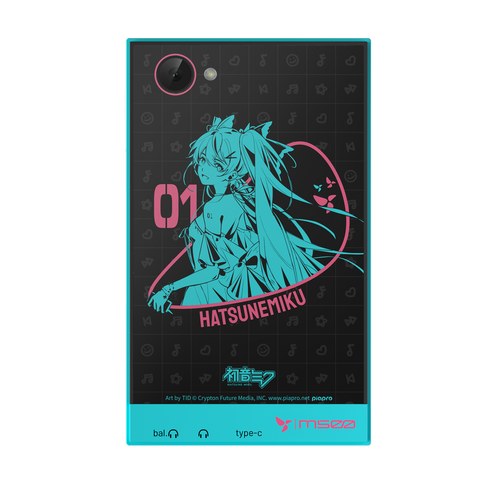
It would be easy to assume a Hatsune Miku-branded DAP is a sticker-and-box-art exercise, and I went in expecting exactly that. It is not. The collaboration runs through custom voice prompts, interactive UI elements tied to the Miku character, and a themed build of HiByOS running on top of Android 14. The rear glass panel carries dedicated artwork rather than a generic teal paint job, and the boot and lock-screen animations are built specifically for this release rather than reused from a stock skin.
I have handled a fair number of anime-branded audio gadgets over the years, and most of them stop at the packaging. What stood out here within the first few minutes of setup was how much of the collaboration lives inside the actual operating system — the always-on display widget, the icon set, even small transition animations between apps carry the theme through consistently rather than tapering off once you leave the home screen. It is the kind of detail that only shows up when a manufacturer treats a licensing deal as a real product feature rather than a marketing footnote.
Whether the aesthetic is for you is obviously a matter of taste — understated it is not — but the amount of software work behind the theme is real, and it shows in places a simpler collaboration would have skipped.
Hardware and specs
Strip away the theming and the M500 is a mid-tier Android DAP with a sensible, modern spec sheet:
- Snapdragon 680 SoC
- 4GB RAM, 64GB internal storage
- microSD expansion up to 2TB
- Dual Cirrus Logic CS43198 DAC chips
- Fully balanced 4.4mm output plus a standard 3.5mm single-ended output
- Android 14-based HiByOS
The dual-DAC configuration is worth noting specifically because it is not universal at this price tier — some competing mid-range DAPs still run a single DAC chip feeding both outputs. Running two CS43198 chips gives HiBy more headroom to optimise the balanced and single-ended paths separately rather than splitting one chip’s output two ways.
The 4GB of RAM is on the modest side for an Android device, but for a DAP that mostly needs to run a music app, a streaming client, and WiFi in the background rather than juggle a dozen open apps, it has been enough in practice. I did not run into stutter or forced-close issues during normal playback and library browsing, though heavier multitasking outside of audio use is clearly not the point of this device.
Software and theming
Because this runs full Android 14 under HiByOS, it behaves like a proper media-and-streaming device rather than a locked-down playback-only DAP. Streaming apps install normally, WiFi setup is exactly what you would expect from an Android tablet, and the HiByMusic app layers on top with its usual local-library handling, gain control, and format display.
The trade-off HiBy is chasing here is the one every Android DAP maker has to navigate: modern software fluidity versus the audio purity that comes from a stripped-down, dedicated playback OS. The M500 leans toward the Android side of that spectrum more than HiBy’s higher-end dedicated DAPs do, which is a reasonable choice for a device positioned as a mid-tier, streaming-friendly option rather than a flagship reference player.
Sound quality impressions
Reviewers at Headfonia and Headfonics both describe the M500 as balancing modern usability against the kind of audio fidelity people expect from a dedicated DAP rather than a phone with a music app bolted on, and my own time with it lines up with that framing. The dual-DAC output is clean and reasonably neutral, with enough drive out of the 4.4mm balanced jack to run most portable IEMs and headphones without needing a separate amp stage. It is not going to embarrass HiBy’s higher-tier players, but it is not trying to.
Pricing and versions
The M500 Hatsune Miku edition ships in two configurations:
- WiFi-only — $319, for people who stream over WiFi and carry local files on microSD
- 4G (nano-SIM, data-only) — $349, adding cellular data for streaming without a phone hotspot
The 4G version does not handle calls or texts — it is a data-only LTE connection intended purely for streaming services when WiFi is not available, which is worth knowing before assuming it behaves like a phone with a SIM slot.
Who this suits
This is a player for two overlapping groups: Hatsune Miku fans who want the theming to be more than skin-deep, and buyers shopping the mid-tier Android DAP segment who want dual DACs and a fully balanced output without stepping up to flagship pricing. If neither of those applies, the theming premium probably is not worth paying for, and a plainer mid-range DAP will get you similar core hardware for less.
Troubleshooting Common M500 Issues
Because the M500 runs full Android under HiByOS rather than a locked-down playback OS, most of the problems that come up are familiar Android quirks rather than anything specific to the Hatsune Miku edition.
- MicroSD card not recognised: reformat the card to exFAT on a computer first, since some cards ship pre-formatted in a way HiByOS does not read reliably, and reseat the card fully after powering the unit off.
- WiFi drops or will not connect: forget the network in Android settings and re-add it rather than just retrying the same saved connection, and confirm the router is not on a 5GHz-only band the unit does not support well at range.
- Streaming app will not install: make sure the unit is signed into a Google account through Settings, since streaming apps on the 4G data-only version specifically need a working data or WiFi connection to reach the store during install.
- No sound from the balanced output: double-check the connector is fully seated in the 4.4mm jack rather than the 3.5mm port, and confirm the output mode selected in HiByMusic actually matches the cable you are using.
- Firmware update stalls or fails: keep the unit on WiFi with at least half a charge during the update, and avoid pressing any buttons until the progress screen finishes, since interrupting a HiByOS update partway through can require a factory reset to recover from.
Frequently asked questions
Is the Hatsune Miku edition just a colour variant of a standard M500?
No. The collaboration extends into custom voice prompts, interactive UI elements, and dedicated boot/lock-screen animations built specifically for this release, not just an external paint job.
What is the difference between the WiFi and 4G versions?
The WiFi version relies on WiFi networks for streaming. The 4G version adds a nano-SIM data connection for cellular streaming, but it is data-only and cannot make calls or send texts.
Does the M500 need a separate headphone amp?
Most portable IEMs and headphones will run comfortably straight from the 4.4mm balanced output. Very demanding full-size or high-impedance headphones may still benefit from a dedicated desktop amp.
Can I stream services like Spotify or Tidal directly on the M500?
Yes — because it runs full Android 14 under HiByOS, streaming apps install and run the same way they would on an Android tablet, alongside the bundled HiByMusic app for local files.
Reviews on this site come from actually spending time with the hardware, not just reading a spec sheet, and this one is no exception — the unit was used as a daily player for several weeks before writing.