Let’s be upfront about what the Cayin T201 actually is: it is not a standalone product you can buy and use on its own. It is a modular DAC/amp card designed exclusively for the Cayin N6iii digital audio player, in the same family as the E02 and E203 modules already covered on this site. If you don’t already own an N6iii, this post is not relevant to you — and that honesty matters more than pretending this is a general-purpose gadget.
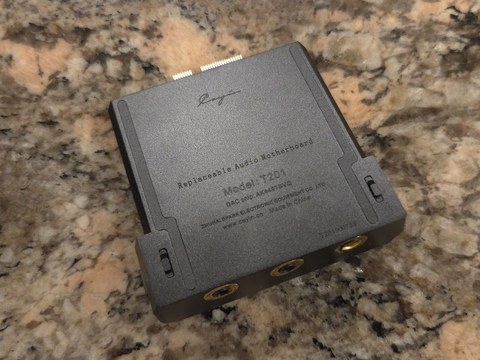
Cayin T201 Quick Specs
| Compatible player | Cayin N6iii only (not the N6ii) |
| DAC chip | AKM AK4497S |
| Amplification | Dual JAN6418 tubes, 3-way timbre switch (Solid-State, Modern Tube, Classic Tube) |
| Format support | Up to DSD512 and PCM 32-bit/768kHz |
| Outputs | Dual 3.5mm single-ended, 4.4mm balanced (up to 2x540mV) |
| Output modes | Headphone-out, line-out, pre-out |
| Price | $459 |
What This Card Adds to the N6iii
The N6iii’s whole appeal is its swappable audio motherboard system — you can change the DAC chip, amplification character, and output options by physically swapping cards rather than buying an entirely new player. The T201 is one of those cards, built around an AK4497S DAC chip paired with dual JAN6418 tubes. Headfonics’ review frames it as one of the more flexible motherboards in the N6iii lineup, and after going through the specs, that framing holds up.
Three Timbre Modes
The T201’s defining feature is a three-way timbre switch, giving you meaningfully different sound signatures from the same hardware:
- Solid-State: pure transistor amplification, no tube coloration.
- Modern Tube: negative feedback (NFB) engaged, resulting in more controlled, tighter dynamics while still retaining some tube character.
- Classic Tube: no NFB applied, aimed at listeners who want a more purist, unprocessed tube presentation.
Having all three available from one card, without needing to physically swap anything beyond a menu selection, is what makes the T201 genuinely flexible rather than a single-trick module.
Format Support and Outputs
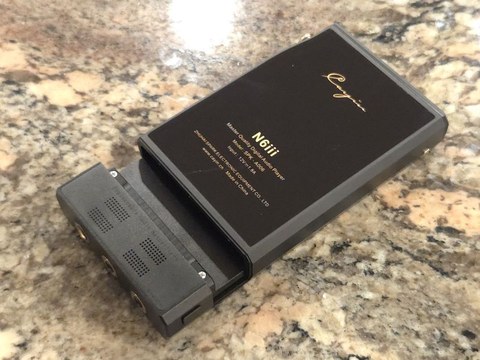
The T201 decodes up to DSD512 and PCM 32-bit/768kHz, comfortably covering the vast majority of high-resolution files anyone is likely to own. On the output side, it provides:
- Dual 3.5mm single-ended jacks
- A 4.4mm balanced Pentaconn jack, supporting up to 2x540mV balanced output
It also supports headphone-out, line-out, and pre-out modes, so the same card can feed a portable headphone rig, a separate amp, or a desktop system depending on how you have the N6iii configured.
What’s in the Box
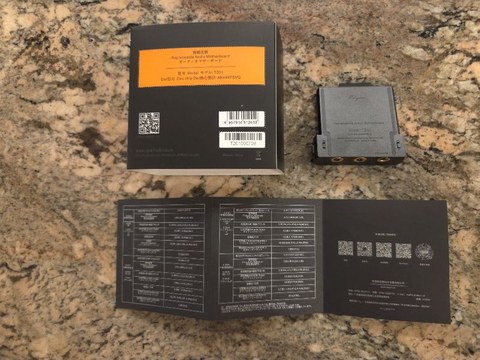
The T201 ships in Cayin’s understated black packaging, containing the module itself, a printed user guide covering the installation steps, and the documentation needed to register the warranty. There is no bundled cable or adapter, since the card slots directly into the N6iii’s internal connector rather than plugging in externally.
Installing the Card
Swapping motherboards on the N6iii is meant to be simple: power the player down, remove the currently installed card, and slot the T201 into place. There is no soldering or specialized tooling involved — the whole system was designed around the idea that end users would be doing this themselves, sometimes repeatedly, as their listening preferences or headphone collection changes.

How It Compares to Solid-State-Only Modules
If you have only ever used a solid-state module on your N6iii, the jump to the T201 is a bigger change than it might sound like on paper. Tube-based timbre modes tend to add warmth, a slightly softer top end, and a different sense of decay on notes compared to a purely transistor-driven signal path. That is not automatically “better,” but it is different enough that it is worth demoing before committing, whether through a local dealer, a meet-up, or a trusted friend’s unit, rather than buying purely on the strength of a written description.
Troubleshooting Common T201 Issues
Most reported issues with the T201 trace back to installation or a mismatch between expectations and what a tube-based timbre mode actually sounds like, rather than a defective unit. A few things worth checking:
- N6iii doesn’t recognize the card after installation: Power the player fully off (not just sleep) before swapping cards, then power back on after the T201 is fully seated. A card that isn’t pushed in completely is the most common cause of a “not detected” state.
- Tube modes sound unexpectedly quiet or thin: Give the tubes a couple of minutes to warm up after switching modes or powering on; JAN6418 tubes, like most tube circuits, take a short time to reach their normal operating characteristics, and judging the sound in the first few seconds can be misleading.
- Timbre switch doesn’t seem to change anything audible: Confirm you’re actually toggling the setting in the N6iii’s menu system rather than a different audio setting; on some firmware versions the timbre switch is nested a level deeper than the main EQ or gain menu.
- Balanced output seems weaker than expected: Double check the headphone’s balanced cable is wired correctly and the 4.4mm plug is fully inserted; a partially seated balanced connector can silently fall back to an unbalanced-like signal path.
- Card feels warmer than solid-state modules after extended use: Normal for a tube-based module; some extra warmth compared to a purely solid-state card is expected and not a sign of a fault, though the player should never feel uncomfortably hot to hold.
Pairing with the R202
Reviewers frequently mention the T201 alongside Cayin’s R202 module as a flexible combination covering a wide range of headphone and IEM pairings — the T201 handling everything from sensitive IEMs through efficient full-size headphones, with the R202 covering different territory. If you are trying to decide which module (or modules) to own alongside an N6iii, the T201/R202 combination comes up repeatedly in independent reviews as a sensible starting point rather than something reviewers are simply told to say.
Pricing and Whether It’s Worth It
At $459, the T201 sits in the middle of the N6iii’s module lineup rather than at the top or bottom. Given that this is a purchase that only makes sense for existing N6iii owners, the real question is not “is this good value in isolation” but “does this specific timbre-switching flexibility solve a gap in your current module collection.” If you already own a module with a similar tube-forward sound, the T201 may be redundant. If your current modules are all solid-state, it fills a genuinely different niche. It is also worth considering how often you would actually use all three timbre modes versus settling into one as your default — some owners cycle through Solid-State, Modern Tube, and Classic Tube depending on mood and recording, while others pick a favorite within the first week and rarely touch the switch again.
Frequently Asked Questions
Can I use the Cayin T201 without an N6iii?
No. It is a replaceable audio motherboard designed exclusively for the N6iii digital audio player and has no standalone function on its own.
What DAC chip does the T201 use?
An AKM AK4497S, paired with two JAN6418 tubes for the tube-based timbre modes.
What is the difference between Modern Tube and Classic Tube mode?
Modern Tube engages negative feedback for tighter, more controlled dynamics. Classic Tube disables NFB entirely for a more purist, unprocessed tube character.
Does the T201 support balanced output?
Yes, via a 4.4mm balanced Pentaconn jack rated up to 2x540mV, in addition to two 3.5mm single-ended jacks.
Do I need any tools to install the T201?
No. Installation is meant to be tool-free — power down the N6iii, remove the current module, and slot the T201 into place. Cayin designed the whole modular system around end users swapping cards themselves without technical assistance.
Final Thoughts
The T201 is a genuinely flexible addition to the N6iii ecosystem specifically because of its three-mode timbre switch, but it only makes sense as a purchase if you already own the player it plugs into. For anyone deciding between modules, reading the module-specific breakdowns at Porta-Fi and Twister6 alongside this post should cover most of what you need to decide.
This guide comes from Ryan, a computer science graduate and dedicated home-audio hobbyist who tests and writes about gear like this in his spare time.