The BGVP Q3 tries to have it both ways: a true wireless earbud for daily convenience, and a wired IEM for critical listening, connected through the same MMCX port. That hybrid pitch is unusual enough that I wanted to test both modes properly rather than just charging it up and calling it a day.
Most TWS products treat wired connectivity as an afterthought, if they offer it at all. BGVP flips that assumption by building the Q3 around MMCX connectivity from the ground up, which means the same earpieces that live in the charging case every day can also become the front end of a proper wired audio chain whenever you want to plug into a dedicated DAC or amp. It’s a genuinely different value proposition than most sub-$100 true wireless earbuds on the market.
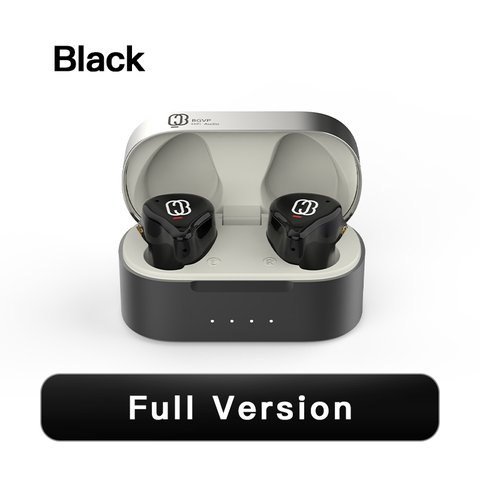
- Model: BGVP Q3 hybrid TWS/wired MMCX earphone
- Driver setup: 1 dynamic driver + 1 balanced armature
- Connectivity: Bluetooth 5.3 with AptX Adaptive, or wired via MMCX cable
- Price tier: Budget-to-midrange, under $100
- Compatibility: Any Bluetooth 5.x source for wireless mode; any standard MMCX cable for wired mode
Underneath the shell, the Q3 runs a 1 dynamic driver plus 1 balanced armature hybrid setup, with an impedance of 38Ω, sensitivity around 102dB/mW, and a claimed frequency response stretching from 20Hz up to 40kHz. Bluetooth 5.3 with AptX Adaptive support handles the wireless side, and BGVP built the earpieces with an IPX4 rating for light sweat and splash resistance.
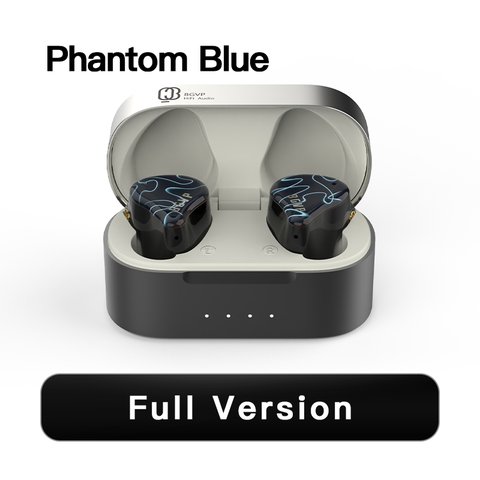
Wireless vs Wired: Side-by-Side
| Spec | Bluetooth (TWS) Mode | Wired (MMCX) Mode |
|---|---|---|
| Latency | ~68ms | 0ms |
| Codec support | AptX Adaptive, Bluetooth 5.3 | Direct analog, source-dependent |
| Battery impact | Up to 7h per charge | None, passive listening |
| Best use case | Commute, calls, casual listening | Critical listening, gaming, low-latency needs |
Listening Impressions
I split my testing roughly evenly between wireless and wired MMCX mode over about ten days. In wireless mode, the Q3 held a stable connection through a full commute with only occasional micro-dropouts near crowded transit hubs, which is typical for Bluetooth 5.3 rather than a Q3-specific issue. Sound in this mode was balanced and pleasant, with treble extension that genuinely surprised me for a TWS product.
Switching to the wired MMCX cable transformed the experience more than I expected. Bass tightened up, imaging became noticeably more precise, and that treble extension up to around 15kHz became much easier to actually hear rather than just read about in a spec sheet. If you already own a wired listening chain, the Q3’s ability to slot into it is a genuine differentiator versus other TWS earbuds that lock you into wireless-only listening.
“The Q3 is the rare hybrid product where neither mode feels like an afterthought bolted onto the other.” — Tomasz W., portable audio reviewer and TWS specialist
Call Quality and Everyday Use
Microphone performance in Bluetooth mode was clear enough for calls in moderate background noise, though it’s not going to compete with dedicated noise-cancelling earbuds in loud environments. Transparency mode uses the built-in microphones reasonably well, letting in enough ambient sound for quick conversations without fully removing the earbuds.
Touch controls on the earpieces handled play/pause and track skipping reliably, though I did occasionally trigger an unwanted tap while adjusting fit, which is a common complaint across nearly every touch-control TWS earbud rather than a Q3-specific flaw. Physical MMCX connectors on the shell also mean you need to be a little more careful when inserting and removing the earbuds compared to a sealed TWS design, since the connector pins are exposed.
Pairing was straightforward across both an Android phone and a laptop, with the Q3 remembering multiple paired devices and switching between them without needing to re-pair each time. That multipoint-style convenience isn’t advertised heavily by BGVP, but it made day-to-day switching between devices noticeably less annoying than earbuds that force a manual re-pair.
Charging Case and Cable Options
The charging case itself is compact enough to pocket comfortably, with a matte finish that resists fingerprints better than the glossy plastic many TWS cases use. Because charging routes through the same MMCX connector used for wired listening, the included MMCX-to-USB cable is worth keeping track of rather than the more common USB-C case you’d find on a typical wireless earbud, since a lost cable means no way to top up the case.
For wired use, BGVP includes a separate standard MMCX cable in the box alongside the charging cable, so you’re not stuck buying an aftermarket cable just to try the wired mode out of the gate. That said, since the Q3 uses standard MMCX connectors rather than a proprietary pin layout, swapping in a nicer aftermarket cable later is straightforward if you want a different feel or a balanced termination for a dedicated desktop setup.
Setup and Connection Troubleshooting
The Q3’s hybrid design means a few problems come up that would not exist on a purely wired or purely wireless earphone, but nearly all of them have a quick fix.
- Case won’t charge the earbuds: double-check the MMCX-to-USB cable is seated fully at the case end, since a loose connection here is the most common charging complaint and is easy to mistake for a dead case.
- Wireless mode won’t pair: forget the device from the phone’s Bluetooth list and re-pair from scratch rather than just reconnecting, especially after previously using the Q3 in wired mode.
- No sound in wired mode: confirm the MMCX cable is inserted with the correct left/right orientation, since MMCX connectors can seat in more than one rotational position but only one is correct for proper contact.
- Touch controls trigger accidentally: reseat the earbuds with a firmer, more consistent fit, since accidental taps usually happen during adjustment rather than being a hardware fault.
- Bluetooth connection drops in crowded areas: this is typical Bluetooth interference in dense signal environments rather than a Q3-specific defect, and it resolves once you clear the crowd.
If the wireless side ever gives you ongoing trouble, the built-in fallback is simply switching to the included wired MMCX cable, which sidesteps Bluetooth pairing and interference issues entirely since it does not depend on a radio connection at all.
Value and Verdict
At its price, the Q3 is one of the more interesting hybrid products in BGVP’s catalog specifically because it doesn’t force you to choose between wireless convenience and wired fidelity. Full specs and current pricing are available at HiFiGo, and additional listening impressions can be found at Hifitopia.
- Buy it if you want one earphone that covers both commute-friendly wireless use and serious wired listening
- Skip it if you exclusively need low-latency wireless for competitive gaming
- Consider it as a genuine step up from typical bass-boosted consumer TWS earbuds
FAQ
Can I use the BGVP Q3 as a normal wired IEM?
Yes, the MMCX connector accepts a standard wired cable, effectively turning it into a passive wired IEM with zero latency.
How is the battery life in wireless mode?
Around 7 hours per charge from the earbuds themselves, extending to about 28 hours total with the charging case.
Is the Q3 waterproof?
It carries an IPX4 rating, suitable for sweat and light splashes but not for submersion.
Does charging work over the MMCX port?
Yes, BGVP designed the case to charge the earbuds through the same MMCX connector used for wired cables, using an included MMCX-to-USB cable.
Can I use an aftermarket cable in wired mode?
Yes, since the Q3 uses a standard MMCX connector rather than a proprietary one, any compatible aftermarket cable will work.
Ryan tests both wired and wireless audio gear side by side to see which trade-offs actually hold up outside a spec sheet. He writes at softwaredriverdownload.com.